Sudoking - Classic sudoku app
Version:1.4.2
Published:2026-05-13
Introduction
Sudoking - Classic sudoku app is a focused, premium Sudoku experience that puts handcrafted puzzles and a distraction-free interface front and center. The app generates a continuous supply of puzzles across three grid sizes (6x6, 9x9 and 12x12) and offers a clear difficulty ladder from Easy and Moderate through Prodigy and Challenge, so players can choose a gentle warm-up or a concentrated logic workout. For a one-time $2 purchase you get an ad-free, offline game that includes pencil marks, contextual hints and options to customize the look and feel of the board, making it straightforward to practice and improve without interruptions.
Gameplay and mechanics
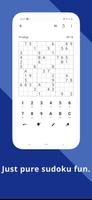
Gameplay in this Sudoku title emphasizes logical deduction and careful pattern recognition. Puzzles are designed by experienced solvers to present a range of solving techniques and visually varied givens; each puzzle is constructed so solutions follow standard logical steps rather than relying on guesswork. You enter numbers directly into cells using a touch-friendly input and use pencil marks to record candidate values when a cell cannot be resolved immediately. The built-in undo and progress-checking tools help you correct mistakes and confirm your current state while hints offer step-by-step guidance only when you need it, preserving the learning process.
Controls and accessibility
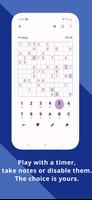
Controls are intentionally simple: tap a cell, tap a number to place it, and use the pencil mode to add or remove notes. The interface places commonly used actions within easy reach so solving stays fluid on phones. Accessibility options include adjustable font sizes and color choices that improve legibility for different lighting conditions and visual preferences. High-contrast themes and a clean grid layout reduce visual clutter, and the app’s touch targets are sized for comfortable one-handed play to accommodate a variety of users and device sizes.
Progression and level structure
Puzzles are organized by grid size and difficulty tier so you can progress at your own pace. Easy puzzles focus on fundamental techniques and straightforward placements; Moderate introduces multi-step reasoning; Prodigy requires more advanced pattern recognition; and Challenge puzzles combine subtle clues with deeper logical chains. Because puzzles are handcrafted rather than purely random, you encounter a broad mix of configurations that help build skill progressively. The lack of repetitive puzzles and the range of sizes provide long-term replayability without relying on online features or leaderboards.
Visual style and customization
The visual design favors clarity: a minimal toolbar, unobtrusive highlighting for selected rows and columns, and a neutral color palette that keeps attention on the grid. You can switch between dark and light themes, tweak font size and choose accent colors to personalize the board’s appearance. These customization options let you create a comfortable solving environment whether you play briefly between tasks or settle in for a longer session.
Replay value and offline play
Replay value comes from the variety of handcrafted puzzles across multiple sizes and difficulties. Because the app is fully playable offline and free from ads, you can open the app and start solving without a network connection or interruptions. The one-time purchase model unlocks the complete experience—no recurring fees, no in-app purchase prompts—so the focus stays on practice and improvement rather than monetization. Regular updates aim to refine puzzle quality and usability while keeping the core single-player experience fast and reliable.
User experience and challenge systems
The app provides a compact experience for both newcomers and seasoned solvers: casual players can enjoy quick rounds on smaller grids, while more experienced users can tackle deeper problems in the Prodigy and Challenge tiers. Progress-checking displays whether current entries conflict with the solution, which helps learners understand mistakes and develop solving strategies. Hints are contextual rather than intrusive, and the pencil-marking tools support methodical note-taking so you can work through complex positions in logical stages.
Advantages and limitations
Sudoking - Classic sudoku app keeps the essentials simple and accessible: a one-time $2 purchase delivers an ad-free, offline game with full feature access, and the focus on handcrafted puzzles and multiple grid sizes provides wide appeal for different skill levels. On the other hand, the paid model may not match the expectations of users who prefer free apps or trial-to-buy approaches, and the app concentrates on classic Sudoku formats rather than offering a broad library of other puzzle types or competitive features.
Development team
Sudoking - Classic sudoku app is produced by a small team of designers and solvers with over a decade of combined experience in puzzle creation. The group emphasizes carefully balanced puzzles, clear interface decisions and steady quality improvements so that the app remains a reliable tool for practice, relaxation and sharpening logical thinking over time.
Show More









![[18+] Secret Reveal: Block Picture APK](https://image.3761.com/upload/202605/13/5ec3dO1Js2cay0E.jpg)