Bagatur Chess Engine
Version:1.1.9
Published:2026-08-05
Introduction
Bagatur Chess Engine is a compact, open-source chess application that pairs a dedicated AI opponent with a lightweight built-in graphical interface, giving players a focused environment for practice, analysis and solo play. Bagatur Chess Engine places the engine front and center: you can set either side to Human or Computer, adjust one of sixteen strength levels, and review the engine's thinking with search information that appears from mid strength settings upward. The app is suitable for casual learners who want a gentle opponent and for stronger players who want a robust solo training partner.
Gameplay mechanics
The playing experience centers on straightforward, classical chess mechanics with a configurable engine opponent. Each game follows standard chess rules with legal-move enforcement, and the engine evaluates positions as it searches. From lower levels the AI intentionally plays simplified or less-concrete moves to give beginners reasonable practice, while higher levels increase search depth and produce more tactical and strategic play. The engine’s estimated ELO is around 3000, which means at top settings it presents serious positional and tactical challenges that can help advanced players identify weaknesses in their play.
Controls and interaction
Controls are designed to be intuitive for both touch and mouse users: move pieces by dragging and dropping or by selecting a source and destination square. You can flip the board to view the position from either side and choose Human or Computer for white or black independently, which makes it easy to run one-sided analysis games or to play both sides for training. Move navigation lets you step backward and forward through the move list to replay variations and revisit critical moments.
Progression and level structure
The engine offers sixteen selectable strength levels so you can create a gradual progression path. Beginners can start at the lowest levels to learn basic tactics and piece coordination, then incrementally raise the level as their accuracy improves. Mid-range levels begin to reveal search statistics and principal variation information so players can see why the engine prefers certain lines. This level structure supports deliberate practice sessions: repeat the same opening against different strengths, focus on endgame technique, or use the visible search info to study decision points.
Visualization and user interface
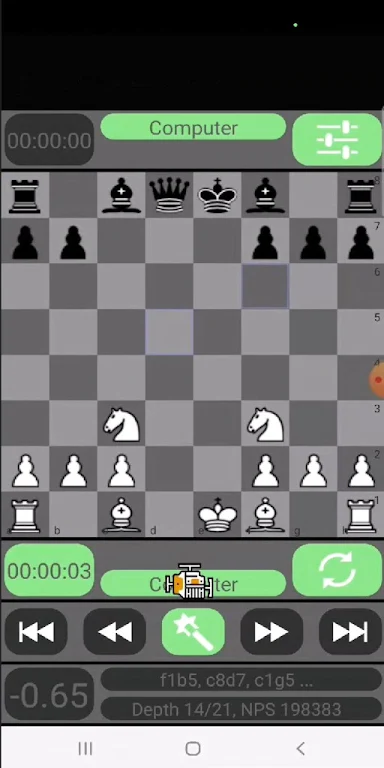
The interface favors clarity and a minimal footprint rather than elaborate animations. Boards and pieces are rendered with high contrast and readable scales so patterns and piece relationships are easy to spot, even on smaller screens. The compact GUI keeps key controls accessible without clutter, and the move list is presented alongside the board to make review straightforward. Visual design choices emphasize rapid comprehension of position and moves so study sessions stay focused.
Customization and study tools
While the GUI is intentionally focused and does not host external engines or plugins, it does provide useful study-oriented features: the ability to set engine level for either side, view search output (such as principal variation and depth) at mid and higher levels, and navigate the full move history. These tools let players isolate mistakes, compare candidate moves and follow the engine’s line of reasoning during a session. Because everything runs locally, you can use Bagatur Chess Engine offline for uninterrupted practice.
Replay value and challenge systems
Replay value comes from experimenting with levels, replaying the same position against different settings, and using visible search details to turn losses into learning moments. The engine’s distinctive playing style encourages different types of preparation—tactical puzzles often emerge organically from its search, and positional subtleties show up at higher settings. Players who enjoy iterative practice and careful review will find many hours of focused training.
Accessibility and user experience
Bagatur Chess Engine is built to be approachable: clear controls, scalable visuals and consistent touch/mouse support make it accessible to a broad range of devices and players. The app’s compact size and offline operation mean it starts quickly and can be used anywhere without connectivity. Search information and level choices give learners immediate feedback, while advanced users can rely on the engine’s stronger levels for serious single-player challenge.
Limitations and compatibility
The engine is intentionally standalone: you cannot import other chess engines into the GUI, and Bagatur Chess Engine is not designed as a platform for engine tournaments or online ranking systems. It is not tuned to compete directly with the very strongest, highly optimized engines such as Stockfish, Komodo or neural-network-based projects, but it remains a capable and instructive opponent that balances playability with analytical transparency.
Show More