Bubble Craps Simulator
Version:1.12
Published:2026-09-19
Introduction
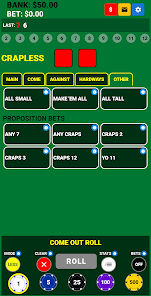
Bubble Craps Simulator is a focused, offline craps practice app that recreates table play in a compact bubble-style interface so you can test betting systems and learn mechanics without risking real money. The simulator supports Classic Craps, Crapless Craps and an Easy Craps mode, each implemented with mathematically accurate odds and realistic payout calculations. Designed for players who want clear feedback rather than flashy graphics, Bubble Craps Simulator emphasizes fast roll cycles, persistent session tracking and a straightforward layout that keeps attention on strategy and probability analysis.
Key Features
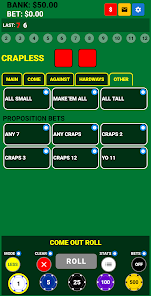
Game modes include full support for Pass Line, Don’t Pass, Come and Don’t Come bets plus common proposition and place bets according to each mode’s rules. Payout math covers odds backing, Buy/Lay handling and commission where appropriate so results align with typical casino conventions. The app preserves a persistent bankroll and detailed roll history so you can pause and resume sessions with all statistics intact. Customizable chip units allow nonstandard increments to match precise progression experiments, and the bubble interface provides instant visual confirmation of accepted bets and payout events.
Gameplay Mechanics
Gameplay mirrors the sequence of a real craps table: place initial bets, resolve the come-out roll, establish a point, and continue through the shooter sequence with Come and Don’t Come options and optional odds. Each session is divided into rounds that represent one shooter’s sequence from come-out through point resolution, which makes it easy to practice point play and pressing behavior step by step. Dice outcomes are produced by an RNG that is tuned for statistical fairness and repeatability for long-run testing so you can validate frequency expectations and stress-test progression systems.
Controls and Interface
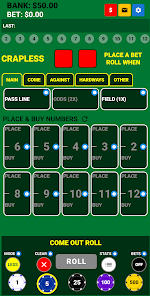
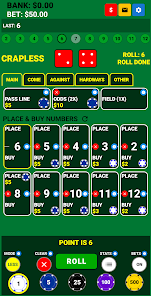
The controls are intentionally simple: tap to place or remove chips, drag to adjust bet locations, and use a single-tap roll button to throw the dice. UI scale can be adjusted for phones and tablets, and tooltips explain bet names, payout logic and resolution order inline to reduce rule guessing. The bubble-style table shows active bets, pending payouts and net bankroll changes at a glance, while optional modest sound effects and dice animations keep the display unobtrusive in public or quiet environments.
Progression Systems and Strategy Practice
This simulator is built to test staking plans and progression strategies. Define unit sizes and model approaches such as flat betting, negative or positive progressions and various press systems. Progression behavior is tracked across sessions so you can observe how unit changes affect bankroll longevity and short-term variance. The app provides sample strategy notes for common systems like Iron Cross, Three-Point Molly, Max Odds and Don’t Pass tactics to help structure practice drills rather than prescribe a single method.
Statistics, Analysis and Replay Value
Detailed analytics capture roll-by-roll history, frequency tables for individual faces and combinations, session averages, peak and trough bankroll points, and plays-per-session metrics. These persistent statistics let you compare runs side-by-side and identify variance patterns over both short and long sequences. Fast simulation speed and private local storage encourage repeated practice: run many short sessions or extended runs, then review the numbers to make objective adjustments to your approach.
Customization, Visual Style and Accessibility
Visual options favor clarity and accessibility over complex animations. Choose from multiple table felts, personalize dice colors with colorblind-friendly palettes, adjust UI scale and enable larger text for readability. The minimalist visual language supports quick scanning of active bets and payout results so players with varied visual needs can focus on decision-making. Control contrast and sound levels independently to suit different environments and visual sensitivities.
Offline Privacy and User Experience
Bubble Craps Simulator is designed for private, offline use with no account required; all bankroll data and session histories are stored locally on the device to preserve privacy and keep practice discreet. The app is light on background animations and intentionally modest with ads to provide a focused environment for strategy testing. Saving and restoring sessions is straightforward, so you can pause practice, return later and pick up where you left off without losing context or statistics.
Development Team and Updates
The developer is an active craps player who created Bubble Craps Simulator to test personal strategies before applying them at live tables. Feature updates prioritize payout accuracy, clearer strategy guidance and deeper statistical tracking based on hands-on playtesting. Recent updates refined bet math, expanded customization for chip units and improved the analytics dashboard to make comparative review easier for repeated practice.
Show More