Echoes / Phone Simulator / DEMO
Version:1.0
Published:2026-10-12
Introduction
Echoes / Phone Simulator / DEMO puts you inside a convincingly simulated smartphone environment where every notification, app and ringtone carries weight. This demo blends puzzle-solving, time-based choices and environmental storytelling, giving players a compact but immersive preview of the mechanics and atmosphere of the full Phone Simulator experience.
What this demo delivers
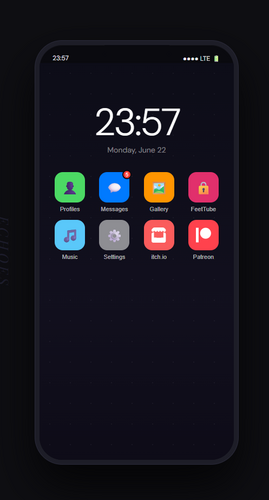
The demo is a focused slice of a larger simulation game that recreates the look and feel of a modern handset. Players explore a tiled desktop, respond to simulated calls and messages, and unlock hidden content by manipulating the phone’s settings. Echoes / Phone Simulator / DEMO uses concise scenarios to introduce core systems: notification chains, app chaining, and consequence-driven dialogue that affect later interactions.
Core mechanics and gameplay loop
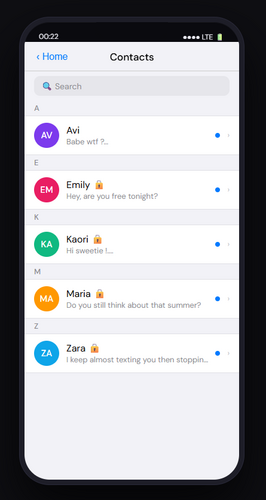
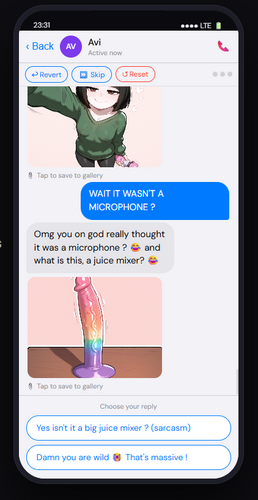
At its heart the gameplay revolves around information management and timing. You will receive multiple overlapping alerts that require prioritization. Some tasks are puzzles that need specific in-game tools or correct order of actions, while others are branching conversations where a single choice can change the available menus. This pulse of quick decisions followed by short-term consequences creates a compact but compelling loop suited to short play sessions.
Key features to watch for
- Realistic UI simulation: A clean, tactile interface that mimics a functioning phone with swipe gestures, toggles and live widgets.
- Dynamic narrative snippets: Small storylets delivered via texts, voicemails and hidden app content that reveal character and context.
- Puzzle notifications: Alerts are not just cosmetic — they often hide logic puzzles, codes and sequence challenges.
- Time-sensitive choices: Many interactions have windows of opportunity, encouraging quick thinking.
Interface and control systems
The controls favor intuitive taps and swipes, with on-screen prompts that guide new players without overwhelming them. Menus slide and respond smoothly, and haptic and audio cues reinforce important events. Echoes / Phone Simulator / DEMO keeps input requirements low while rewarding pattern recognition and careful multitasking. The interface makes it easy to scan for clues and navigate between concurrent tasks.
Customization and progression
Although this is a demo, there are customization touches such as wallpaper selection, app layout tweaks and ringtone choices that affect player immersion. Progression in the demo is scenario-based rather than grind-based: unlocking new content expands the types of alerts and story paths you encounter. These early choices hint at deeper systems planned for the full release.
User experience and performance
Performance is optimized for smooth transitions and minimal load times. The demo prioritizes readability and polished audio design to communicate urgency when notifications pile up. Visuals are stylized rather than photorealistic, which keeps the app lightweight and focused on gameplay clarity. On-device responsiveness is a strong point; even on modest hardware the interface remains fluid and dependable.
Strategies and tips for new players
Start by learning the notification hierarchy: determine which alerts can wait and which need immediate response. Use the demo’s customization options early to set sound and visual cues that suit your playstyle. When faced with puzzles, examine message timestamps and app icons for hidden patterns. Don’t be afraid to experiment with different reply options — branching outcomes are compact but meaningful, and replaying short scenarios helps reveal alternate paths.
Why try Echoes / Phone Simulator / DEMO
This demo offers a tight, well-crafted introduction to a phone-as-game concept. It’s ideal for players who enjoy narrative fragments, puzzle-driven interaction and managing overlapping systems. The short scenarios serve as both an accessible tutorial and a teaser for deeper mechanics. If you appreciate clever UI-driven design and small, consequence-rich choices, Echoes / Phone Simulator / DEMO is worth exploring.
Getting started
Installation is straightforward and quick. Once launched, allow the demo to play through its opening tutorial to learn gestures and notification handling. Experiment with settings, and replay any scenario to discover alternate results. The demo’s structure encourages short sessions and repeat exploration, making it a friendly pick-up-and-play experience that showcases the potential of the full game.
Show More