Lexi Play
Version:1.0.2
Published:2026-10-15
Introduction
Lexi Play is a playful educational game designed to help young learners build Greek vocabulary through short, interactive mini-games and lively visuals. The app is aimed at children aged three and up and blends drag-and-drop letter puzzles with an optional voice recognition mode so players can practice both spelling and pronunciation across more than 1,000 words organized into 22 themed categories.
Core gameplay and mechanics
The gameplay in Lexi Play centers on lightweight, repeatable activities that teach letters, syllables and whole words. Most sessions present a target word and a broken set of letters that children reassemble using simple drag-and-drop gestures or by tapping letters in sequence. When voice mode is enabled, a child can speak a word and the app rewards correct pronunciation by auto-filling letters or advancing the mini-game. Word lists progress in length and complexity across four difficulty settings, so short, familiar nouns appear at the start and longer or compound words appear as players move up.
Controls, accessibility and device requirements
Controls are optimized for touchscreens: drag, tap and swipe interactions keep the learning curve short for preschoolers. Voice-driven features require microphone access and depend on the device’s speech services; these features are optional and can be disabled in settings. Lexi Play includes accessibility settings such as adjustable text-to-speech speed, a slow letter-by-letter playback option to support beginners, and clear color contrast and large interface elements for easy reading and interaction. The core game runs offline, so lessons, sounds and graphics are available without a network connection, while speech recognition uses either on-device or system services depending on the phone.
Progression, rewards and challenge systems
Progress is tracked locally by points and streaks that reward consistent practice and accuracy. As children earn points they encounter increasingly challenging word sets within each category; consistent success opens higher difficulty tiers and exposes learners to new vocabulary themes. The game encourages replay through repeatable mini-games, randomized word order to avoid memorization of positions, and scoring that highlights improvements over time rather than absolute rank. These lightweight challenge systems are intended to motivate improvement while remaining appropriate for early learners.
Visual design and user experience
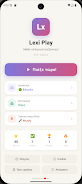
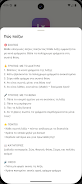
Lexi Play uses bright, child-friendly animations, colorful letter tiles and themed backgrounds to make vocabulary practice feel lively without overwhelming the player. The interface is intentionally uncluttered: clear menus for category selection, difficulty, and a parental section with instructions keep navigation straightforward. Sounds and animations give immediate feedback for correct and incorrect answers, and the slow-playback text-to-speech supports learners who need a step-by-step pronunciation guide.
Categories, level structure and replay value
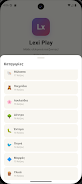
Words are grouped into 22 themed categories such as Animals, Food, Home, School, Nature, Space and Greece-focused vocabulary, which helps children learn related sets of words and build contextual understanding. Each category contains many mini-levels that cycle with different words and slightly varied puzzles so sessions remain fresh. Because content is organized by theme and difficulty, caregivers can choose specific categories to reinforce classroom lessons or focus on vocabulary that matches the child’s interests, increasing replay value through targeted practice.
Safety, privacy and parental controls
Lexi Play is built with a child-first approach: there are no ads and no in-app purchases, creating an uninterrupted environment suitable for preschool and elementary users. A parental menu provides instructions, category selection and privacy information; privacy policy and developer credits are included within the app’s menu. Parents can disable voice features or adjust audio settings if microphone or recognition performance varies by device or environment.
About the developer and practical notes
Developed by Darthost, Lexi Play focuses on core vocabulary acquisition and pronunciation practice without relying on online services for gameplay. Because voice-driven recognition uses device-level services and the microphone, accuracy can vary with background noise and hardware. The app is intended as a supportive tool for caregivers and educators who want a structured, child-safe way to practice Greek vocabulary during short, repeatable sessions.
Show More