RIMS
Version:6.1.9
Published:2026-10-15
Introduction
RIMS is a streamlined mobile app designed to centralize records, workflows, and reporting for teams needing fast access to data. It blends clear dashboards with configurable modules to help professionals manage tasks, audits, and client information without heavy configuration or training.
Overview
RIMS positions itself as a practical solution for organizations that require a lightweight, reliable information management system on Android devices. The experience focuses on speed and clarity: essential data is surfaced quickly and navigation stays predictable even when modules grow. For administrators, the balance between built-in functionality and customization is particularly useful.
Core capabilities at a glance
- Centralized records: Consolidate client, asset, and project records into a single searchable repository.
- Workflow management: Create simple task flows, assign owners, and track status updates without complex scripting.
- Reporting tools: Generate exportable summaries and visual reports for audits or meetings.
- Configurable modules: Enable only the features you need to keep the interface uncluttered.
How it organizes data
Data in RIMS is organized around entities and modules. Entities represent the core objects you manage — such as clients, locations, or equipment — and each entity can have custom fields, attachments, and activity logs. Modules act as workflows that operate over those entities, letting teams create checklists, assign responsibilities, or perform inspections with recorded outcomes.
Interface & performance
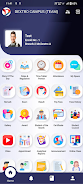
The interface prioritizes legibility and fast load times. Lists and record cards use concise typography and sensible spacing so users can scan information on smaller screens. Navigation uses a consistent header and an accessible tab bar, reducing the learning curve for new users. Performance varies with data size, but caching and background synchronization keep basic interactions snappy even when network connectivity is intermittent.
Security and permissions
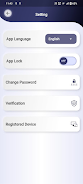
RIMS supports role-based access control so administrators can define who sees and edits each module or record type. Offline mode keeps encrypted copies of recent records on the device, with sync policies that respect user roles. For teams handling sensitive information, these controls allow a practical balance between mobility and data protection.
Getting started
Installation and setup are straightforward. After installing RIMS from the Play Store, an administrator configures core entities and invites team members. Templates are available for common use cases to accelerate deployment. Typical setup steps include:
- Create core entities (clients, sites, devices).
- Enable relevant modules and set permissions.
- Import existing records via CSV or cloud connector.
- Invite users and assign roles.
Tips for first-time users
- Start with a single module and expand as the team becomes comfortable.
- Use templates to standardize data fields before importing large datasets.
- Configure sync windows to reduce mobile data usage during work hours.
- Train a small group of champions who can field questions and refine workflows.
Why professionals choose RIMS
Teams adopt RIMS when they need a practical, easy-to-manage platform rather than a heavy enterprise system. Its strengths are immediacy and adaptability: teams can sketch a workflow and have it running within hours instead of weeks. That makes RIMS particularly appealing to small- and medium-sized operations, field crews, and project-based teams that require consistent data capture on mobile devices.
User experience and updates
Regular updates focus on improving stability, adding small but meaningful features, and refining the UI based on user feedback. The user experience emphasizes minimal friction: common actions require few taps, and in-app guidance helps when new features arrive. Customer support channels and documentation are available for administrators planning larger rollouts.
Final notes for decision-makers
Evaluate RIMS by piloting it with a representative team and measuring improvements in data accuracy, time-to-report, and user satisfaction. The platform’s modular design makes it easy to scale up or pare down features, so you can align the system with evolving operational needs without a costly migration.
Show More