Bridge Escape Bridge Draw Game
Version:1.0.1
Published:2026-10-15
Introduction
Bridge Escape Bridge Draw Game puts you in control of a tiny car's fate: drag to draw a single continuous bridge and then watch the vehicle attempt the crossing under realistic physics. The core idea is simple but demanding—each stroke is permanent, so careful planning matters more than repeated trial-and-error—making Bridge Escape Bridge Draw Game a focused puzzle experience you can pick up in short sessions or return to for longer blocks of problem solving.
Key features and what to expect
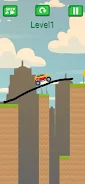
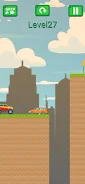
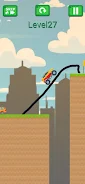
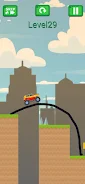
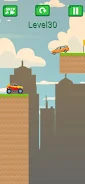
The game centers on a drag-to-draw bridge mechanic that requires you to sketch one uninterrupted path between two points and send the car across. Realistic physics simulate weight, balance, and structural failure, so designs that look plausible on paper may collapse under the car's momentum. Across 200 handcrafted levels the layout complexity increases gradually: early stages introduce the basic drawing and crossing rhythm while later challenges test spatial reasoning, timing of your release, and the resilience of the bridge you create. The interface is intentionally minimal to keep the focus on the puzzle—simple controls, clear level indicators, and unobtrusive UI elements help the gameplay feel immediate and satisfying.
Gameplay mechanics and controls
Drawing is done with a single continuous gesture: place your finger or stylus, drag to form the bridge path, and release to commit the stroke. There is no undo—this permanence is a core part of the design and encourages deliberate planning. Once the bridge is set, a realistic physics engine determines how the car accelerates, transfers weight across the structure, and reacts to inclines or gaps. Because the car's motion and the bridge's response are tightly coupled, small changes to the angle, support points, or curvature of your stroke can produce very different results, which keeps each level feeling fresh even after multiple attempts.
Progression and level structure
Levels are organized to teach systems gradually while introducing new constraints over time. Early puzzles help you learn how bridge angle and anchor points affect stability; midgame stages expand on these ideas and require more creative routing; the later set of levels demands precision and a deeper understanding of how small variations influence outcomes. The design avoids sudden spikes in difficulty by spacing more challenging configurations across multiple levels, and players are encouraged to revisit earlier stages to try alternative approaches for efficiency or aesthetics. A clear level-select system makes it easy to track progress and replay levels to refine your designs.
Visual style and user experience
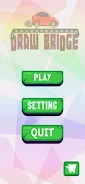
The visual presentation emphasizes clarity: readable icons, a calm color palette, and a tidy layout keep attention on the drawing area and the vehicle's motion. Animations for the car and bridge reactions are smooth to help you interpret cause and effect, while level backgrounds remain unobtrusive so you can focus on problem solving. The interface is designed to be accessible to a wide audience, with large touch targets and straightforward feedback when a bridge fails or succeeds. These choices support a low-friction experience that suits both brief play breaks and longer puzzle sessions.
Replay value, challenges, and learning curve
Although each level requires a single committed drawing, replayability comes from experimenting with different bridge shapes, anchor placements, and release timings to discover more efficient or elegant solutions. The steady difficulty curve rewards practice: as you learn how the physics respond, you can revisit earlier levels to test new ideas or perfect a design. Because later stages are more exacting, the game also appeals to players who enjoy incremental improvement and the satisfaction of overcoming a stubborn puzzle through iteration and observation.
Accessibility, offline play, and device compatibility
Bridge Escape Bridge Draw Game is built to be accessible on a range of Android devices, and its minimal design helps maintain performance across models. The gameplay does not require a constant internet connection, so you can play levels offline during commutes or when network access is limited. Controls are simple enough for casual players while offering depth for those who want to master the physics, and basic accessibility considerations such as large touch areas and clear visual cues make the game approachable for many users.
Who will enjoy this game
If you enjoy thoughtful, physics-based puzzles that reward planning more than repetition, Bridge Escape Bridge Draw Game offers a compact, focused experience: 200 levels, a clean interface, and a single control scheme that exposes depth through emergent behavior rather than complex menus. The one-stroke constraint creates a distinctive challenge—demanding concentration and precision—but it also makes success especially satisfying. Whether you are looking for short mental exercises or a series of increasingly demanding puzzles, this title provides a quiet, well-paced environment to practice spatial reasoning and creative problem solving.
Show More