Motus - Trouve le Mot
Version:5.4
Published:2026-10-15
Introduction
Motus - Trouve le Mot is a refined word puzzle app that challenges you to find a hidden word within a set of limited attempts, using positional and color-coded letter feedback to guide each guess. This concise introduction explains core gameplay, controls, progression, and accessibility so you know what to expect before you install Motus - Trouve le Mot and start playing its daily challenges.
Gameplay and mechanics
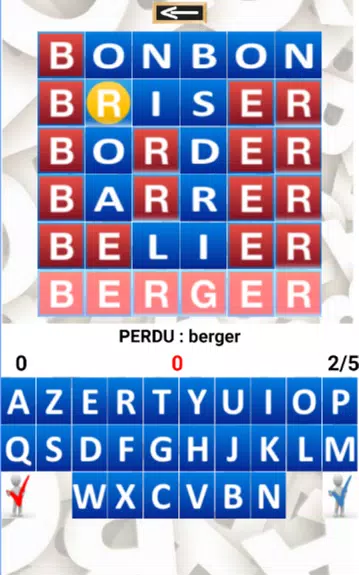
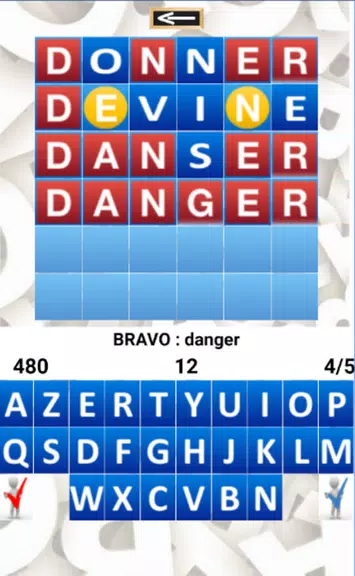
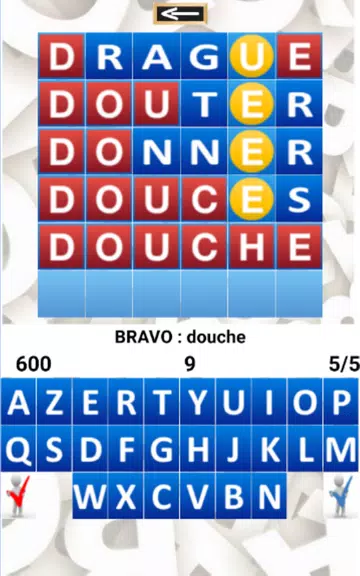
The core loop in Motus - Trouve le Mot revolves around submitting a candidate word, viewing immediate coded feedback about which letters are correct or misplaced, and refining subsequent guesses to converge on the solution. Each round limits attempts, which encourages logical deduction rather than random guessing: safe plays gather reliable information, while riskier choices may reveal more letters at the cost of an attempt. The feedback uses clear visual cues and short animations to confirm matches and indicate when letters belong elsewhere in the word, helping players build a strategy of elimination and pattern recognition.
Controls and interface
Controls are intentionally simple: tap letters on an on-screen keyboard to compose a word, then use the submit control to check your answer. The interface scales well between phones and tablets, with responsive buttons and touch targets that make tapping accurate on smaller screens. Minimal but informative animations draw attention to progress without interrupting flow, and the tutorial walks new players through symbol meanings and basic tactics so the interface feels approachable from the first session.
Progression and challenge systems
Rather than a long campaign, progression is built around daily puzzles, optional difficulty tiers, and short-term streak incentives. Daily challenges refresh regularly to reward consistency, while optional harder modes alter the word length or reduce allowed attempts for players seeking a tougher test. Streak tracking and leaderboards support light competition: compare consistency over days or measure efficiency by attempts used. The structure rewards both casual sessions and deliberate practice, offering natural replay value as players try to improve accuracy and preserve streaks.
Visual style and performance
The visual approach favors legibility and focus. Clean typography, high contrast elements, and color choices designed for clarity help you read and interpret feedback quickly. Animations are compact and efficient, chosen to reinforce information rather than distract. The app is optimized for a broad range of devices, keeping memory and battery use modest so sessions remain smooth on older hardware. Load times are brief and controls remain responsive, which supports quick plays during short breaks or commutes.
Customization and accessibility
Motus - Trouve le Mot includes customization options to suit different play styles and needs: adjustable font sizes help readability, several color-blind friendly palettes improve contrast for players with color vision differences, and simple sound toggles control audio cues. These settings are easy to reach from the options screen and help the app accommodate varied lighting, hearing, and interaction preferences so more people can enjoy consistent sessions.
Offline play and reliability
Offline availability for the daily puzzle means you can play without a continuous internet connection in most cases; the app caches the current challenge and basic progress data so short flights or subway rides do not interrupt a streak. Synchronization for leaderboards and progress occurs when a connection is available, reducing reliance on persistent network access while preserving core gameplay when offline.
Replay value and user experience
The combination of limited attempts, adaptive difficulty, and fresh daily puzzles makes replay value high: each round feels like a compact logic problem with room for incremental improvement. Small, meaningful decisions—which letters to test, when to use a hint, how to balance risk—create an engaging mental workout without long sessions. Lightweight social features let you share results or compare leaderboard positions, adding a communal element without forcing social interaction.
Getting started and tips
Installation is straightforward: download the package, allow minimal permissions, and complete a short onboarding that demonstrates feedback symbols and hint usage. To improve quickly, begin with words that cover common vowels and consonants, observe placement clues carefully, and preserve hints for late-game uncertainty. These simple habits turn each round into an opportunity to sharpen pattern recognition and deduction.
Show More