
CardVault: Card Manager
Version:1.0.4
Published:2026-05-23
Introduction
CardVault: Card Manager is a secure, offline-first card and ID organizer designed for people who want local control of sensitive information. CardVault: Card Manager stores credit and debit cards, loyalty and gift cards, ID documents, transport passes and other personal records encrypted on your device with AES-256 via SQLCipher, so nothing needs to be uploaded to a cloud account. The app is intended as a compact digital replacement for a physical wallet or a way to keep backup card details handy without giving up privacy.
How it works and controls
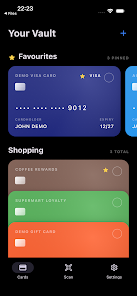
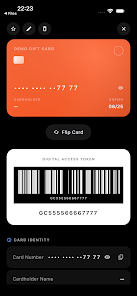
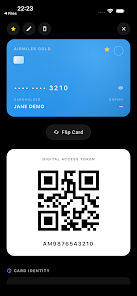
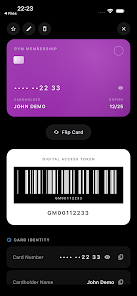
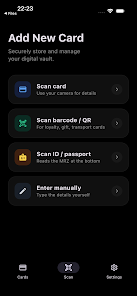
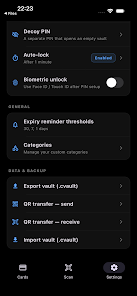
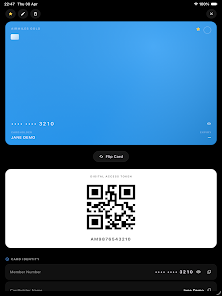
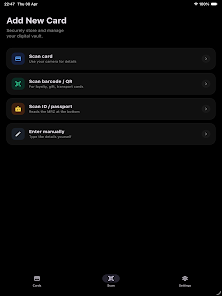
The interface uses a simple, card-based layout that makes it easy to add, view and manage entries. Adding a card can be done manually through structured fields or quickly by using the built-in camera scanner: OCR for card numbers, MRZ scanning for passports and IDs, and barcode/QR capture for passes and memberships. Navigation relies on familiar touch gestures and on-screen controls — swipe to archive or favorite, tap to open an entry, and press-and-hold to reveal quick actions. Unlocking supports PIN, pattern, biometric methods and a decoy vault option for plausible deniability. For security, repeated failed unlock attempts trigger configurable lockout behavior.
Organization and progression
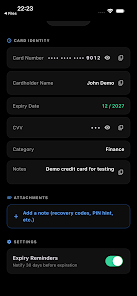
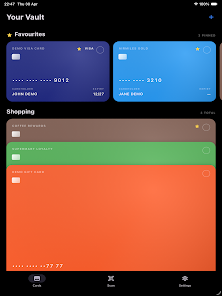
Rather than a game-style progression, CardVault: Card Manager uses an organizational progression that helps you build a practical system over time. You create vaults and folders to separate work and personal cards, tag items for quick filtering, and pin frequently used entries to the top. Expiry and renewal reminders help you keep track of expiring IDs, cards or memberships, and an audit-style history shows recent changes so you can review additions and edits. As your collection grows, smart sorting and search filters make it easy to find what you need without scrolling through long lists.
Backup, transfer and offline play
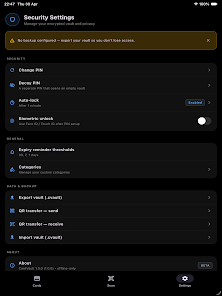
Offline-first design means the app works without an internet connection and does not require account setup. Encrypted backups are stored locally and can be exported or moved to another device using a secure QR transfer or an encrypted file. These options let you restore your vault without exposing unencrypted data. Because there is no automatic cloud sync, cross-device use relies on manual encrypted transfer or backups, which keeps control in your hands but requires extra steps for multi-device workflows.
Security and challenge systems
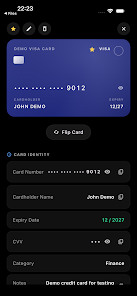
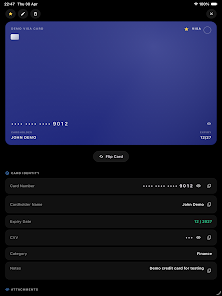
Security features focus on preventing unauthorized access and tampering. AES-256 encryption and SQLCipher protect stored content, local key management keeps keys on the device, and optional root or jailbreak detection warns if the device environment may be compromised. Biometric unlock speeds regular access while decoy vaults and configurable auto-lock timers add layers of plausible deniability and convenience. You can also set up an inactivity timer and require re-authentication for sensitive actions such as exporting data or viewing full card details.
Customization and visual style
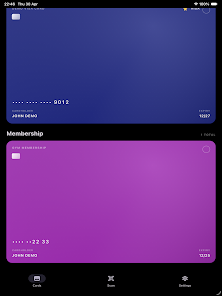
The visual presentation is intentionally minimal and functional, emphasizing legibility and quick scanning of information. Cards are displayed with clear labels, icons for card types, and thumbnails for ID images when present. You can customize fields and templates for different card types so entries match your needs, and basic appearance options help adjust spacing and density for easier browsing. These choices keep the interface clean on phones of different sizes and reduce unnecessary clutter.
User experience and accessibility
CardVault: Card Manager aims for straightforward workflows: add a card, tag or file it, and rely on reminders for maintenance. The app supports accessibility considerations such as adjustable text sizes, high-contrast elements, and clear touch targets to improve usability for a wide range of users. Camera-based scanners include guidance overlays to help line up documents and barcodes, and the app provides contextual help within each screen so new users can learn controls without digging through a manual.
Replay value and maintenance
Even though this is not a game, the app encourages regular engagement through practical features: periodic expiry notifications, housekeeping suggestions for duplicated or outdated entries, and straightforward backup reminders. Developers may release updates and beta features over time; as the app is currently in open beta, occasional adjustments and bug fixes are possible. Users who prefer minimal permissions can disable camera scanning and enter details manually while retaining full encryption benefits.
Limitations to consider
CardVault: Card Manager does not offer automatic cloud synchronization, so using multiple devices requires manual encrypted transfers. Some functionality, such as scanning and image capture, requires camera and storage permissions which you can decline if you prefer a purely manual workflow. As an open beta product, feature sets may evolve and occasional instability is possible; the security-first architecture, however, is designed to keep your data encrypted and under your control at all times.
Show More
Information
Screenshots
Latest Update











Hot Tags
Latest News
-
![Revealing the Launch Playlists and Cross-Progression for COD Warzone Mobile News]()
-
![March 2024 Free Redemption Codes for Honkai: Star Rail News]()
-
PUBG Mobile Teams Up with Bentley Motors: Luxury Cars, Exclusive Collectibles, and Beyond 2024-04-18
![PUBG Mobile Teams Up with Bentley Motors: Luxury Cars, Exclusive Collectibles, and Beyond News]()
-
![Monster Never Cry is now accessible on both Android and iOS mobile devices. News]()
-
V2.2 of the Farlight 84 update introduces an overhauled Season structure, fresh in-game currency, an 2024-04-16
![V2.2 of the Farlight 84 update introduces an overhauled Season structure, fresh in-game currency, an News]()
-
![Arrival of Genshin Impact 4.6 Update: 'Embers of Two Realms, Twilight of Crimson' News]()
-
April 2024 Clash of Clans Update: Unveiling a Fresh Companion, Enhanced Levels, Chat Tagging, and Be 2024-04-16
![April 2024 Clash of Clans Update: Unveiling a Fresh Companion, Enhanced Levels, Chat Tagging, and Be News]()






