

3T Ticket
Version:1.0.0
Published:2026-05-28
Introduction
3T Ticket is a professional event management app designed for organisers and on-site staff who need fast, reliable ticketing tools on a smartphone. From a single mobile interface you can validate QR-coded tickets, read and write NFC wristbands and badges, monitor live check-in numbers and manage team access while maintaining a complete, real-time audit trail. The app is built to keep working when venue connectivity is poor by caching data locally and synchronising changes when a connection returns, making 3T Ticket suitable for events of every size and scale around the world.
Key features and how they work in practice
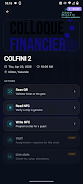
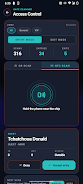
The app combines fast camera-based QR scanning with NFC read/write support so staff can handle a mix of digital and physical credentials. Scanning is optimised for a steady, one-handed workflow: point-and-scan with visual feedback for valid, invalid or duplicate entries and a short vibration or tone to confirm actions. NFC programming is performed on-device to write attendee details or access levels into wristbands and badges on the spot, enabling personalised welcome screens and quick access control without a separate desktop setup.
Controls, interface and visual design
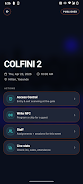
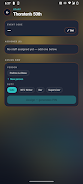
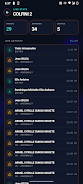
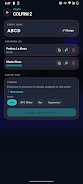
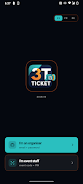
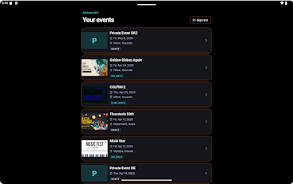
3T Ticket presents a role-scoped interface where gate staff, bar teams and supervisors see controls tailored to their responsibilities. Gate screens prioritise scanning and quick refunds, bar views can support cashless validation flows, and supervisor dashboards surface live counts and search tools. The visual style is clean and practical with clear status colours, large touch targets for fast operation under pressure, and compact audit entries so supervisors can scan event activity at a glance.
Event workflow and progression systems
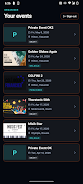
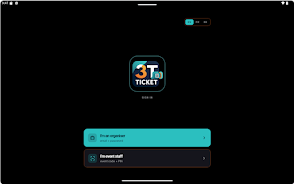
Organisers set up events through the platform and distribute a simple event code and four-digit PIN to staff to enable rapid onboarding on the day. This progression—from setup to staff sign-in to live operations—reduces training time: new team members can join an active shift and immediately perform the tasks assigned to their role. The app maintains a chronological, searchable audit trail that functions as a progression log: every scan, write or administrative change is recorded so post-event reconciliation and reporting are straightforward.
Customization, templates and replay value
Within each event you can customise wristband and badge layouts, choose which attendee fields are written to NFC, and set role permissions to match your operational model. Templates speed repeat deployments for recurring events, and configurable fields let organisers adapt check-in flows to different venues or ticket types. Because templates, templates and cached event states persist on-device, teams can reuse setups across multiple shows, enhancing operational consistency and reducing setup time for returning events.
Offline-first behaviour and reliability
Offline-first design is central to the user experience: event data is cached locally so scans and badge writes continue to function even when the venue has no reliable internet. Background sync resumes automatically when a network is detected, and conflicts are handled by timestamped audit entries so organisers retain a clear record of what happened while disconnected. For large crowds the app is designed to scale by minimising network round-trips and prioritising write operations that can be reconciled later.
Accessibility, security and device requirements
Accessibility considerations include large, legible fonts, high-contrast status indicators and simple navigation paths so staff can operate devices quickly under varied lighting conditions. Security is managed through limited-access roles and the event code plus PIN sign-in, which removes the need for staff to create persistent personal accounts on the device. Note that NFC features require hardware that supports NFC read/write functions, and organisers should plan secure distribution of event codes and PINs to prevent unauthorised access.
Limitations and practical advice
While 3T Ticket supports both QR and NFC workflows, organisers should verify that their chosen devices support the required NFC modes and test badge templates ahead of time. Staff who need full administrative controls should be assigned organiser-level credentials rather than role-limited views, since switching accounts is necessary to access the complete set of event tools. Finally, because the app caches data locally, it is good practice to allow occasional online sync periods for reporting and reconciliation.
For teams running festivals, conferences or one-off shows, 3T Ticket provides a compact, resilient toolset for on-the-ground operations: fast scanning, on-site NFC programming, clear role-based interfaces and dependable offline behaviour. Whether you need quick staff sign-in, detailed audit trails or scalable check-in systems, 3T Ticket is built to handle the practical challenges of live events while keeping control and reporting straightforward.
Show More
Information
Screenshots
Latest Update












Hot Tags
Latest News
-
![Revealing the Launch Playlists and Cross-Progression for COD Warzone Mobile News]()
-
![March 2024 Free Redemption Codes for Honkai: Star Rail News]()
-
PUBG Mobile Teams Up with Bentley Motors: Luxury Cars, Exclusive Collectibles, and Beyond 2024-04-18
![PUBG Mobile Teams Up with Bentley Motors: Luxury Cars, Exclusive Collectibles, and Beyond News]()
-
![Monster Never Cry is now accessible on both Android and iOS mobile devices. News]()
-
V2.2 of the Farlight 84 update introduces an overhauled Season structure, fresh in-game currency, an 2024-04-16
![V2.2 of the Farlight 84 update introduces an overhauled Season structure, fresh in-game currency, an News]()
-
![Arrival of Genshin Impact 4.6 Update: 'Embers of Two Realms, Twilight of Crimson' News]()
-
April 2024 Clash of Clans Update: Unveiling a Fresh Companion, Enhanced Levels, Chat Tagging, and Be 2024-04-16
![April 2024 Clash of Clans Update: Unveiling a Fresh Companion, Enhanced Levels, Chat Tagging, and Be News]()