

360 Dash Cam
Version:4.9.9.0
Published:2026-08-07
Introduction
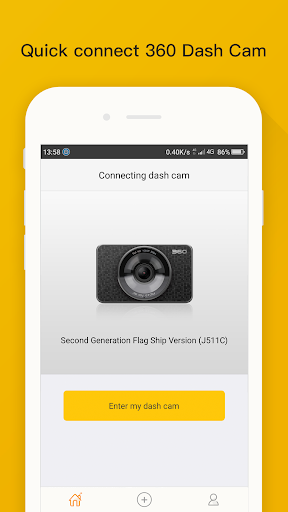
360 Dash Cam is a companion Android app that links your mobile device to a compatible 360 Dash Cam over Wi-Fi, giving you fast, on-screen access to recorded video without removing the memory card. The app is designed to make previewing and reviewing footage straightforward: you can browse recorded clips, play back recent events on a larger display, and quickly verify timestamps and angles when you need evidence or want to inspect a trip. Installation is simple and pairing takes only a few taps, so the 360 Dash Cam experience becomes an extension of your phone rather than an extra piece of hardware to manage.
Key features
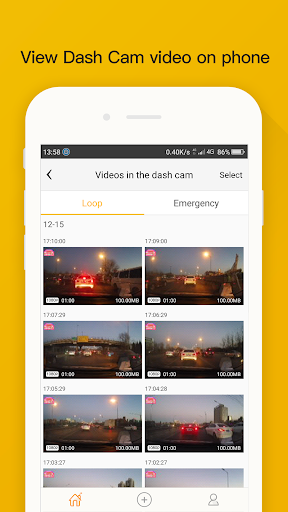
The app focuses on playback and file browsing rather than heavy editing, offering intuitive controls for instant review. After connecting to your 360 Dash Cam via its Wi-Fi hotspot, the app shows a thumbnail timeline of available clips, a list of files sorted by date and size, and straightforward playback controls. You can play or pause footage, seek through a clip using a scrub bar, jump to the next or previous recording, and switch to full-screen viewing to check small details. Basic metadata such as start time, duration, and file size are visible for each clip so you can prioritize what to view first.
How it works
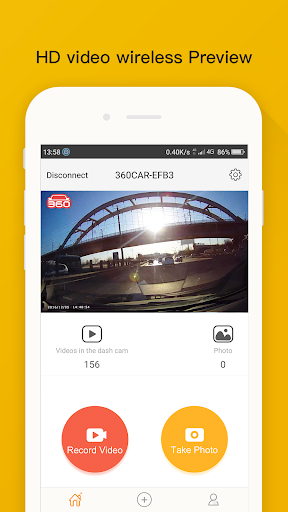
Once the phone is on the same network as the dash cam, the app scans the device for stored recordings and presents them in a familiar file list. Selecting a clip streams the video over the Wi-Fi connection to your phone for near-instant playback, avoiding the need to remove the microSD card or use a card reader. The process is optimized for convenience: thumbnails generate quickly, and the app caches recently viewed clips to reduce repeated loading when reviewing multiple files during the same session.
Controls and playback
The playback interface uses common touch gestures and buttons so users can focus on the content rather than learning new mechanics. Play, pause, and seek are prominent, and tapping the timeline or dragging the scrubber moves playback to specific moments. In many situations a two-finger pinch will zoom the video display to check details, and a single tap can toggle on-screen information such as timestamps or resolution. These controls keep the review process fast and predictable when dealing with urgent footage from a 360 Dash Cam recording.
File organization and progression
Recordings are presented chronologically with easy navigation between sessions, which serves as a basic progression system for users who regularly inspect their driving history. The app highlights recent or incident-marked files at the top of the list, letting you move quickly from one clip to the next. While it does not replace advanced fleet management or editing suites, the simple folder and date views allow you to track progress through a journey, revisit specific segments, and maintain a clear sequence for evidence or personal review.
Visual style and accessibility
The app emphasizes legibility and clear contrast in its user interface so video details are easier to see on a phone screen. Large thumbnail previews, readable fonts for timestamps, and high-contrast buttons support users who need to scan footage quickly. Accessibility options such as adjustable text size and a simplified playback mode reduce friction for users with limited dexterity or vision needs, improving the overall experience when reviewing clips captured by the 360 Dash Cam.
Offline use and performance
Because playback streams from the device over a direct Wi-Fi connection, you can use the app without an internet connection as long as the phone and dash cam are paired. Performance depends on signal strength and the dash cam's internal processing; strong Wi-Fi yields smoother playback and faster thumbnail generation, while weaker connections may introduce buffering or lower responsiveness. The app minimizes unnecessary network traffic by limiting live data transfer to the active clip and caching what is required for immediate review.
Limitations and compatibility
To use the app you must have a compatible 360 Dash Cam device and an adequate Wi-Fi connection. The app is optimized for preview and playback and does not include advanced video editing or cloud backup features. Playback quality and responsiveness are influenced by the dash cam model and signal conditions, so for formal incident reporting it can be helpful to transfer original files via card reader for archival purposes. Compatibility details and supported firmware versions are documented in the device manual and within the app settings.
Tips for best results
For reliable reviews, keep your dash cam firmware up to date, connect your phone to the dash cam hotspot with minimal interference, and view clips on a charged device to avoid interruptions. Use the timeline and metadata views to zero in on specific segments quickly, and rely on the 360 Dash Cam app for fast, on-the-go verification of events before deciding whether to extract files for long-term storage or sharing with authorities.
Show More
Information
Screenshots
Latest Update












Latest News
-
![Revealing the Launch Playlists and Cross-Progression for COD Warzone Mobile News]()
-
![March 2024 Free Redemption Codes for Honkai: Star Rail News]()
-
PUBG Mobile Teams Up with Bentley Motors: Luxury Cars, Exclusive Collectibles, and Beyond 2024-04-18
![PUBG Mobile Teams Up with Bentley Motors: Luxury Cars, Exclusive Collectibles, and Beyond News]()
-
![Monster Never Cry is now accessible on both Android and iOS mobile devices. News]()
-
V2.2 of the Farlight 84 update introduces an overhauled Season structure, fresh in-game currency, an 2024-04-16
![V2.2 of the Farlight 84 update introduces an overhauled Season structure, fresh in-game currency, an News]()
-
![Arrival of Genshin Impact 4.6 Update: 'Embers of Two Realms, Twilight of Crimson' News]()
-
April 2024 Clash of Clans Update: Unveiling a Fresh Companion, Enhanced Levels, Chat Tagging, and Be 2024-04-16
![April 2024 Clash of Clans Update: Unveiling a Fresh Companion, Enhanced Levels, Chat Tagging, and Be News]()






