

PAPAGO Focus
Version:v2.6.0.231215
Published:2026-08-07
Introduction
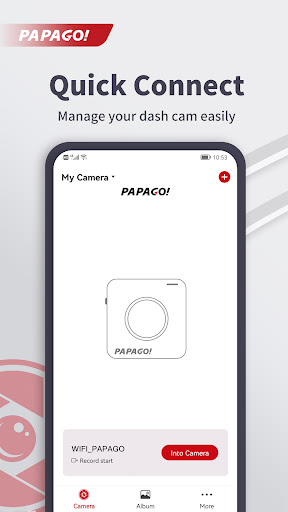
PAPAGO Focus is a companion app for PAPAGO dash cams that puts live viewing and basic file management into your pocket. From the moment you open PAPAGO Focus you can connect your smartphone to the dash cam over WiFi to preview live footage, browse recorded clips and change device preferences without removing the SD card or booting a computer. The app is designed to simplify routine review of incidents and day-to-day configuration so drivers spend less time transferring files and more time on the road.
Key features
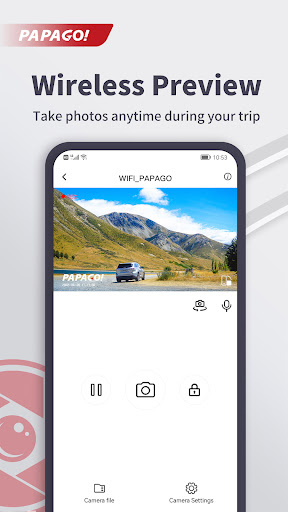
PAPAGO Focus offers a straightforward set of functions that mirror the most common tasks owners perform with their dash cams. Live preview displays a stable real-time feed so you can check camera alignment and capture angles before you start driving. Recorded video playback lets you quickly locate a clip by date and time, view it on the phone screen and verify details such as license plates or timestamps. The app also exposes essential device settings—recording duration, loop intervals, G-sensor sensitivity and basic camera preferences—so you can fine-tune how the dash cam behaves without digging through menus on the camera itself.
Playback controls and navigation
The playback interface in the app focuses on speed and clarity. You can play, pause and scrub through footage using a timeline; thumbnails and timestamps help you zero in on a moment of interest. Slow-motion and frame-by-frame stepping are available for careful inspection of critical frames, and previews are cached to reduce delays when you jump between nearby clips. These controls are intentionally simple to keep review fast when you need to check an incident at the roadside.
Settings and customization
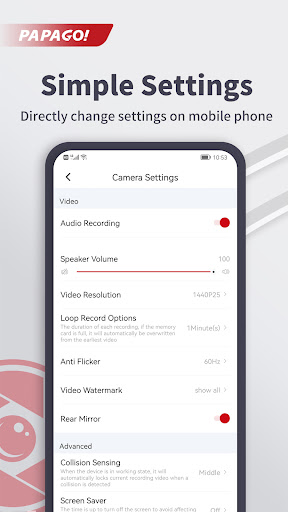
Through PAPAGO Focus you can access the camera’s core recording options and customize behavior to match your needs. Common settings exposed in the mobile interface include resolution and frame rate choices, loop recording length, impact sensitivity for automatic event tagging, and parking-mode preferences where supported by the camera hardware. Changing these options from a phone screen is faster and more convenient than using the dash cam’s onboard buttons, making it practical to adapt settings for long trips, city driving or overnight parking.
File organization and storage management
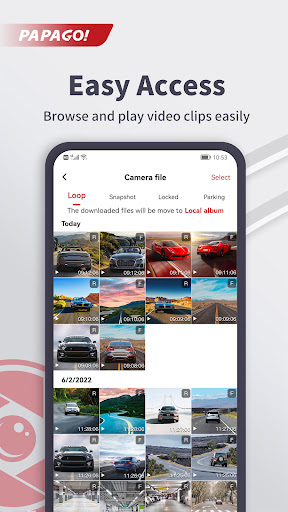
The app organizes video files by date and event type to help you find clips quickly. Normal recordings and incident-tagged files are shown with clear labels and timestamps so you can sort or filter by day, hour or event. File management tools let you delete unwanted footage to free SD card space and protect important clips from automatic overwriting; these controls help maintain continuous recording by keeping available storage within safe limits. When you need to keep a copy, the app provides an easy way to copy selected clips to your phone for offline review or safekeeping.
Visual design and user experience
PAPAGO Focus follows a practical visual approach: large touch targets, readable typography and a focused layout that emphasizes the video view and playback timeline. The interface places commonly used actions—playback, delete, protect and settings—within easy reach so routine tasks require minimal taps. Visual indicators for connection status and remaining SD card capacity are visible at a glance, and the app responds quickly to commands when connected via a direct WiFi link to the camera.
Offline access, accessibility and reliability
The app connects directly to your dash cam over WiFi, so it does not require a cellular or internet connection to preview footage or manage files. That makes the experience reliable in areas with limited service and preserves privacy by keeping video transfers local to your device. Accessibility considerations such as adjustable text sizes and high-contrast elements improve usability for a wider range of users. Be aware that a WiFi link between camera and phone is required to access these features, and PAPAGO Focus is specifically built to support PAPAGO dash cam models.
Practical tips and support
To get the best results, check that your dash cam and phone are running compatible firmware and app versions, park and align the camera for the desired field of view before recording, and monitor the SD card capacity regularly. If connection issues arise, toggling the camera’s WiFi and the phone’s WiFi or restarting the app usually resolves transient problems. For model-specific guidance consult the device manual and the manufacturer’s support channels; PAPAGO Focus is intended as a complementary tool for day-to-day review and configuration rather than a replacement for the full device documentation.
Show More
Information
Screenshots
Latest Update












Hot Tags
Latest News
-
![Revealing the Launch Playlists and Cross-Progression for COD Warzone Mobile News]()
-
![March 2024 Free Redemption Codes for Honkai: Star Rail News]()
-
PUBG Mobile Teams Up with Bentley Motors: Luxury Cars, Exclusive Collectibles, and Beyond 2024-04-18
![PUBG Mobile Teams Up with Bentley Motors: Luxury Cars, Exclusive Collectibles, and Beyond News]()
-
![Monster Never Cry is now accessible on both Android and iOS mobile devices. News]()
-
V2.2 of the Farlight 84 update introduces an overhauled Season structure, fresh in-game currency, an 2024-04-16
![V2.2 of the Farlight 84 update introduces an overhauled Season structure, fresh in-game currency, an News]()
-
![Arrival of Genshin Impact 4.6 Update: 'Embers of Two Realms, Twilight of Crimson' News]()
-
April 2024 Clash of Clans Update: Unveiling a Fresh Companion, Enhanced Levels, Chat Tagging, and Be 2024-04-16
![April 2024 Clash of Clans Update: Unveiling a Fresh Companion, Enhanced Levels, Chat Tagging, and Be News]()






