
Samsung Kumandam
Version:1.0.1
Published:2026-10-12
Introduction
Samsung Kumandam is a sleek remote-control app that transforms your Android device into a versatile controller for TVs, set-top boxes, and smart appliances. It combines infrared and network control with a clean interface so you can manage entertainment and home devices from one place with minimal setup.
What Samsung Kumandam Does
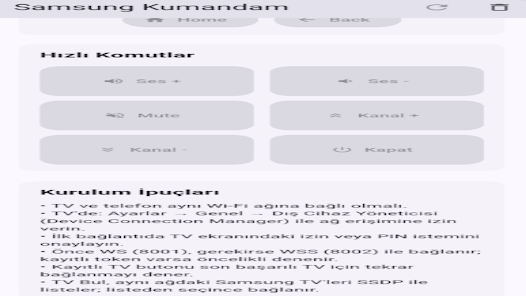
Samsung Kumandam centralizes device control into a single application, supporting both IR blasters and Wi‑Fi-connected hardware. The app recognizes common brands, stores favorites, and provides quick access to power, volume, channel switching, and input selection. It’s designed for users who want fewer remote clutter and faster access to everyday functions.
Key Features at a Glance
- Universal Control: Compatibility with a wide range of TVs, receivers, and set-top boxes via infrared and network commands.
- Customizable Layouts: Create and reorder buttons to match physical remotes or simplify complex menus.
- Macro Support: Chain multiple commands into a single button for one-touch routines like “Watch Movie”.
- Device Profiles: Save settings for multiple rooms and switch between living room, bedroom, and guest setups.
- Quick Search: Find devices and functions fast with a streamlined search bar and intelligent suggestions.
How It Works
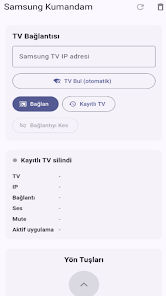
After installing Samsung Kumandam, the app guides you through detecting devices. For infrared-capable phones, it pairs directly with hardware by sending test signals. For Wi‑Fi devices, the app scans your network to identify supported smart TVs or set-top boxes and uses their APIs or standard network protocols to communicate. The interface provides immediate feedback so you know when a command has been received.
Customization and Personalization
Users can redesign control panels to match personal preferences. Samsung Kumandam lets you drag-and-drop buttons, change sizes, and label functions. You can also build custom macros—combine powering on a TV, switching HDMI input, and launching an app with one tap. Profiles allow different configurations per household member or room.
Interface and Performance
The layout prioritizes clarity: large, responsive buttons, clear icons, and simple text labels. Commands are executed with minimal delay when using IR hardware; network commands depend on device responsiveness and local Wi‑Fi quality. Battery impact is modest because the app mainly sends short control signals rather than running continuous background services.
User Experience Notes
Samsung Kumandam keeps common tasks in reach. Users appreciate the gesture shortcuts for volume control and the ability to pin favorite controls to the home screen. Occasional compatibility gaps can appear with niche devices, but the profile editor allows manual tuning to bridge those gaps. Regular updates add new device codes and refine network behavior.
Tips for New Users
- Place frequently used buttons on the primary panel to reduce navigation steps.
- If a device doesn’t respond, try re-teaching the command using a physical remote and the app’s learning tool.
- Use macros for repetitive routines like powering on multiple devices together.
- Keep your phone’s Wi‑Fi and app updated for best network controls.
Installation and Getting Started
Installation is straightforward: download, allow required permissions (IR access or local network), and follow the in-app setup wizard. Add each device one at a time, test basic functions, and then arrange your layout. Samsung Kumandam supports creating backups of your profiles so you can restore settings after reinstalling or switching phones.
Why People Choose It
People pick Samsung Kumandam when they want one dependable control surface that replaces multiple remotes. Its combination of universal control, layout flexibility, and macro capability delivers practical convenience. Frequent updates and an approachable design make it a solid option for users who want to streamline their home entertainment and device management without a steep learning curve.
Show More
Information
Screenshots
Latest Update












Hot Tags
Latest News
-
![Revealing the Launch Playlists and Cross-Progression for COD Warzone Mobile News]()
-
![March 2024 Free Redemption Codes for Honkai: Star Rail News]()
-
PUBG Mobile Teams Up with Bentley Motors: Luxury Cars, Exclusive Collectibles, and Beyond 2024-04-18
![PUBG Mobile Teams Up with Bentley Motors: Luxury Cars, Exclusive Collectibles, and Beyond News]()
-
![Monster Never Cry is now accessible on both Android and iOS mobile devices. News]()
-
V2.2 of the Farlight 84 update introduces an overhauled Season structure, fresh in-game currency, an 2024-04-16
![V2.2 of the Farlight 84 update introduces an overhauled Season structure, fresh in-game currency, an News]()
-
![Arrival of Genshin Impact 4.6 Update: 'Embers of Two Realms, Twilight of Crimson' News]()
-
April 2024 Clash of Clans Update: Unveiling a Fresh Companion, Enhanced Levels, Chat Tagging, and Be 2024-04-16
![April 2024 Clash of Clans Update: Unveiling a Fresh Companion, Enhanced Levels, Chat Tagging, and Be News]()






