
分贝仪,噪声器
Version:1.0.0
Published:2026-10-12
Introduction
分贝仪,噪声器 is a compact sound-level tool that measures ambient noise and displays live decibel readings, spectrums, and alerts for loud environments. It helps users check workplace levels, monitor home noise, and capture peak events with easy-to-read visual feedback and exportable logs.
Overview of the app
This app turns your Android device into a practical noise meter suitable for everyday checks and professional spot measurements. It delivers fast dB readings, short-term averaged values, and peak holds so you can see both momentary spikes and sustained sound pressure levels. Developers balanced functionality with a minimal learning curve, making core tools accessible from the main screen.
Key capabilities
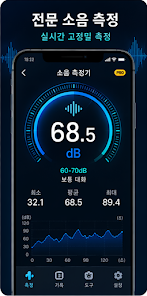
- Real-time decibel display with numerical and bar-graph visualization that updates multiple times per second.
- Frequency analysis and simple spectrum view for identifying tonal sources or hums.
- Weighted measurements (A and C weighting) to reflect perceived loudness or low-frequency energy.
- Peak hold and statistical metrics such as Lmax, Lmin and Leq for comprehensive reporting.
- Background monitoring with customizable alerts when a threshold is exceeded.
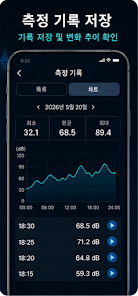
- Data logging and CSV export for documentation or further analysis.
How the tool measures sound
The measurement engine converts microphone inputs into calibrated decibel values using built-in algorithms. Although smartphone microphones vary, the app offers calibration controls so you can match readings against a reference meter. Weighting filters mimic human hearing response and reduce misleading results from low-frequency noise or very high tones. For practical measurements the app provides short and long averaging options to suit impulsive or continuous noise sources.
User Interface and performance
Design focuses on clarity: large numeric readouts, a colored meter strip, and a small spectrum area let you interpret results at a glance. Animations are kept minimal to preserve battery life during prolonged monitoring. The app supports widgets for quick access and includes a dark theme to improve visibility in low-light situations. When running in the background, it conserves resources while still capturing important events.
Practical uses and workflows
People use this kind of utility in many scenarios: verifying office noise compliance, checking appliance sound levels, monitoring construction work, or tuning audio systems. For occupational checks you can set a legal or company threshold and let the app record whenever the limit is crossed. Musicians and AV technicians use the spectrum view to locate annoying resonances. Families appreciate the quick safety checks around children’s toys and household devices.
Tips for accurate readings
- Calibrate against a known reference meter when accuracy matters; the calibration menu adjusts the displayed dB value.
- Avoid covering the microphone or pointing the phone into a pocket during measurement.
- Use A-weighting for general hearing-related checks and C-weighting for low-frequency evaluation.
- Take several measurements at different positions and average them for a reliable assessment of an area.
- Enable peak logging when you need to capture short impulsive noises like slams or bangs.
The 分贝仪,噪声器 app also includes export options so you can attach results to reports or share them with colleagues. Saved sessions include timestamps and summary statistics to simplify documentation.
Getting started
Install the app from the store and grant microphone permission when prompted. Open the main screen to see live dB values and adjust weighting or averaging in the settings. If you plan to use the app for official checks, perform a calibration step and run a short validation against a calibrated instrument. Widgets and notification controls are available for continuous monitoring without keeping the app open.
Why users pick this app
Users praise the balance between advanced measurement options and everyday usability. Whether you need a quick noise check at home or a logged record for a site inspection, the app provides essential tools without a steep learning curve. Regular updates refine calibration routines and expand export formats based on user feedback.
For anyone who wants a single, portable solution for sound level measurement, 分贝仪,噪声器 provides a practical mix of features and simplicity that makes routine acoustic checks straightforward. Try a few sample recordings and explore the logging features to see how it fits your workflow.
Show More
Information
Screenshots


Latest Update












Latest News
-
![Revealing the Launch Playlists and Cross-Progression for COD Warzone Mobile News]()
-
![March 2024 Free Redemption Codes for Honkai: Star Rail News]()
-
PUBG Mobile Teams Up with Bentley Motors: Luxury Cars, Exclusive Collectibles, and Beyond 2024-04-18
![PUBG Mobile Teams Up with Bentley Motors: Luxury Cars, Exclusive Collectibles, and Beyond News]()
-
![Monster Never Cry is now accessible on both Android and iOS mobile devices. News]()
-
V2.2 of the Farlight 84 update introduces an overhauled Season structure, fresh in-game currency, an 2024-04-16
![V2.2 of the Farlight 84 update introduces an overhauled Season structure, fresh in-game currency, an News]()
-
![Arrival of Genshin Impact 4.6 Update: 'Embers of Two Realms, Twilight of Crimson' News]()
-
April 2024 Clash of Clans Update: Unveiling a Fresh Companion, Enhanced Levels, Chat Tagging, and Be 2024-04-16
![April 2024 Clash of Clans Update: Unveiling a Fresh Companion, Enhanced Levels, Chat Tagging, and Be News]()






