

My Bean Notes
Version:1.0.7
Published:2026-10-12
Introduction
My Bean Notes is an Android app designed for coffee lovers who want a focused, private way to record and revisit tasting impressions. My Bean Notes runs entirely on your device so every entry — from a simple cafe jot to a methodical home cupping session — stays private and accessible offline. The interface is designed to let you capture aroma, acidity, body, aftertaste and other details quickly, while also offering space for longer notes about beans, roast level or the brewing method that produced the cup.
Key features and note structure
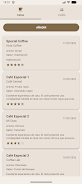
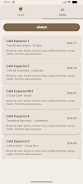
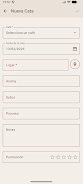
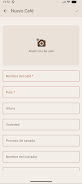
The app provides a structured entry form that helps you think through each tasting: fields for bean origin, roast date, grind, brew method, water temperature and extraction time, plus separate sections for aroma, flavor, mouthfeel and overall rating. Each note supports tags and short descriptors so you can filter and find entries later, and a built-in photo option lets you attach images of the bag, the brew or tasting setup. Search and sort controls make it easy to compare past tastings by rating, date, origin or tag, so you can spot trends in your preferences over time without leaving your phone.
Controls, customization and visual style
Navigation uses simple touch gestures and standard Android controls for a natural mobile experience: tap to create or edit an entry, swipe to move between notes, use sliders for rating intensity and dropdown pickers for consistent fields like brew method. The visual design is intentionally clean and readable, with clear typography, well-spaced form fields and subtle color cues to highlight ratings and tags. You can adjust font sizes and toggle a compact view for quick browsing, making the app comfortable both for long review sessions and quick on-the-go notes at a café counter.
Progression, tracking and replay value
Rather than game-style progression, My Bean Notes focuses on personal tracking that helps your palate develop: a timeline view and simple statistics let you see how your ratings and flavor notes evolve, helping you identify which beans and methods consistently produce results you enjoy. That history encourages revisiting past entries to refine brewing parameters or to repeat experiments that produced unexpected favorites. Because entries are easy to create and compare, the app naturally supports repeated tasting, structured practice and gradual improvement in brewing and tasting skills.
User experience and accessibility
The app is built for clarity and low friction: form presets shorten the entry process, autosave prevents accidental data loss during edits, and context labels explain each tasting field for users who are newer to cupping vocabulary. Accessibility has been considered with high contrast text options, scalable fonts and compatibility with common Android screen readers so a broader range of users can enjoy and maintain a tasting log. Tooltips and short inline help keep the learning curve shallow while still supporting more detailed note-taking for advanced users.
Offline operation, privacy and local storage
All notes are stored locally on your Android device so you retain full control of your data; there is no required account creation and no cloud sync built into the app. Because My Bean Notes runs offline, you can use it at cafés, roasteries and remote tasting locations without network access. If you rely on device-level backup solutions provided by Android, those can be used independently, but the app itself does not transmit data off your phone.
Limitations and device compatibility
My Bean Notes is available only for Android devices and does not include automatic cross-device synchronization or built-in online sharing. If you need to work across multiple phones or platforms, plan to use device-level backups or manual export methods supported by your device. The app intentionally keeps features local and lightweight to prioritize privacy, speed and a distraction-free tasting workflow.
Show More
Information
Screenshots
Latest Update












Hot Tags
Latest News
-
![Revealing the Launch Playlists and Cross-Progression for COD Warzone Mobile News]()
-
![March 2024 Free Redemption Codes for Honkai: Star Rail News]()
-
PUBG Mobile Teams Up with Bentley Motors: Luxury Cars, Exclusive Collectibles, and Beyond 2024-04-18
![PUBG Mobile Teams Up with Bentley Motors: Luxury Cars, Exclusive Collectibles, and Beyond News]()
-
![Monster Never Cry is now accessible on both Android and iOS mobile devices. News]()
-
V2.2 of the Farlight 84 update introduces an overhauled Season structure, fresh in-game currency, an 2024-04-16
![V2.2 of the Farlight 84 update introduces an overhauled Season structure, fresh in-game currency, an News]()
-
![Arrival of Genshin Impact 4.6 Update: 'Embers of Two Realms, Twilight of Crimson' News]()
-
April 2024 Clash of Clans Update: Unveiling a Fresh Companion, Enhanced Levels, Chat Tagging, and Be 2024-04-16
![April 2024 Clash of Clans Update: Unveiling a Fresh Companion, Enhanced Levels, Chat Tagging, and Be News]()






