
Navi Radiography Pro
Version:1.2.0
Published:2026-10-12
Introduction
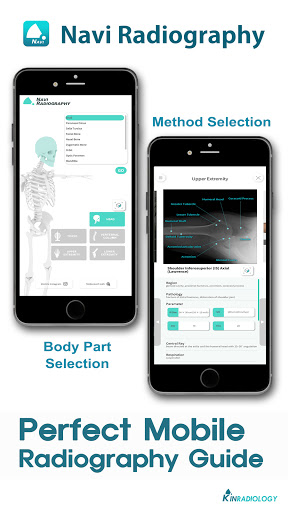
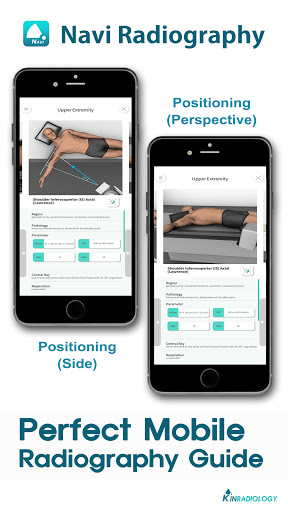
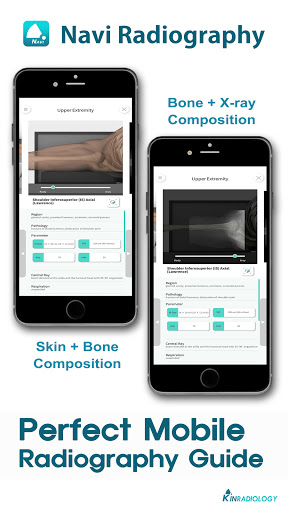
Navi Radiography Pro helps radiographers and clinicians review diagnostic images quickly on Android devices, combining a responsive DICOM viewer, measurement tools, and secure PACS connectivity. It speeds routine image navigation and light reporting while maintaining image fidelity and patient privacy for everyday clinical workflows.
What Navi Radiography Pro Brings to Practice
Navi Radiography Pro is designed as a compact, on-the-go imaging companion that adapts to busy clinics and mobile units. The app focuses on essential tools: high-quality image rendering, reliable measurement utilities, and streamlined transfers to hospital systems. It’s not a diagnostic replacement but a productivity tool that supports decision-making and documentation.
Core Capabilities
- DICOM viewing: Smooth zoom, pan, window/level adjustments, series scrolling, and multi-plane support where available.
- Annotation and measurement: Linear, angle, and area measures with adjustable calibration for consistent results.
- PACS and cloud access: Secure fetching and sending of studies via DICOM, HTTPS, and standard authentication protocols.
- Image enhancement: Noise reduction, edge enhancement, and preset filters tuned for radiographic contrast improvement.
- Reporting aids: Customizable templates, voice notes, and exportable snapshots for inclusion in patient records.
How It Integrates into Clinical Workflow
The app integrates into daily routines by reducing friction between image acquisition and preliminary review. Technicians can quickly check exposures on portable X-ray units, clinicians can triage studies before formal reporting, and referrals can be shared with colleagues securely. Connectivity to PACS and support for standard DICOM modalities make the handoff to hospital systems straightforward.
Interface and Performance
Navi Radiography Pro emphasizes clarity and speed. The interface keeps controls accessible without obscuring the image. Rendering is hardware-accelerated where possible, preserving frame rates on modern devices and avoiding sluggish panning on large series. Battery and data usage are optimized for field use, especially during extended shifts.
Customization and Tools
Customization options let teams tailor the app to local protocols. Administrators can define measurement presets, report templates, and default image filters. Users can save frequently used layouts and create quick-access buttons for repetitive tasks. These small efficiencies add up in high-volume settings.
Security and Compliance
Security is treated as a priority: encrypted transfers, optional on-device anonymization, and role-based access control help protect patient data. The app logs activity for audit purposes and supports common authentication methods used in healthcare IT environments. Implementations should be reviewed against local regulations before clinical deployment.
Practical Tips for New Users
- Start by calibrating measurement tools with a known reference to ensure accurate lengths and areas.
- Use the preset filters for quick contrast enhancement, then fine-tune window/level manually as needed.
- Enable low-power rendering only when battery constraints are critical; otherwise keep hardware acceleration on for smoother navigation.
- Leverage report templates and voice notes to cut documentation time after image review.
Training sessions of 30–45 minutes typically cover the essentials: connecting to PACS, navigating series, and exporting annotated images. Clinicians and technologists usually find the learning curve shallow.
Where Navi Radiography Pro Excels
The app stands out in mobile or constrained environments where a full workstation isn’t available. It performs well for quick checks after acquisition, for remote consultations, and for emergency triage when time is critical. The balance between image fidelity and responsiveness makes it suitable for many routine radiographic tasks.
Installing and Getting Started
Installation is straightforward from the Android store or by sideloading in controlled deployments. After installation, configure network settings to connect to PACS servers and import any required credentials or certificates. Test connectivity with a known study before relying on the app during patient care.
For teams exploring lightweight imaging tools, Navi Radiography Pro provides a focused feature set that improves workflow without unnecessary complexity. Its practical approach to viewing, measuring, and sharing radiographic images helps clinics stay efficient while keeping patient data secure.
Show More
Information
Screenshots
Latest Update












Latest News
-
![Revealing the Launch Playlists and Cross-Progression for COD Warzone Mobile News]()
-
![March 2024 Free Redemption Codes for Honkai: Star Rail News]()
-
PUBG Mobile Teams Up with Bentley Motors: Luxury Cars, Exclusive Collectibles, and Beyond 2024-04-18
![PUBG Mobile Teams Up with Bentley Motors: Luxury Cars, Exclusive Collectibles, and Beyond News]()
-
![Monster Never Cry is now accessible on both Android and iOS mobile devices. News]()
-
V2.2 of the Farlight 84 update introduces an overhauled Season structure, fresh in-game currency, an 2024-04-16
![V2.2 of the Farlight 84 update introduces an overhauled Season structure, fresh in-game currency, an News]()
-
![Arrival of Genshin Impact 4.6 Update: 'Embers of Two Realms, Twilight of Crimson' News]()
-
April 2024 Clash of Clans Update: Unveiling a Fresh Companion, Enhanced Levels, Chat Tagging, and Be 2024-04-16
![April 2024 Clash of Clans Update: Unveiling a Fresh Companion, Enhanced Levels, Chat Tagging, and Be News]()






