

NoteLearner
Version:1.0.15
Published:2026-10-14
Introduction
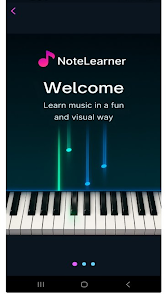
NoteLearner is an interactive piano learning app that teaches users to play by combining a falling-notes visual system with hands-on practice and a practical song library. NoteLearner puts real-time visual cues under your fingers so beginners and intermediate players can follow timing and fingering while they practice, and it keeps sessions focused with tempo controls and section looping for targeted repetition.
Key features
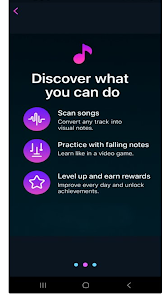
The core learning interface uses a falling-notes display that indicates both timing and suggested fingering, allowing users to read a simplified, game-like score instead of a full traditional sheet. The app includes a built-in song library for immediate practice and supports an optional premium tier that unlocks tempo control, independent right/left hand isolation, an integrated composer for basic arrangements, and a song scanner to import simple pieces for study. Community-inspired options such as in-app rankings and a Hall of Fame are available as opt-in features to encourage progress without forcing online interaction.
How it works
Practice sessions are centered on short, repeatable exercises where falling notes guide finger placement and timing. Notes fall toward a reference line; when they hit the target you play or tap the corresponding key. Tempo control lets you slow passages down to work on coordination, and hand isolation mode mutes one hand so you can focus on the other. The integrated composer provides a straightforward interface to create or arrange melodies and immediately test them in the same visual environment.
Progression and practice structure
NoteLearner organizes material into progressively challenging pieces and exercises so learners can build skills step by step. Beginners can start with simple tunes and slow tempos, then increase complexity by enabling additional notes, faster tempos, and longer passages. The app tracks practice history and session length so you can see improvement over time, and optional achievements and leaderboards give structure to longer-term goals while keeping progress personal and measurable.
Controls and user experience
The interface is designed for touch-first interaction on phones and tablets with large, responsive on-screen keys and clear visual feedback when a note is hit. Controls include tempo sliders, loop in/out markers for repeating difficult sections, and simple toggles for hand isolation and fingering display. Menus are kept lightweight and accessible so new learners can start a practice session in seconds without wading through complex settings.
Visual style and customization
Visually, the app focuses on clarity: color-coded lanes for left and right hands, adjustable note size and speed, and an unobtrusive background so attention stays on the keys. Users can adjust the visual density of the falling notes and choose a calmer or more contrast-rich theme to match viewing conditions. The composer and scanner interfaces use the same visual language so created or imported pieces behave consistently in practice mode.
Offline use and replay value
Most core features of NoteLearner, including the built-in song library, tempo control, hand isolation, and the composer, are available offline so users can practice without an internet connection. Downloadable content expansions and premium libraries can be stored locally for repeated practice, and the combination of short exercises, looped practice, and composition tools gives the app strong replay value for developing repertoire and polishing difficult passages.
Accessibility and learning support
NoteLearner includes settings to make practice approachable for a range of learners: adjustable tempo, visual contrast options, and the ability to disable fingering hints for more advanced practice. Guided pieces include optional text guidance for rhythm and hand placement so users who are unfamiliar with notation can still follow lessons. The app is intended as a practice tool rather than a full substitute for private instruction, and many users will benefit from combining its guided visuals with occasional teacher feedback.
Known limitations
Certain advanced features are part of the premium tier and require a purchase to unlock the full library and composer options. NoteLearner focuses on guided visual practice and structured repetition; it does not replace in-person technique coaching for detailed hand posture or advanced theory, but it provides a practical, consistent environment for daily practice and early-to-intermediate repertoire development.
Show More
Information
Screenshots
Latest Update
-
![Lines Gold Pro - Icon Pack APK]()
Lines Gold Pro - Icon Pack
-
![Remote Fire TV APK]()
Remote Fire TV
-
![Flight Dark Pro - Icon Pack APK]()
Flight Dark Pro - Icon Pack
-
![Ares Light: Pastel Icon Pack APK]()
Ares Light: Pastel Icon Pack
-
![getConf - Hidden Settings APK]()
getConf - Hidden Settings
-
![Dots Live Wallpaper - Battery APK]()
Dots Live Wallpaper - Battery
-
![Chroma - Icon Pack APK]()
Chroma - Icon Pack
-
![One UI Fluffy Icon Pack APK]()
One UI Fluffy Icon Pack
-
![Pixly Limitless Fluo Icon Pack APK]()
Pixly Limitless Fluo Icon Pack
-
![Compress Video - Resize Video APK]()
Compress Video - Resize Video
-
![Pixly Professional Dark APK]()
Pixly Professional Dark
-
![Tracker Detect Pro APK]()
Tracker Detect Pro












Latest News
-
![Revealing the Launch Playlists and Cross-Progression for COD Warzone Mobile News]()
-
![March 2024 Free Redemption Codes for Honkai: Star Rail News]()
-
PUBG Mobile Teams Up with Bentley Motors: Luxury Cars, Exclusive Collectibles, and Beyond 2024-04-18
![PUBG Mobile Teams Up with Bentley Motors: Luxury Cars, Exclusive Collectibles, and Beyond News]()
-
![Monster Never Cry is now accessible on both Android and iOS mobile devices. News]()
-
V2.2 of the Farlight 84 update introduces an overhauled Season structure, fresh in-game currency, an 2024-04-16
![V2.2 of the Farlight 84 update introduces an overhauled Season structure, fresh in-game currency, an News]()
-
![Arrival of Genshin Impact 4.6 Update: 'Embers of Two Realms, Twilight of Crimson' News]()
-
April 2024 Clash of Clans Update: Unveiling a Fresh Companion, Enhanced Levels, Chat Tagging, and Be 2024-04-16
![April 2024 Clash of Clans Update: Unveiling a Fresh Companion, Enhanced Levels, Chat Tagging, and Be News]()






