

PhotoNotes
Version:1.48
Published:2026-10-14
Introduction
PhotoNotes transforms your camera roll into a structured, searchable knowledge base by pairing high-quality photos with instant editable notes and a fast local archive. PhotoNotes prompts you to record the context around a photo at capture time, so images are searchable and meaningful later instead of becoming anonymous items in a cluttered gallery. The app is designed for professionals documenting sites or meetings, students collecting study materials, and anyone who wants immediate context, precise images, and a timeline-driven local library that is reliable offline.
Capture workflow and controls
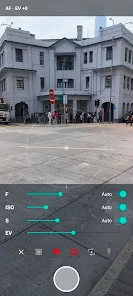
The capture workflow in PhotoNotes emphasizes speed and context: a zero-latency shutter using the Android Camera2 API minimizes motion blur, and the integrated note field appears immediately after each shot so you can jot tags, short descriptions, or checklist items without jumping between apps. Manual camera controls include multiple focus modes, independent ISO and shutter speed adjustments, exposure compensation, and composition aids such as a rule-of-thirds grid and a digital level. These controls let users prioritize clarity and detail for documentation tasks while retaining a fast, one-handed capture option for quick notes and snapshots.
Organization, progression, and library structure
Rather than treating photos as isolated files, PhotoNotes organizes content into a timeline-based local library backed by the Room persistence library. Entries progress from raw captures to annotated records as you add tags, labels, and comments; this creates a natural progression from initial image to fully indexed reference. The app supports date filtering, keyword search across photo captions and note text, and color-coded labels that function like priority markers—allowing a user to build simple workflows (for example: capture, tag, review, archive) and to track progress as items move through those stages.
Search, retrieval and replay value
Search and retrieval are central to PhotoNotes’ utility. Full-text indexing across notes and captions combined with fast metadata filters makes it practical to retrieve a specific photo weeks or months after capture, even within thousands of entries. This replay value is practical rather than recreational: repeatedly reusing annotated images for reports, study sessions, or maintenance logs reduces duplicated work and preserves institutional memory for users who routinely document evolving projects.
Customization and visual design
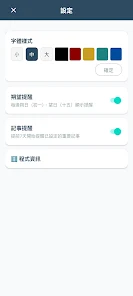
The app’s visual style remains intentionally clean and functional: a neutral interface highlights images and text without visual clutter, and customization options focus on usability—selectable label colors, adjustable text sizes for note fields, and configurable default metadata fields for common use cases (project name, location, client, or course). These options allow users to tailor PhotoNotes to different workflows and visual preferences while keeping the core interface consistent and easy to navigate.
Performance, offline use and privacy
PhotoNotes is built for local-first operation. Images and notes are stored locally using Room for fast access and reliable offline use; this means you can document sites and events where connectivity is limited and still rely on fast keyword lookups later. Background processing is optimized to avoid overheating and to keep the app responsive during extended capture sessions. Because storage is local by default, the app supports privacy-sensitive use cases where maintaining control over the data is important for professionals and students alike.
Accessibility and user experience
The user experience in PhotoNotes emphasizes clarity and accessibility: readable fonts, contrast-conscious layouts, and large tappable controls reduce friction for users with varying levels of dexterity. The capture-to-note flow minimizes steps, and contextual help prompts explain manual controls for new users so the learning curve is manageable. For power users, advanced tools are available; for occasional users, the app works comfortably as a fast point-and-shoot note taker.
Limitations and device compatibility
PhotoNotes relies on the Android Camera2 API for many advanced capture features, so older devices that do not fully implement Camera2 may not expose every manual option. The range of controls and settings can introduce a learning curve for people who prefer a purely automatic camera, and extremely large libraries may benefit from occasional maintenance (archiving or exporting) to keep metadata tidy. These trade-offs reflect the app’s focus on precision and local control rather than simplified, cloud-based automation.
Who benefits most
PhotoNotes is particularly useful for users who need reliable, contextual records: field technicians, architects, students, researchers, and anyone who needs to convert visual observations into searchable, reusable notes. With a balanced combination of high-fidelity capture, immediate annotation, timeline organization, and offline privacy, PhotoNotes aims to make image-based documentation faster to create and easier to find when it matters most.
Show More
Information
Screenshots





Latest Update












Latest News
-
![Revealing the Launch Playlists and Cross-Progression for COD Warzone Mobile News]()
-
![March 2024 Free Redemption Codes for Honkai: Star Rail News]()
-
PUBG Mobile Teams Up with Bentley Motors: Luxury Cars, Exclusive Collectibles, and Beyond 2024-04-18
![PUBG Mobile Teams Up with Bentley Motors: Luxury Cars, Exclusive Collectibles, and Beyond News]()
-
![Monster Never Cry is now accessible on both Android and iOS mobile devices. News]()
-
V2.2 of the Farlight 84 update introduces an overhauled Season structure, fresh in-game currency, an 2024-04-16
![V2.2 of the Farlight 84 update introduces an overhauled Season structure, fresh in-game currency, an News]()
-
![Arrival of Genshin Impact 4.6 Update: 'Embers of Two Realms, Twilight of Crimson' News]()
-
April 2024 Clash of Clans Update: Unveiling a Fresh Companion, Enhanced Levels, Chat Tagging, and Be 2024-04-16
![April 2024 Clash of Clans Update: Unveiling a Fresh Companion, Enhanced Levels, Chat Tagging, and Be News]()






