

Wayby
Version:1.0.4
Published:2026-10-14
Introduction
Wayby is a lightweight productivity app that streamlines travel planning, local discovery, and route sharing with simple tools for organizing places, schedules, and group itineraries. It blends map-based browsing with offline storage, quick sharing, and customizable lists to keep trips and daily routes efficient and accessible.
Core Functionality
At its center, Wayby provides a straightforward interface for saving locations, building routes, and attaching notes or photos to specific stops. Users can pin favorite venues, sequence multi-stop journeys, and generate clean, shareable itineraries that colleagues or friends can open without extra setup. The app balances simplicity with robust organizational options.
Maps and Offline Access
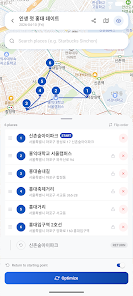
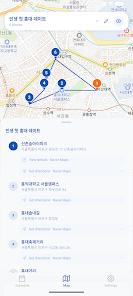
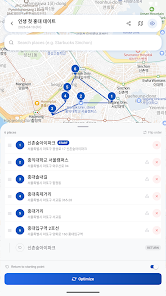
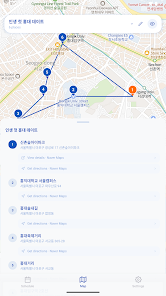
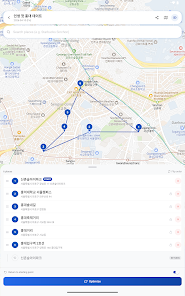
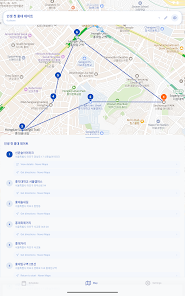
Maps in Wayby are optimized for speed and clarity. The app supports tiled map downloads so you can access your saved routes when service is limited. Offline mode preserves core navigation visuals, saved coordinates, and annotations while reducing data usage during travel. Visual markers and color-coded waypoints make multi-leg trips easy to scan at a glance.
Collaboration and Sharing
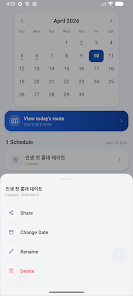
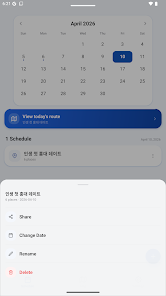
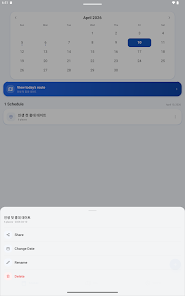
Collaboration features let small groups coordinate plans without switching between multiple tools. Shareable links, exported route files, and group lists allow participants to view or comment on an itinerary. Wayby also supports quick one-tap sharing to messaging apps and email, making it simple to distribute directions and meeting points.
Customization and Lists
Your saved locations can be organized into custom lists for work, leisure, or recurring errands. Apply tags and labels to filter content, reorder entries manually, or let the app suggest an optimized route order. Custom icons and color choices help distinguish lists visually so you can find what you need quickly.
Integrations and Workflow
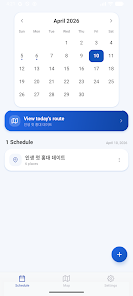
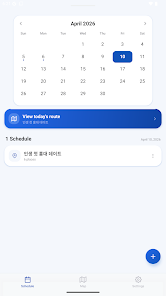
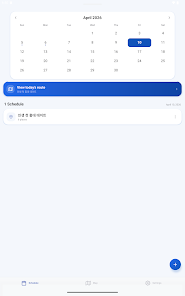
Wayby connects with calendar apps to add travel times and reminders directly into your schedule. Import and export options support common file formats for points of interest and routes, enabling straightforward transfers between mapping services or corporate tools. Notifications and timed reminders help keep plans on track.
Performance and Compatibility
Designed for efficient performance on a wide range of Android devices, Wayby minimizes background battery drain while maintaining responsive map rendering. The app is tuned to handle hundreds of saved locations without lag, and it adapts display density for phones and tablets. Regular updates focus on smoothing interactions and improving compatibility with newer Android releases.
Privacy and Data Control
Wayby emphasizes local control of your data. Saved locations and notes remain accessible offline and can be backed up to the cloud only when the user chooses. Export tools let you download a complete copy of your lists and routes, and simple permission requests clarify how the app uses location and storage access to deliver core features.
User Experience and Interface
The design favors a minimal learning curve: a main map view, a collapsible sidebar with lists, and a prominent action button for adding new stops. Visual feedback, subtle animations, and readable typography help make navigation intuitive. Tutorials and contextual tips guide new users through common tasks without interrupting workflow.
Getting Started
- Install and open Wayby, then grant optional permissions for location and storage.
- Create your first list and add a few places by searching the map or entering coordinates.
- Download an offline map tile for the area you’ll visit if connectivity may be limited.
- Share an itinerary link with collaborators or export the list for backup.
Wayby aims to simplify planning for everyday travel and occasional trips alike. With a focus on clear maps, flexible sharing options, and practical integrations, the app helps users keep places, schedules, and group plans organized without unnecessary complexity. Whether arranging a short commute or a multi-day itinerary, Wayby provides the building blocks to coordinate movements efficiently and securely.
Show More
Information
Screenshots
Latest Update












Hot Tags
Latest News
-
![Revealing the Launch Playlists and Cross-Progression for COD Warzone Mobile News]()
-
![March 2024 Free Redemption Codes for Honkai: Star Rail News]()
-
PUBG Mobile Teams Up with Bentley Motors: Luxury Cars, Exclusive Collectibles, and Beyond 2024-04-18
![PUBG Mobile Teams Up with Bentley Motors: Luxury Cars, Exclusive Collectibles, and Beyond News]()
-
![Monster Never Cry is now accessible on both Android and iOS mobile devices. News]()
-
V2.2 of the Farlight 84 update introduces an overhauled Season structure, fresh in-game currency, an 2024-04-16
![V2.2 of the Farlight 84 update introduces an overhauled Season structure, fresh in-game currency, an News]()
-
![Arrival of Genshin Impact 4.6 Update: 'Embers of Two Realms, Twilight of Crimson' News]()
-
April 2024 Clash of Clans Update: Unveiling a Fresh Companion, Enhanced Levels, Chat Tagging, and Be 2024-04-16
![April 2024 Clash of Clans Update: Unveiling a Fresh Companion, Enhanced Levels, Chat Tagging, and Be News]()






