
Asthma Tracker: Peak Flow
Version:1.0.3
Published:2026-10-14
Introduction
Asthma Tracker: Peak Flow is a calm, focused asthma diary for Android that helps users record symptoms, peak flow readings, inhaler use and environmental triggers so they can spot patterns and prepare concise reports for clinicians. Asthma Tracker: Peak Flow is designed for daily use: quick check-ins, personalized peak-flow zones based on your personal best, and clear visualisations that make trends easy to understand. Whether you manage your own asthma, support a family member, or need a private, offline way to track adherence and triggers, Asthma Tracker: Peak Flow puts core self-monitoring tools into a single, lightweight app.
Key Features
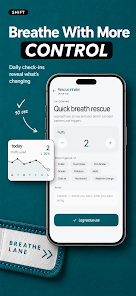
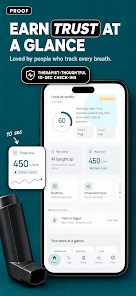
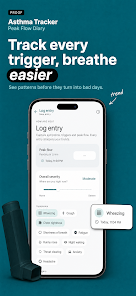
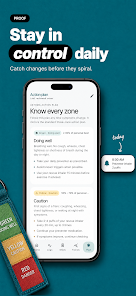
The app offers a fast, 10-second daily check-in workflow that combines simple symptom sliders (wheeze, cough, chest tightness, night waking, fatigue) with a large peak-flow control so entries are quick and repeatable. Peak-flow readings are shown against a personal-best reference and automatically coloured into green, yellow and red zones tailored to your calibration. Medication logging covers inhalers (preventer, controller and rescue), biologics, oral medicines and spacer use, with a rescue inhaler counter and configurable reminders to support adherence. Local air-quality measurements (including PM2.5), pollen trends and a real-time AQI overlay let you compare environmental data with your symptom history so trigger patterns become visible.
User Interaction and Controls
Controls are deliberately simple: a big slider for peak flow, tappable options for symptom presence and severity, and a single screen to record medication events. Navigation is based on a calendar and timeline so you can review daily entries, jump between weeks, or focus on a specific month. Reminders and quiet-hour settings are customizable and respectful of sleep, and a one-tap export creates a clean PDF or CSV that clinicians can review without requiring app access. The interface supports quick corrections to entries and preserves a clear audit trail of changes.
Progress, Insights and Replay Value
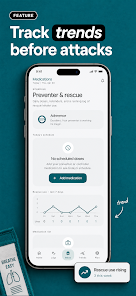
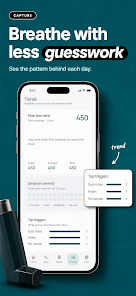
Progress is presented through multiple visual layers: trend lines for peak flow, heat maps for symptom severity, adherence percentages for preventer use and charts that highlight rescue inhaler spikes. These visualisations act like a progression system, showing improvement or decline over time and helping you set short-term goals such as increasing preventer adherence or reducing rescue use. The app encourages regular logging without gamification; consistency and insight are the primary rewards, and the replay value comes from reviewing how different seasons, air-quality events or medication changes affect control.
Visual Style and Customisation
The design aims for a calming, low-distraction aesthetic with muted colours and clear typography. You can adjust font size, enable high-contrast mode and toggle simplified layouts for easier reading. Personalisation options include setting your own reminder schedule, choosing which symptom sliders appear on the quick-check screen and selecting the units used for peak flow. Charts and exports can be filtered by date range so reports match the timeframe you need for appointments or personal review.
Accessibility and Guided Support
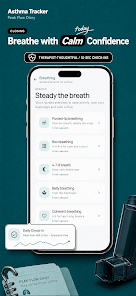
The app includes accessibility considerations such as large touch targets, readable contrast and optional voice prompts for check-ins. Built-in guided breathing exercises and inhaler technique refreshers provide practical support between clinical visits; these are brief, accessible sessions meant to reinforce good technique and relieve mild symptoms but are not substitutes for medical care. The UI is designed to be approachable for older adults and caregivers who may be logging on behalf of someone else.
Offline Use, Privacy and Data Handling
All data is stored locally on your device by design: there is no account system, no cloud sync and no third-party trackers. This on-device architecture keeps entries private and allows you to export records when you want to share them with a clinician. Because backup is device-based, users are advised to export CSV or PDF backups periodically if they plan to switch devices or keep a secondary copy. No analytics or advertising SDKs are present and the developer has stated they do not sell or share respiratory data.
Limitations
Asthma Tracker: Peak Flow is a monitoring and logging tool, not a medical device. It does not provide diagnoses or replace a written asthma action plan from your healthcare provider. The app does not include automatic cloud synchronization or multi-device account features, and it is currently maintained for Android only. Users should consult a clinician for interpretation of trends and before making treatment changes based on app data.
About the Developer
GlitchLab developed the app with input from respiratory professionals and emphasizes clinical clarity, accessible design and strict user privacy. The team continues to refine visual reports, environmental overlays and reminder behaviours in response to user feedback and respiratory clinician advice. If you want a private, no-frills way to track peak flow, symptoms and inhaler use that stays on your phone, Asthma Tracker: Peak Flow aims to make daily monitoring straightforward, informative and respectful of your privacy.
Show More
Information
Screenshots
Latest Update












Hot Tags
Latest News
-
![Revealing the Launch Playlists and Cross-Progression for COD Warzone Mobile News]()
-
![March 2024 Free Redemption Codes for Honkai: Star Rail News]()
-
PUBG Mobile Teams Up with Bentley Motors: Luxury Cars, Exclusive Collectibles, and Beyond 2024-04-18
![PUBG Mobile Teams Up with Bentley Motors: Luxury Cars, Exclusive Collectibles, and Beyond News]()
-
![Monster Never Cry is now accessible on both Android and iOS mobile devices. News]()
-
V2.2 of the Farlight 84 update introduces an overhauled Season structure, fresh in-game currency, an 2024-04-16
![V2.2 of the Farlight 84 update introduces an overhauled Season structure, fresh in-game currency, an News]()
-
![Arrival of Genshin Impact 4.6 Update: 'Embers of Two Realms, Twilight of Crimson' News]()
-
April 2024 Clash of Clans Update: Unveiling a Fresh Companion, Enhanced Levels, Chat Tagging, and Be 2024-04-16
![April 2024 Clash of Clans Update: Unveiling a Fresh Companion, Enhanced Levels, Chat Tagging, and Be News]()






