
Spinning Center App
Version:2.0.800
Published:2026-10-14
Introduction
The Spinning Center App is a centralized tool for creating, scheduling and delivering rotating visual content across displays and devices. It streamlines carousel management with a clean interface, precise timing controls and multi-device synchronization so teams can deploy dynamic presentations without complex setups or coding knowledge.
What this solution delivers
Designed for marketers, venue operators and digital signage teams, the Spinning Center App focuses on simple workflows and consistent playback. It combines a drag-and-drop editor, a library of transition presets and granular timing options to make rotating content feel intentional rather than accidental. The result is more engaging displays and less time spent troubleshooting playback issues.
Primary capabilities
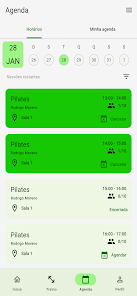
- Timeline-based scheduling: Build playlists and set exact start/end times for each slide or clip.
- Transition engine: Choose from easing curves, fades and custom spin-like carousel effects that maintain smooth frame rates.
- Multi-screen sync: Send the same sequence to multiple endpoints and keep them locked in sync.
- Remote updates: Push edits instantly to connected devices and preview changes before publishing.
How it operates day-to-day
Work begins in the editor, where assets are imported and arranged on a timeline. Each frame can receive metadata — captions, links or display conditions — and time slices can be duplicated for rapid layout creation. When a playlist is published, the app converts the timeline into a lightweight package optimized for playback on low-power devices. Updates travel through secure channels so displays can refresh without human intervention.
User interface and controls
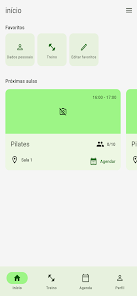
The interface balances a visual canvas with detailed inspector panels. Canvas interactions include pinch-to-zoom, grid snapping and alignment guides for pixel-accurate placement. Inspector panels let you fine-tune duration, easing and scheduling rules. The Spinning Center App keeps common controls visible while nesting advanced options to avoid overwhelming new users.
Customization and style options
Branding and visual consistency are central to the experience. Templates provide starting points for different use cases — retail promos, event loops, menu systems — and can be customized with fonts, color palettes and animation speed. Developers can extend the app through a simple API to load external data, such as live feeds or inventory counts, which then rotate through content slots automatically.
Performance and reliability
Playback prioritizes smooth frame rates and low CPU usage. The app uses pre-rendering for complex transitions and adaptive quality to balance visuals with device capability. Caching and local playback ensure displays keep running even when network connectivity is intermittent. Logs and health checks make it straightforward to identify failing endpoints and push corrective updates.
Practical tips for new users
- Start with a template that matches your venue type to save setup time.
- Preview playlists on a test device before full deployment to check timing and readability.
- Use short loop lengths for high-traffic areas; longer sequences work better where dwell time is higher.
- Batch asset uploads and rely on the app’s compression to maintain visual quality with smaller file sizes.
Why teams adopt this app
Teams pick the Spinning Center App because it reduces friction between content creation and live display. The learning curve is shallow for basic tasks but the system scales to support automation and integrations for advanced workflows. Built-in analytics provide insights on playback frequency and resource use, helping to refine content strategy over time.
Getting started quickly
Installation is straightforward: download the app, create an account, connect a device with the provided pairing code and choose a template. Most users have a simple playlist running within minutes. For larger deployments, use the admin console to register multiple displays and apply group policies for coordinated scheduling.
Whether updating a single screen or orchestrating dozens, the Spinning Center App focuses on dependable rotation mechanics and clear controls so teams can keep content fresh and displays performing reliably.
Show More
Information
Screenshots
Latest Update












Latest News
-
![Revealing the Launch Playlists and Cross-Progression for COD Warzone Mobile News]()
-
![March 2024 Free Redemption Codes for Honkai: Star Rail News]()
-
PUBG Mobile Teams Up with Bentley Motors: Luxury Cars, Exclusive Collectibles, and Beyond 2024-04-18
![PUBG Mobile Teams Up with Bentley Motors: Luxury Cars, Exclusive Collectibles, and Beyond News]()
-
![Monster Never Cry is now accessible on both Android and iOS mobile devices. News]()
-
V2.2 of the Farlight 84 update introduces an overhauled Season structure, fresh in-game currency, an 2024-04-16
![V2.2 of the Farlight 84 update introduces an overhauled Season structure, fresh in-game currency, an News]()
-
![Arrival of Genshin Impact 4.6 Update: 'Embers of Two Realms, Twilight of Crimson' News]()
-
April 2024 Clash of Clans Update: Unveiling a Fresh Companion, Enhanced Levels, Chat Tagging, and Be 2024-04-16
![April 2024 Clash of Clans Update: Unveiling a Fresh Companion, Enhanced Levels, Chat Tagging, and Be News]()






