
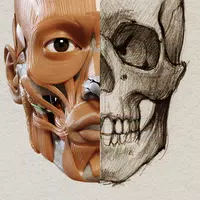
3D Anatomy for the Artist
Version:6.1.0
Published:2026-10-15
Introduction
3D Anatomy for the Artist is a detailed reference tool that presents human anatomy in interactive 3D to support drawing, sculpting, and design. It combines layered models, controllable poses, and clear labeling so artists can study structure, proportion, and motion from any angle in a practical, studio-ready format.
Overview and purpose
Designed specifically for visual artists rather than medical students, 3D Anatomy for the Artist prioritizes clarity and visual learning. The app breaks down bones, muscles, and surface forms into selectable layers so users can isolate structures and understand how anatomy affects silhouette and movement.
Core features at a glance
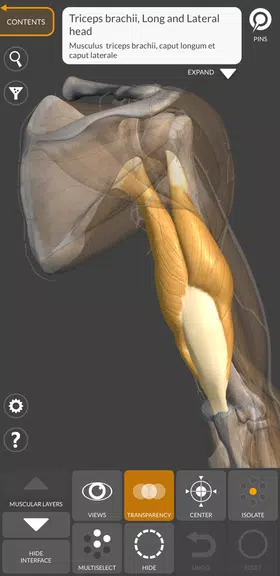
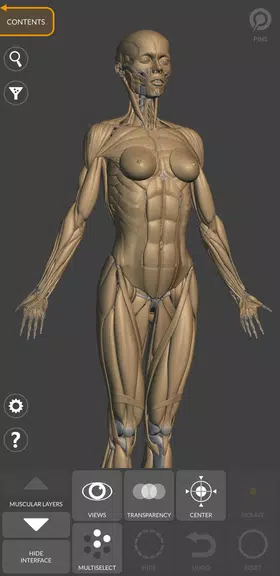
- Layered models: Turn skeletal, muscular, and surface layers on or off to study relationships between systems.
- Pose manipulation: Move joints and set natural or exaggerated poses to observe muscle stretch and compression.
- Lighting and rendering: Adjust light direction and intensity to evaluate form and shadow for reference purposes.
- Annotations: View names and short descriptions for major muscles and bones to aid learning and memorization.
How it works in practice
After loading a model, users rotate and zoom to inspect details. Joint handles allow precise posing, and sliders control muscle contraction or exaggeration to simulate different body types and expressions. The interface makes it simple to create a reference angle for a sketch or a digital painting session.
Tools that support artistic workflows
3D Anatomy for the Artist includes measurement guides and proportion overlays so artists can compare head-to-body ratios or limb lengths. The screenshot and export options let creators capture a view for offline study or import into a design pipeline.
Customization and presets
Several preset body types and common poses accelerate setup time. Users can save custom views and pose configurations, enabling quick recall during ongoing projects. The ability to toggle muscle opacity and bone visibility gives control over how much anatomical detail appears at once.
Performance and interface design
The app balances visual fidelity with responsive controls; models render smoothly on mid-range devices while maintaining enough detail for close study. Menus are organized by system and region, reducing the steps needed to isolate a limb or specific muscle group.
User experience highlights
Artists often praise the intuitive pose editor and the clarity of anatomical separations. Beginners find the labeled layers useful for learning names, while experienced creators appreciate the precision of joint rotation and proportion tools. The app is structured to minimize distraction so reference work stays productive.
Practical tips for beginners
- Start by examining the skeleton to establish proportions before adding muscles.
- Use lighting changes to reveal how planes and volumes behave under different conditions.
- Save multiple camera angles for a subject to quickly switch perspectives during studies.
- Combine reference screenshots with quick gesture sketches to reinforce spatial understanding.
Why professionals choose this resource
3D Anatomy for the Artist is valued by illustrators, concept designers, and sculptors for its focus on visual clarity and practical controls. Rather than overwhelming users with clinical detail, the app highlights form and function, making anatomical study directly applicable to creative work.
Getting started and installation notes
Download and launch the app, then try a few built-in poses to become familiar with joint handles. Explore layer toggles and save at least one custom pose to test export features. Regular short sessions with the app help build muscle memory and improve anatomical intuition.
Whether used as a classroom supplement or a daily studio reference, 3D Anatomy for the Artist offers a compact, focused toolkit that makes anatomical study accessible and relevant to artistic practice.
Show More
Information
Screenshots

Latest Update












Latest News
-
![Revealing the Launch Playlists and Cross-Progression for COD Warzone Mobile News]()
-
![March 2024 Free Redemption Codes for Honkai: Star Rail News]()
-
PUBG Mobile Teams Up with Bentley Motors: Luxury Cars, Exclusive Collectibles, and Beyond 2024-04-18
![PUBG Mobile Teams Up with Bentley Motors: Luxury Cars, Exclusive Collectibles, and Beyond News]()
-
![Monster Never Cry is now accessible on both Android and iOS mobile devices. News]()
-
V2.2 of the Farlight 84 update introduces an overhauled Season structure, fresh in-game currency, an 2024-04-16
![V2.2 of the Farlight 84 update introduces an overhauled Season structure, fresh in-game currency, an News]()
-
![Arrival of Genshin Impact 4.6 Update: 'Embers of Two Realms, Twilight of Crimson' News]()
-
April 2024 Clash of Clans Update: Unveiling a Fresh Companion, Enhanced Levels, Chat Tagging, and Be 2024-04-16
![April 2024 Clash of Clans Update: Unveiling a Fresh Companion, Enhanced Levels, Chat Tagging, and Be News]()






