

Weather Radar
Version:2.23.23
Published:2026-10-15
Introduction
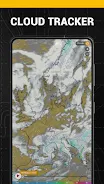
Weather Radar delivers fast, interactive weather mapping for Android, showing live precipitation, storm tracks, and forecasts on a clear map interface. Designed for everyday planning and severe-weather awareness, Weather Radar combines radar layers, satellite views, and timely alerts so you can track conditions in real time wherever you are.
Key Features You’ll Use Daily
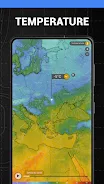
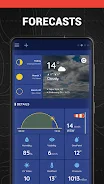
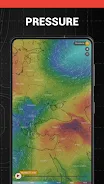
Weather Radar provides a suite of tools to keep you informed: high-resolution radar loops, layered satellite imagery, customizable alerts, and multi-day forecasts. The app supports multiple map styles, color schemes for different precipitation types, and zoom levels that reveal street-level details or wide-area storm movement. You’ll find hourly temperature charts, wind speed vectors, and rainfall accumulation forecasts all accessible from the main map screen.
How the Mapping System Works
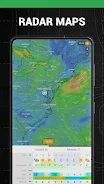
At the heart of the app is a responsive map engine that overlays radar and satellite data on familiar map tiles. The radar is animated so you can see storm motion, while a timeline control lets you scrub backward or forward through recent and predicted frames. Data is fetched from reputable weather providers and tiled dynamically to reduce bandwidth, which helps the app remain responsive even on mobile networks.
Interface and Customization
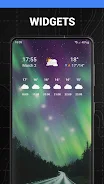
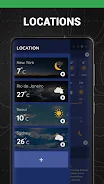
The interface is focused on clarity. A single map view presents controls for layers, timelines, and locations. Customize the display by selecting which layers to show—radar, satellite, temperature, or wind—change color palettes for better contrast, and pin favorite locations for quick access. Widgets can be added to your home screen to show current conditions and a short-term radar snapshot without opening the app.
Notifications, Alerts, and Safety Tools
Weather Radar offers configurable push notifications for severe-weather alerts, rainfall warnings, and storm track changes. Notifications can be tailored by location and severity so you only receive notices that matter. The app also highlights watches and warnings issued by local weather services and provides clear timestamps and sources for each alert.
Performance and Battery Use
Designed with mobile efficiency in mind, the app balances visual quality with performance. Radar tiles are cached to reduce repeated downloads, and animations are optimized to minimize CPU impact. Users can limit background refresh frequency or disable high-resolution tiles to extend battery life during travel or extended outdoor activities.
Practical Uses and Workflow
People rely on Weather Radar for commute planning, outdoor events, and travel decisions. Start by saving home, work, or travel destinations, then use the timeline to inspect expected precipitation during your planned timeframe. For road trips, the app’s route-checking feature lets you preview radar along a planned route so you can adjust departure times or routes to avoid heavy weather.
Compatibility and Reliability
Weather Radar works across modern Android devices and scales to both phones and tablets. The app supports offline viewing of previously cached tiles and degrades gracefully on slower networks. Regular updates ensure compatibility with the latest Android releases and keep data sources current.
Privacy, Data Use, and Subscription Options
The app outlines what data is collected and how it’s used, typically limiting collection to location data for delivering localized forecasts and optional analytics to improve service quality. A free tier includes basic radar, forecasts, and alerts. Premium subscriptions unlock advanced radar loop lengths, ad-free maps, specialized overlays, and priority access to new features. Subscriptions are optional and managed through the Play Store.
First Steps: Getting the Most from Weather Radar
- Grant location permission to receive local alerts and to center the map automatically.
- Pin important locations like home and work for quick switching.
- Adjust notification settings so alerts match your tolerance for interruptions.
- Explore map layers and color schemes that best reveal precipitation types and intensities.
- Enable widget support for instant glanceable updates on your home screen.
With its clear map-centric design and practical tools, Weather Radar streamlines how you monitor weather on the go. Whether you need a quick radar check before walking the dog or detailed storm tracking for travel planning, the app provides a reliable, efficient interface to stay one step ahead of changing conditions.
Show More
Information
Screenshots
Latest Update












Latest News
-
![Revealing the Launch Playlists and Cross-Progression for COD Warzone Mobile News]()
-
![March 2024 Free Redemption Codes for Honkai: Star Rail News]()
-
PUBG Mobile Teams Up with Bentley Motors: Luxury Cars, Exclusive Collectibles, and Beyond 2024-04-18
![PUBG Mobile Teams Up with Bentley Motors: Luxury Cars, Exclusive Collectibles, and Beyond News]()
-
![Monster Never Cry is now accessible on both Android and iOS mobile devices. News]()
-
V2.2 of the Farlight 84 update introduces an overhauled Season structure, fresh in-game currency, an 2024-04-16
![V2.2 of the Farlight 84 update introduces an overhauled Season structure, fresh in-game currency, an News]()
-
![Arrival of Genshin Impact 4.6 Update: 'Embers of Two Realms, Twilight of Crimson' News]()
-
April 2024 Clash of Clans Update: Unveiling a Fresh Companion, Enhanced Levels, Chat Tagging, and Be 2024-04-16
![April 2024 Clash of Clans Update: Unveiling a Fresh Companion, Enhanced Levels, Chat Tagging, and Be News]()






