

Swahili English Bible
Version:1.1.2
Published:2026-10-15
Introduction
Swahili English Bible brings a bilingual scripture reader to Android with clear Swahili and parallel English text, offline downloads, searchable content and narrated audio so you can read, listen and learn on the move. The app emphasizes readable layouts on phones and tablets, reliable offline access for travel or limited connectivity, and flexible reading modes that make side-by-side study or focused single-column reading equally comfortable.
Key features and how they help you study
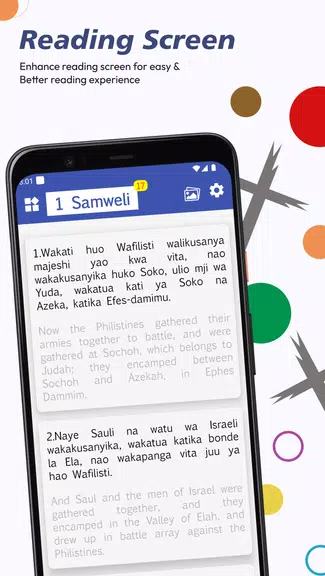
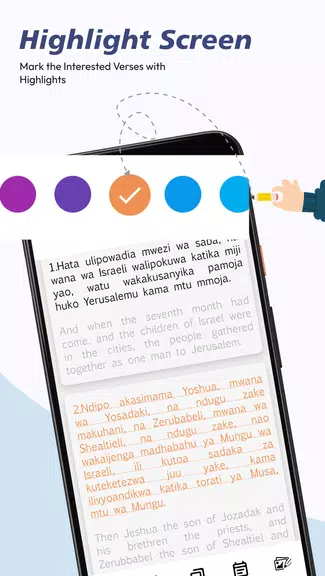
The Swahili English Bible uses a parallel verse view to present Swahili and English lines together, making comparative study and language practice straightforward. Adjustable font sizes, line spacing and a choice of single-column, dual-column or side-by-side layouts let you match the presentation to your device and eyesight. Persistent bookmarks, highlights and personal notes let you mark important passages and return to them later, while a contextual full-text search shows results with surrounding verses so you keep study context at a glance. Downloaded material is organized by book so you only store what you need for offline reading and listening.
Navigation, controls and reading mechanics
Navigation centers on a simple book–chapter–verse selector and quick gestures for moving between passages. Tap or swipe to advance, use the chapter picker to jump ahead, and long-press a verse to add a note, highlight or bookmark. On-screen controls are consistent across views so common tasks remain fast: play or pause audio, jump to a verse, switch languages, or copy a passage reference for sharing. The app keeps gestures small and predictable, reducing accidental jumps and helping you build a steady reading rhythm.
Progression systems and study routines
Built-in progression tools help you maintain reading plans without complex setup. Simple progress markers show completed chapters and the last-read position, and the app remembers your place across sessions so you can resume study quickly. Use highlights and notes to assemble a personal study record, and export or copy referenced passages to include in lesson plans or group study. The progression design favors steady, repeatable routines: daily chapter targets, repeated listening sessions for language practice, and a visible completion indicator to track long-term goals.
Audio playback and offline listening
Audio narration supports continuous per-chapter playback with standard transport controls and adjustable speed for study or review. Downloaded audio files store locally alongside text so you can read and listen without a network connection; preloading of the next chapter reduces gaps between tracks for uninterrupted sessions. Offline-first design minimizes mobile data usage by letting you select which books and audio to keep on the device, and playback resumes from your last position if you pause or switch tasks.
Customization, visual style and accessibility
Design choices prioritize legibility and low distraction. Choose light or dark theme, adjust font family and size, and fine-tune line spacing for long reading sessions. Small visual aids—verse separators, subtle highlight styles and emphasis for search hits—help scanning without clutter. Accessibility options include larger default fonts, high-contrast themes and clear playback speed controls to support users with visual or auditory needs, and the responsive layout adapts to a wide range of Android versions and screen sizes.
Security, data handling and practical workflow
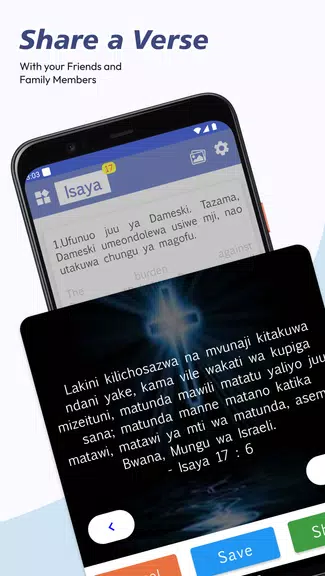
User notes and downloaded translations remain local by default and can be backed up to cloud services only if you opt in; no account is required for core reading and listening functions. Permissions are limited to storage and optional network access for downloads and streaming. A brief tutorial overlay guides new users through navigation and shortcuts on first run, and quick-share tools let you copy verse references into messaging apps, lesson plans or study group notes while maintaining control over personal data.
Getting started and typical uses
Install the app, pick the books you want and follow the short tutorial to learn gestures and toolbar controls. Try a quick search for a familiar verse, switch between Swahili and English lines, and enable audio narration for hands-free listening. Whether you use the Swahili English Bible for personal devotion, bilingual family reading, classroom language practice or sermon preparation, its combination of readable layouts, offline support and study tools makes it practical to move from exploration to a steady study routine within minutes.
Show More
Information
Screenshots

Latest Update












Latest News
-
![Revealing the Launch Playlists and Cross-Progression for COD Warzone Mobile News]()
-
![March 2024 Free Redemption Codes for Honkai: Star Rail News]()
-
PUBG Mobile Teams Up with Bentley Motors: Luxury Cars, Exclusive Collectibles, and Beyond 2024-04-18
![PUBG Mobile Teams Up with Bentley Motors: Luxury Cars, Exclusive Collectibles, and Beyond News]()
-
![Monster Never Cry is now accessible on both Android and iOS mobile devices. News]()
-
V2.2 of the Farlight 84 update introduces an overhauled Season structure, fresh in-game currency, an 2024-04-16
![V2.2 of the Farlight 84 update introduces an overhauled Season structure, fresh in-game currency, an News]()
-
![Arrival of Genshin Impact 4.6 Update: 'Embers of Two Realms, Twilight of Crimson' News]()
-
April 2024 Clash of Clans Update: Unveiling a Fresh Companion, Enhanced Levels, Chat Tagging, and Be 2024-04-16
![April 2024 Clash of Clans Update: Unveiling a Fresh Companion, Enhanced Levels, Chat Tagging, and Be News]()






