
MY SUZUKI
Version:1.6.5
Published:2026-10-15
Introduction
MY SUZUKI is a companion app designed to simplify ownership, offering service reminders, digital documents, and quick access to vehicle information in a single interface. The app connects your Suzuki model to maintenance schedules, roadside assistance contacts, and personalized settings so owners can manage their vehicle life from a smartphone efficiently.
Key Features at a Glance
MY SUZUKI brings together essential tools for everyday vehicle management. Users can view scheduled services, locate workshop history, and store digital versions of manuals and registration papers. A clean dashboard highlights upcoming maintenance, fuel economy trends, and notifications for campaigns or recalls. The app also stores dealer contact information for one-tap booking and real-time support.
How Maintenance and Reminders Work
Automated reminders are central to the workflow. After adding your vehicle details, MY SUZUKI tracks mileage and time-based intervals to suggest optimal service windows. Reminders appear in-app and through push notifications, and they can be customized for frequency or snoozed when needed. Service histories are logged chronologically to simplify warranty checks and resale preparation.
In-App Tools and Documentation
The document vault removes the need for paper folders. Users can upload or access owner manuals, warranty certificates, inspection reports, and purchase invoices. The app supports searchable documents so you can quickly find a specific item before a service appointment. Additionally, practical tools like a fuel cost analyzer and trip logs help owners monitor expenses and driving patterns.
Connectivity and Compatibility
MY SUZUKI is designed to work with a broad range of Suzuki models and recent Android devices. While full telematics features depend on vehicle hardware and dealership integration, core functions such as reminders, document storage, and contact directories operate independently. The app synchronizes with your account to preserve settings across devices and to share service history with authorized dealerships when required.
Interface and User Workflow
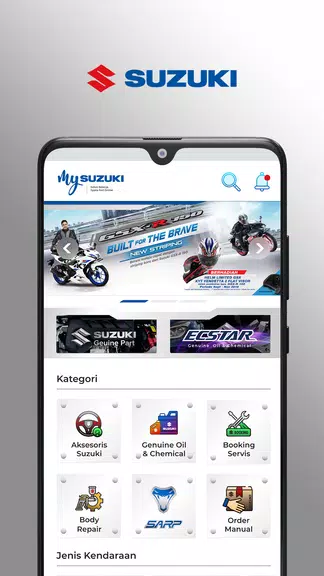
The interface prioritizes clarity and speed. A home screen card layout surfaces the most relevant items—next service, active alerts, and recent documents—so users spend less time navigating. Settings allow owners to tailor notification preferences, choose measurement units, and set multiple vehicles under a single profile. Adding a car is handled through a guided flow that requests VIN, model year, and optional dealer linkage.
Practical Benefits for Owners
For drivers who manage multiple cars or rely on scheduled maintenance, the app reduces friction in ownership tasks. MY SUZUKI centralizes proof of service for warranty claims and makes it easier to plan repairs before minor issues escalate. Roadside assistance details and dealer locations accelerate help during breakdowns, and a clear service log can increase confidence when selling a used vehicle.
Performance and Security
Performance is optimized for quick access and offline viewing of previously downloaded documents. Data is stored securely with account authentication and encrypted transfers, and the app follows standard practices for privacy controls. Users can export records and revoke device access through account settings if a phone is lost or replaced.
Tips for Getting the Most from MY SUZUKI
- Complete your profile: Enter VIN and purchase date to enable precise service tracking.
- Link your dealer: Authorize service centers to receive records and streamline booking.
- Keep documents up to date: Upload recent invoices to maintain a reliable history.
- Enable notifications: Allow push alerts so reminders arrive when they matter most.
Whether you need a place to consolidate vehicle records or a tool to manage routine maintenance, MY SUZUKI provides a focused, practical experience. The app emphasizes useful automation, straightforward navigation, and secure storage so ownership tasks become faster and more predictable. Regular updates continue to add features that reflect common owner needs, making it a helpful companion across the ownership lifecycle.
Show More
Information
Screenshots
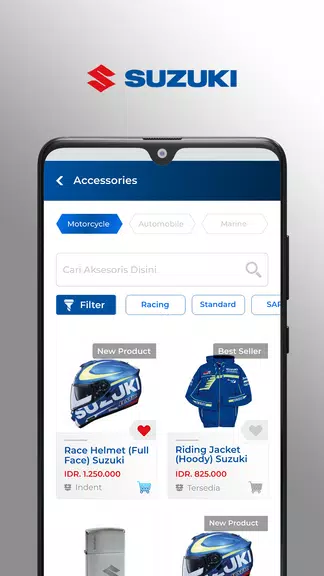
Latest Update












Latest News
-
![Revealing the Launch Playlists and Cross-Progression for COD Warzone Mobile News]()
-
![March 2024 Free Redemption Codes for Honkai: Star Rail News]()
-
PUBG Mobile Teams Up with Bentley Motors: Luxury Cars, Exclusive Collectibles, and Beyond 2024-04-18
![PUBG Mobile Teams Up with Bentley Motors: Luxury Cars, Exclusive Collectibles, and Beyond News]()
-
![Monster Never Cry is now accessible on both Android and iOS mobile devices. News]()
-
V2.2 of the Farlight 84 update introduces an overhauled Season structure, fresh in-game currency, an 2024-04-16
![V2.2 of the Farlight 84 update introduces an overhauled Season structure, fresh in-game currency, an News]()
-
![Arrival of Genshin Impact 4.6 Update: 'Embers of Two Realms, Twilight of Crimson' News]()
-
April 2024 Clash of Clans Update: Unveiling a Fresh Companion, Enhanced Levels, Chat Tagging, and Be 2024-04-16
![April 2024 Clash of Clans Update: Unveiling a Fresh Companion, Enhanced Levels, Chat Tagging, and Be News]()






