

GlucoLab
Version:1.0.4
Published:2026-10-15
Introduction
GlucoLab is a modern diabetes management app that helps users record blood glucose readings, set medication reminders, and visualize trends over time. Designed for daily use, GlucoLab combines straightforward logging, personalized targets, and exportable reports to support conversations with healthcare providers.
Core features that simplify tracking
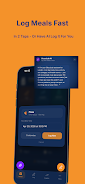
GlucoLab focuses on clean, fast data entry and actionable insight. You can log fingerstick values, continuous glucose monitor (CGM) readings, meals, insulin doses and exercise in a few taps. The app supports customizable tags and notes so each entry can capture context like stress, illness, or anticipation of activity. Built-in reminders let you schedule testing, medication and refill alerts to keep routines consistent.
Visuals and trend analysis
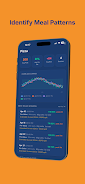
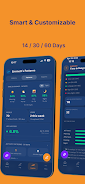
Clear visualizations turn raw numbers into usable information. GlucoLab provides daily, weekly and monthly charts with color-coded ranges that highlight highs and lows. Rolling averages and time-in-range calculations help you quickly assess overall control. Interactive graphs allow pinch-to-zoom, tap-to-see-details and comparison overlays so you can compare periods, meals or therapy changes at a glance.
Workflow and ease of use
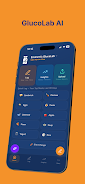
The interface is designed for minimal friction. A home dashboard surfaces recent readings and the next reminder without clutter. Quick-entry widgets let you add a glucose reading or a medication dose from the notification shade or lock screen. Smart defaults reduce repetitive typing, and recent values are remembered to speed follow-up entries.
Data export and sharing
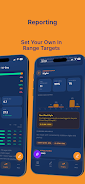
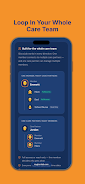
When you need to share information with a clinician, GlucoLab creates concise, printable reports. Export options include PDF and CSV formats for compatibility with electronic medical records or research tools. You can email reports directly, or generate summaries that highlight key metrics like average glucose, estimated HbA1c and time-in-range so conversations with care teams are focused and productive.
Integration and compatibility
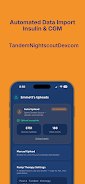
GlucoLab works with a growing set of Bluetooth-enabled glucose meters and certain CGM systems. Where direct pairing isn’t available, manual import and CSV upload options keep historical data intact. The app is optimized for current Android releases and functions smoothly on a range of devices, with low battery and data usage in mind.
Privacy, security and backups
User data privacy is prioritized with local encryption and optional cloud backup. Backups can be scheduled automatically to your preferred cloud provider or stored locally for greater control. GlucoLab includes passcode and biometric lock options to protect sensitive health records on shared devices.
Customization and personalization
Personal targets, glucose thresholds and notification preferences are fully adjustable. You can define multiple daily schedules to reflect workdays, weekends or shift changes. Themed display options and large-font modes improve readability for users with visual needs. Advanced users can set custom calculations for insulin sensitivity and carbohydrate ratios to tailor bolus suggestions.
Practical tips for everyday use
- Set gentle reminders for testing rather than intrusive alarms to encourage consistency.
- Use tags (meal type, exercise, medication) to build searchable context for unusual readings.
- Export monthly summaries before appointments to provide a clear snapshot for clinicians.
- Enable automatic backup once you’re comfortable with cloud storage to avoid data loss.
Performance and reliability
GlucoLab emphasizes responsiveness and reliability. The app performs well on mid-range hardware, with fast load times and smooth graph rendering. Background sync is optimized to minimize impact on battery life while ensuring your latest entries are available across devices if cloud backup is enabled.
Getting started
Download the app, create a profile with basic targets and enter a few recent readings to let the trend analysis begin. Explore the dashboard and set one reminder to start; additional features can be enabled as you grow more comfortable. GlucoLab’s onboarding screens and help section walk new users through integrations, export steps and privacy settings so you can adopt a tracking routine that fits your life.
Show More
Information
Screenshots
Latest Update












Latest News
-
![Revealing the Launch Playlists and Cross-Progression for COD Warzone Mobile News]()
-
![March 2024 Free Redemption Codes for Honkai: Star Rail News]()
-
PUBG Mobile Teams Up with Bentley Motors: Luxury Cars, Exclusive Collectibles, and Beyond 2024-04-18
![PUBG Mobile Teams Up with Bentley Motors: Luxury Cars, Exclusive Collectibles, and Beyond News]()
-
![Monster Never Cry is now accessible on both Android and iOS mobile devices. News]()
-
V2.2 of the Farlight 84 update introduces an overhauled Season structure, fresh in-game currency, an 2024-04-16
![V2.2 of the Farlight 84 update introduces an overhauled Season structure, fresh in-game currency, an News]()
-
![Arrival of Genshin Impact 4.6 Update: 'Embers of Two Realms, Twilight of Crimson' News]()
-
April 2024 Clash of Clans Update: Unveiling a Fresh Companion, Enhanced Levels, Chat Tagging, and Be 2024-04-16
![April 2024 Clash of Clans Update: Unveiling a Fresh Companion, Enhanced Levels, Chat Tagging, and Be News]()






