
Digital Planner: Smart Journal
Version:1.0.0.0
Published:2026-10-15
Introduction
Digital Planner: Smart Journal is a productivity app that combines daily scheduling, note-taking, and goal tracking in a single digital notebook. It organizes tasks, appointments, and ideas with flexible templates, synchronization, and handwriting support, making it simple to move from planning to action across devices.
Core features that streamline your day
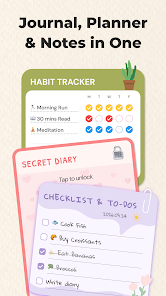
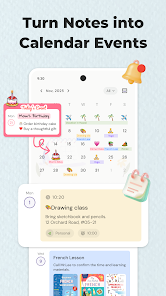
At its heart, Digital Planner: Smart Journal offers a set of tools designed to reduce friction in planning. A unified calendar and task manager keeps events and to-dos in one place. Rich-text notes with embedded images and audio let you capture context quickly. Smart reminders adapt to deadlines, and recurring task patterns automate repetitive items so nothing slips through the cracks.
Interface and workflow
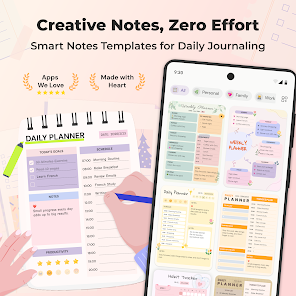
The interface emphasizes clarity and quick access: a left-hand navigation panel connects calendars, notebooks, and tags, while the main canvas switches between day, week, and free-form note views. Drag-and-drop reordering makes adjusting priorities intuitive. The system supports multi-window editing, so you can view a meeting note beside a task list without losing focus.
Flexible templates and personalization
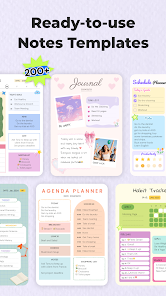
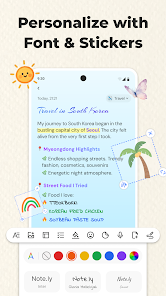
Templates are a major strength for users who prefer structure. Choose from daily planners, weekly reviews, project outlines, and habit trackers, then modify layout elements like columns, checklists, and time blocks. For deeper customization, Digital Planner: Smart Journal supports custom fonts, color themes, and sticker packs to create a workspace that feels personal and motivating.
Handwriting, sketching, and multimedia notes
Tablet and stylus users will appreciate handwriting recognition and sketching capabilities. Convert handwritten notes to text with a single tap or keep sketches as visual references. Attach photos, scanned documents, and voice memos to entries so each item carries the full context you need for future reference.
Synchronization and data safety
Cross-device syncing uses an encrypted cloud service to keep your content current on phones, tablets, and desktops. Offline support ensures you can create and edit without connectivity, and changes will synchronize automatically when you reconnect. Backups can be exported as PDFs or archive files, allowing for local storage or migration to other tools.
Organizational tools for busy workflows
Built-in tagging and nested notebooks give you multiple ways to categorize information. Use tags for quick filters like #urgent or #research, and nested notebooks to reflect long-term projects or client accounts. A powerful search engine indexes text, handwriting, and attachments so you can retrieve information quickly with natural language queries.
Productivity techniques integrated
The app includes templates and timers for popular productivity methods such as time-blocking, Pomodoro sessions, and Eisenhower prioritization. Focus mode hides non-essential elements and limits notifications so you can work uninterrupted. Weekly review prompts help you reflect on progress, reprioritize, and set measurable goals for the coming days.
Performance and compatibility
Digital Planner: Smart Journal is optimized for modern Android devices, offering smooth scrolling and low-latency handwriting input. It supports Android versions commonly used on contemporary phones and tablets and scales UI elements appropriately for larger screens. Resource usage is tuned to avoid battery drain during extended note-taking sessions.
Privacy and export options
Privacy-conscious users will find granular controls for sharing and access. Individual notebooks can be kept private or shared with collaborators via secure links. Export options include PDF, Markdown, and common image formats, making it simple to archive or integrate content with other services.
Getting started quickly
Begin with a short onboarding flow that helps you import calendars, migrate existing notes, and select templates that match your routine. A sample week is generated from your calendar to demonstrate how tasks, meetings, and notes appear together. Helpful tooltips and an in-app help center reduce the learning curve so you can start planning effectively the same day you install.
Whether you need a compact daily planner or a robust system for managing projects, Digital Planner: Smart Journal balances flexibility and structure. Its combination of templates, synchronization, and multimedia support makes it a practical choice for students, professionals, and anyone who wants to turn intentions into consistent progress.
Show More
Information
Screenshots

Latest Update












Latest News
-
![Revealing the Launch Playlists and Cross-Progression for COD Warzone Mobile News]()
-
![March 2024 Free Redemption Codes for Honkai: Star Rail News]()
-
PUBG Mobile Teams Up with Bentley Motors: Luxury Cars, Exclusive Collectibles, and Beyond 2024-04-18
![PUBG Mobile Teams Up with Bentley Motors: Luxury Cars, Exclusive Collectibles, and Beyond News]()
-
![Monster Never Cry is now accessible on both Android and iOS mobile devices. News]()
-
V2.2 of the Farlight 84 update introduces an overhauled Season structure, fresh in-game currency, an 2024-04-16
![V2.2 of the Farlight 84 update introduces an overhauled Season structure, fresh in-game currency, an News]()
-
![Arrival of Genshin Impact 4.6 Update: 'Embers of Two Realms, Twilight of Crimson' News]()
-
April 2024 Clash of Clans Update: Unveiling a Fresh Companion, Enhanced Levels, Chat Tagging, and Be 2024-04-16
![April 2024 Clash of Clans Update: Unveiling a Fresh Companion, Enhanced Levels, Chat Tagging, and Be News]()






