
Spinr: Focus Wheel & Study
Version:1.0.0
Published:2026-10-16
Introduction
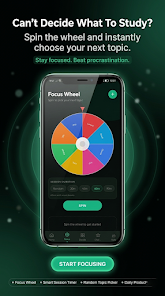
Spinr: Focus Wheel & Study is a focused study and productivity utility that combines a visual spinner with flexible timers, lightweight task management, and unobtrusive motivation tools to help you get more done in less time. The app positions a spinning wheel at the center of each session so users can populate sectors with study subjects, work tasks, or custom time blocks and let chance reduce decision fatigue while maintaining a clear schedule of concentrated work and short breaks.
Quick overview
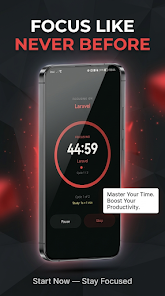
This editor-style overview describes how Spinr: Focus Wheel & Study turns study sessions into manageable, repeatable routines. Create tasks or named sectors, assign default durations, then either tap to spin and let the wheel choose or pick items manually from a task list. Timers start automatically when a sector is selected, and background audio, reminders, and simple analytics help sustain momentum without overwhelming the interface.
Core interaction and controls
The core interaction is intentionally simple: tap the wheel to spin, tap again to pause or stop the current timer, and use the task list to create, rename, or archive sectors. Widgets and quick-start shortcuts let you launch commonly used session templates from the home screen, and scheduled reminders integrate with your calendar so sessions fit into daily routines. Controls are designed to be responsive with minimal taps between setup and focus time.
Session structure, progression and challenge systems
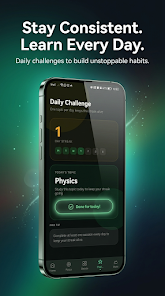
Sessions are organized into blocks that you compose from sectors on the wheel. Progression comes from gradually increasing session lengths, completing target numbers of focused blocks per day, and tracking streaks or badge milestones. Gentle challenge systems encourage consistency: you can set daily targets, aim for uninterrupted work intervals, or follow templates that mix longer study periods with short review breaks. These simple goals create long-term replay value because small, measurable improvements compound over time.
Customization and visual style
Customization is a major focus: color-code sectors, adjust the number of wheel slices, set default and custom timer lengths, choose whether completed items stay on the wheel or rotate out, and switch between light, dark, and high-contrast themes. Animations are smooth and modest by design so the spinner feels tactile without distracting from the task. Visual clarity is emphasized; the main screen presents the wheel and immediate controls while history, analytics, and settings are placed in accessible secondary screens.
Analytics, history and templates
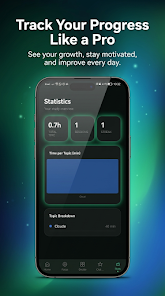
Session history records completed blocks, durations, and tag-based activity so you can review where time was spent and identify patterns. Built-in analytics show streaks and trends over days or weeks, and saved workflows or templates let you re-launch a preferred session sequence with one tap. Export options let you back up session logs locally for personal record-keeping while keeping sensitive data on your device unless you choose otherwise.
Accessibility, offline play and performance
Accessibility options include larger controls, high-contrast themes, and adjustable audio levels to support different sensory needs. The app works offline for timing, spinning, and local logging so you can use it without a network connection; internet access is only required for optional cloud-based features if you enable them. Performance is optimized to avoid significant battery drain even when ambient sounds are playing in the background.
Motivation and user experience
Rather than push aggressive gamification, the app uses streaks, badges, and gentle nudges to sustain momentum while keeping pressure low. Short ambient sound options and a minimal interface help create a calm focus environment. Templates, quick-start widgets, and automatic timer behavior reduce setup friction so more of your attention can go to work and less to managing the tool itself.
Getting started
To begin with Spinr: Focus Wheel & Study download the app, create three or four sectors that cover your most common tasks or subjects, assign default durations, and try a short session to see how the wheel changes task selection. After a few uses you can save templates, set simple daily targets, and rely on session history to refine durations and priorities. Regular use helps the spinner act as a steady anchor for productive days while offering room for customization as your routine evolves.
Why this approach works
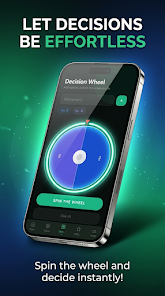
The wheel-based model reduces the friction of choosing what to do next and preserves the structure that focused work requires. By combining predictable timing controls with a touch of randomness, Spinr: Focus Wheel & Study encourages variety without sacrificing the discipline of scheduled study, making it a practical choice for students and professionals who want a lightweight, privacy-friendly tool to support regular, measurable improvement.
Show More
Information
Screenshots
Latest Update
-
![Lines Gold Pro - Icon Pack APK]()
Lines Gold Pro - Icon Pack
-
![Remote Fire TV APK]()
Remote Fire TV
-
![Flight Dark Pro - Icon Pack APK]()
Flight Dark Pro - Icon Pack
-
![Ares Light: Pastel Icon Pack APK]()
Ares Light: Pastel Icon Pack
-
![getConf - Hidden Settings APK]()
getConf - Hidden Settings
-
![Dots Live Wallpaper - Battery APK]()
Dots Live Wallpaper - Battery
-
![Chroma - Icon Pack APK]()
Chroma - Icon Pack
-
![One UI Fluffy Icon Pack APK]()
One UI Fluffy Icon Pack
-
![Pixly Limitless Fluo Icon Pack APK]()
Pixly Limitless Fluo Icon Pack
-
![Compress Video - Resize Video APK]()
Compress Video - Resize Video
-
![Pixly Professional Dark APK]()
Pixly Professional Dark
-
![Tracker Detect Pro APK]()
Tracker Detect Pro












Latest News
-
![Revealing the Launch Playlists and Cross-Progression for COD Warzone Mobile News]()
-
![March 2024 Free Redemption Codes for Honkai: Star Rail News]()
-
PUBG Mobile Teams Up with Bentley Motors: Luxury Cars, Exclusive Collectibles, and Beyond 2024-04-18
![PUBG Mobile Teams Up with Bentley Motors: Luxury Cars, Exclusive Collectibles, and Beyond News]()
-
![Monster Never Cry is now accessible on both Android and iOS mobile devices. News]()
-
V2.2 of the Farlight 84 update introduces an overhauled Season structure, fresh in-game currency, an 2024-04-16
![V2.2 of the Farlight 84 update introduces an overhauled Season structure, fresh in-game currency, an News]()
-
![Arrival of Genshin Impact 4.6 Update: 'Embers of Two Realms, Twilight of Crimson' News]()
-
April 2024 Clash of Clans Update: Unveiling a Fresh Companion, Enhanced Levels, Chat Tagging, and Be 2024-04-16
![April 2024 Clash of Clans Update: Unveiling a Fresh Companion, Enhanced Levels, Chat Tagging, and Be News]()






