

Calmify - Find your Calm
Version:1.0.22
Published:2026-10-16
Introduction
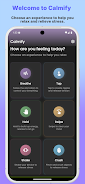
Calmify - Find your Calm is a compact stress-relief app built around short tactile micro-experiences that help users pause and reset during a busy day. Calmify - Find your Calm focuses on brief, private interactions rather than long-form meditation: guided breathing animations, touch-driven tasks like tap and swipe, hold-and-release mechanics and motion-based tools such as shake and crush offer quick, satisfying feedback when you need it most. Designed to work fully offline, the app emphasizes haptic, audio and visual feedback to deliver a distraction-free moment of calm between meetings, study sessions, commutes or any time anxiety spikes.
Key features and core mechanics
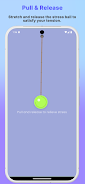
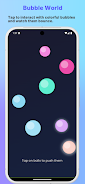
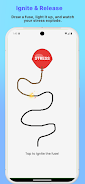
The experience centers on ten distinct micro-interactions that each follow a simple mechanical loop: cue, controlled interaction, and calming resolution. Some interactions guide paced inhalation and exhalation with animated visualizers and soft sound cues, while others translate physical gestures—taps, swipes, pulls, shakes—into immediate haptic responses and gentle motion effects. These micro-games are deliberately short, ranging from 20 seconds to a couple of minutes, so they fit into natural breaks in your day and produce immediate sensory feedback without demanding extended attention.
Controls and interaction design
Controls are intentionally low-friction and tactile. Each activity describes a clear, single-step gesture and provides a short practice run to tune timing and intensity. Tap and hold interactions give instant vibration and sound feedback calibrated for subtlety; swipe and pull responses use smooth animations to mirror your motion; motion-based tools respond to device accelerometer input so movements feel natural and safe. Simple on-screen toggles let you adjust haptic strength, sound volume and visual motion to match your preferences and environment.
Progression and personalization
Calmify - Find your Calm encourages gentle progression without gamified pressure. As you use the app, interactions open subtle variations and refinements—longer paced-breathing rhythms, alternative soundscapes, or slightly different visual palettes—so the toolkit grows with your practice. Personalization options let you designate favorite interactions for quick access, set preferred session durations, and save a small sequence of micro-experiences into a custom routine. These lightweight progression elements give a sense of discovery while preserving the app’s short-format focus.
Visual style and audio design
The interface uses a calm, minimalist aesthetic: soft color gradients, rounded shapes, and slow, deliberate animations that reduce visual clutter and keep attention on the interaction. Sounds are intentionally restrained—ambient tones and subtle percussive cues—designed to complement haptic feedback without startling. Visual pacing is consistent across interactions so transitions feel natural and the overall presentation supports a sense of gentle focus rather than high-energy stimulation.
Level structure, variation and replay value
Rather than traditional levels, the app organizes activities by length and intensity so you can pick a micro-session for a quick reset or chain a few together for a longer break. Each experience includes small randomized elements—slightly varied rhythms, alternate soundscapes, or changing visual details—to keep repetitions from feeling identical. This variation, combined with the ability to create short routines, provides replay value for users who want to return to the same tools while still experiencing slight novelty each time.
Customization, accessibility and user experience
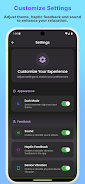
Accessibility is built into the design: adjustable haptic intensity and sound volume, high-contrast visual modes, scalable text labels, and an option to disable motion-based activities for users with mobility concerns. Controls are large and readable, and the app supports single-handed operation so brief interactions are easy to perform in many contexts. The overall UX aims for clarity and speed: clear prompts, a short onboarding that demonstrates gestures, and a compact home screen that surfaces favorites and recent activities.
Offline use, privacy and performance
All core functionality runs locally with no required internet connection, ensuring the app performs the same whether you are on a plane, in a quiet office, or offline for privacy reasons. Calmify - Find your Calm collects no tracking data and minimizes required permissions to preserve user privacy. Lightweight code and optimized animations keep the app responsive on a wide range of devices while preserving battery life and ensuring haptics behave consistently.
Who it’s for and appropriate use
Calmify - Find your Calm is intended as a practical toolkit for short-term stress relief and mindful pauses; it is not a substitute for professional mental health care. It suits people who want fast, sensory tools to manage tension, those who prefer tactile interactions over long guided sessions, and users who need a private, offline resource to calm the mind in short windows throughout the day.
Show More
Information
Screenshots
Latest Update












Latest News
-
![Revealing the Launch Playlists and Cross-Progression for COD Warzone Mobile News]()
-
![March 2024 Free Redemption Codes for Honkai: Star Rail News]()
-
PUBG Mobile Teams Up with Bentley Motors: Luxury Cars, Exclusive Collectibles, and Beyond 2024-04-18
![PUBG Mobile Teams Up with Bentley Motors: Luxury Cars, Exclusive Collectibles, and Beyond News]()
-
![Monster Never Cry is now accessible on both Android and iOS mobile devices. News]()
-
V2.2 of the Farlight 84 update introduces an overhauled Season structure, fresh in-game currency, an 2024-04-16
![V2.2 of the Farlight 84 update introduces an overhauled Season structure, fresh in-game currency, an News]()
-
![Arrival of Genshin Impact 4.6 Update: 'Embers of Two Realms, Twilight of Crimson' News]()
-
April 2024 Clash of Clans Update: Unveiling a Fresh Companion, Enhanced Levels, Chat Tagging, and Be 2024-04-16
![April 2024 Clash of Clans Update: Unveiling a Fresh Companion, Enhanced Levels, Chat Tagging, and Be News]()






