
HabiTurn - Daily Habit Tracker
Version:1.2.6
Published:2026-10-17
Introduction
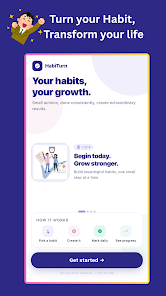
HabiTurn - Daily Habit Tracker is a focused habit app built to help you convert small, repeatable actions into durable routines with minimal friction. The onboarding walkthrough gets you started in minutes and the first-use checklist explains core controls, so you can begin tracking morning rituals, study blocks, short workouts or hydration reminders without extra setup. The app balances tidy visuals and practical tools to make routine logging quick, predictable and meaningful.
Core features and workflow
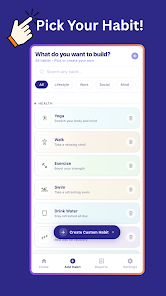
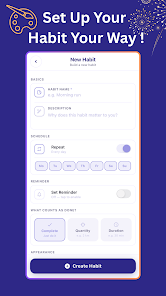
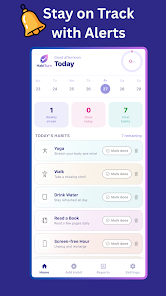
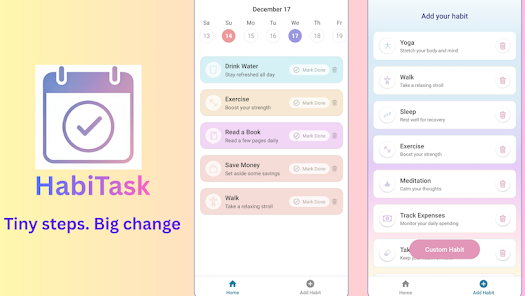
The central workflow revolves around creating single-purpose habit entries, assigning a frequency and then recording completions with one tap or a simple swipe. Each habit can have a title, icon, color tag, optional notes and a priority marker so the most important items stay visible on the home screen. A compact dashboard presents today’s tasks, active streaks and completion percentages, while a habit detail view surfaces recent activity as a timeline so you can see patterns at a glance. Inline actions let you postpone a habit for the day or mark it done without leaving the list, which keeps logging a seconds-long interaction instead of a chore.
How progress is measured
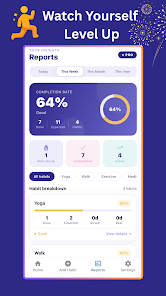
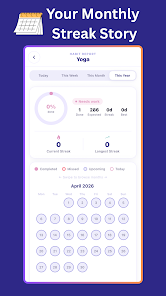
Progress is tracked with a timeline and calendar model that records successes, missed days and recovery windows that help protect long-term streaks from short interruptions. Visual indicators include consecutive completion counters, percentage completion over chosen intervals and heatmap-style overviews that highlight the strongest times of day or week. Scheduling supports daily, weekly and custom intervals, and the system recalculates completion percentages intelligently when you reschedule or temporarily pause a habit so the progress view stays fair rather than punitive.
Controls and quick interactions
Controls are intentionally simple and gesture-driven: tap to mark a task done, long-press to edit details, and swipe to snooze or dismiss a habit for the day. Inline editing allows you to change reminders, adjust frequency or add a quick note directly from the list view. The calendar view provides a month-level snapshot where tapping any date shows that day’s completions and misses, and the home screen widgets surface immediate tasks without opening the app. These interaction patterns reduce friction and help the app blend into your existing routine.
Progression, rewards and challenge systems
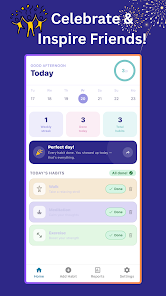
Instead of abstract levels, progression is expressed through streaks, milestone markers and personal challenges that celebrate consistent effort. Streak preservation settings and recovery windows give you control over how strict streak rules are, and milestone badges mark achievements like a first full week or a 30-day run. Personal challenges let you bundle a set of habits into a short-term target to kickstart new behavior or recover momentum after a lapse. Gentle, context-aware reminders are tuned to nudge rather than nag, preserving motivation over time.
Customization and visual style
Customization options help habits feel personal and instantly recognizable: choose from a palette of colors, select icons from a curated library and add descriptive titles so each item is glanceable on the dashboard. The interface favors a clean, readable layout with high-contrast text, clear headings and calming accents to reduce visual clutter. Trend charts and completion graphs use consistent scales and clear annotations so you can interpret progress quickly, and adjustable spacing and compact widgets ensure the layout works comfortably on both phones and tablets.
Accessibility, offline use and reliability
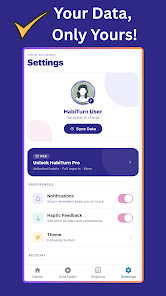
The app includes accessibility considerations like scalable text sizes, a high-contrast theme and descriptive labels for screen readers to make it easier for more people to use. Offline functionality stores your habit log locally and synchronizes with lightweight cloud storage when a connection is available, so the app remains reliable while you travel or switch networks. Background processing for reminders is optimized for battery life, and export options let you archive your history in standard formats for personal analysis.
Integrations, compatibility and everyday use
HabiTurn - Daily Habit Tracker integrates with common calendar applications and standard notification channels so reminders appear alongside the other tools you use daily. The synchronization model is designed to be unobtrusive and data-efficient, and the app supports a broad range of Android versions and device sizes. Practical examples include assembling a morning routine of hydration and journaling, scheduling focused work blocks and setting short daily study sessions that add up over weeks.
Getting started tips
Start with two or three small, achievable habits and pick reminder times that align with your existing routine. Use icons and color tags to make entries glanceable on the dashboard, and review weekly reports to fine-tune timing or frequency. Rely on recovery windows and short personal challenges to restart momentum without losing long-term progress. With thoughtful controls, clear progression indicators and offline reliability, HabiTurn - Daily Habit Tracker is designed to make consistent habit building practical and sustainable for daily life.
Show More
Information
Screenshots
Latest Update












Latest News
-
![Revealing the Launch Playlists and Cross-Progression for COD Warzone Mobile News]()
-
![March 2024 Free Redemption Codes for Honkai: Star Rail News]()
-
PUBG Mobile Teams Up with Bentley Motors: Luxury Cars, Exclusive Collectibles, and Beyond 2024-04-18
![PUBG Mobile Teams Up with Bentley Motors: Luxury Cars, Exclusive Collectibles, and Beyond News]()
-
![Monster Never Cry is now accessible on both Android and iOS mobile devices. News]()
-
V2.2 of the Farlight 84 update introduces an overhauled Season structure, fresh in-game currency, an 2024-04-16
![V2.2 of the Farlight 84 update introduces an overhauled Season structure, fresh in-game currency, an News]()
-
![Arrival of Genshin Impact 4.6 Update: 'Embers of Two Realms, Twilight of Crimson' News]()
-
April 2024 Clash of Clans Update: Unveiling a Fresh Companion, Enhanced Levels, Chat Tagging, and Be 2024-04-16
![April 2024 Clash of Clans Update: Unveiling a Fresh Companion, Enhanced Levels, Chat Tagging, and Be News]()






