
Clara
Version:1.1.0
Published:2026-10-18
Introduction
Clara is a productivity app designed to simplify task management, automate routine workflows, and centralize communications across devices. It blends task lists, smart reminders, and integration options into a single, intuitive interface so users can plan days, track progress, and reduce friction between tools without steep learning curves.
Key capabilities
The core of the app focuses on helping users convert intentions into completed work. It offers synchronized task lists, context-aware reminders, and shared project spaces that adapt to personal and team needs. Strong calendar linking and third-party integrations let you pull events, messages, and documents into a single actionable view, minimizing time spent switching apps.
- Task management: Create tasks with due dates, priorities, and subtasks.
- Smart reminders: Location and time-based nudges that learn from behavior.
- Integrations: Connect email, calendar, cloud storage, and chat platforms.
- Collaboration: Shared boards, comments, and permission controls for teams.
How it fits into your workflow
Clara is designed to be both a daily planner and a work hub. Use it to capture quick ideas, break large goals into manageable steps, and assign or delegate tasks across a small team. Its automation recipes let repetitive items — like weekly reports or recurring approvals — run with minimal manual input, freeing time for high-value activities.
Interface and navigation
The interface favors clarity: a left-hand navigation rail organizes projects, a central pane displays active items, and a right-hand context panel surfaces details and attachments. Customizable views allow you to switch between list, board, and timeline formats so the same data can be consumed in whatever layout suits the task. Subtle animations and quick-access shortcuts help experienced users move faster without confusing newcomers.
Productivity and automation tools
Built-in automations reduce repetitive work while keeping control where it matters. Users can set rules to move tasks through stages, notify teammates on status changes, or populate templates for regular processes. The app’s smart sorting and priority suggestions are backed by simple heuristics that learn from completed tasks to better predict what should be done next.
- Templates: Pre-built workflows for common activities like onboarding, content planning, and sprint tracking.
- Rule builder: Visual automation blocks to trigger actions based on conditions.
- Smart suggestions: Priority and scheduling hints based on deadlines and historical pace.
Performance and compatibility
Clara is engineered for responsiveness on a wide range of devices. Offline caching keeps your lists available when connectivity is spotty and syncs changes automatically once you’re back online. The app keeps background processes lightweight to preserve battery life and supports both ARM and x86 architectures for strong compatibility across modern Android devices.
Security and privacy
Secure defaults help protect sensitive information: data is encrypted in transit and at rest, and granular access controls let administrators limit what team members can see and edit. Single sign-on (SSO) and two-factor authentication are supported for enterprise deployments, while local backup options let individual users maintain a personal copy of important data.
Getting started
Onboarding is straightforward: sign up, connect at least one calendar or email account, and import existing tasks if desired. Clara guides new users through core features with a short interactive tour and a library of templates to jumpstart common workflows. For teams, invite colleagues and set up project spaces to start collaborating in minutes.
With a focus on simplicity, flexible views, and thoughtful automation, this app aims to replace fragmented tools with a single place to plan, act, and review work. Regular updates introduce new integrations and usability improvements based on user feedback, keeping the platform current without disrupting established processes.
Show More
Information
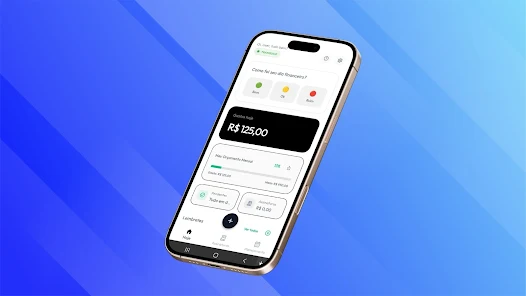
Screenshots
Latest Update












Latest News
-
![Revealing the Launch Playlists and Cross-Progression for COD Warzone Mobile News]()
-
![March 2024 Free Redemption Codes for Honkai: Star Rail News]()
-
PUBG Mobile Teams Up with Bentley Motors: Luxury Cars, Exclusive Collectibles, and Beyond 2024-04-18
![PUBG Mobile Teams Up with Bentley Motors: Luxury Cars, Exclusive Collectibles, and Beyond News]()
-
![Monster Never Cry is now accessible on both Android and iOS mobile devices. News]()
-
V2.2 of the Farlight 84 update introduces an overhauled Season structure, fresh in-game currency, an 2024-04-16
![V2.2 of the Farlight 84 update introduces an overhauled Season structure, fresh in-game currency, an News]()
-
![Arrival of Genshin Impact 4.6 Update: 'Embers of Two Realms, Twilight of Crimson' News]()
-
April 2024 Clash of Clans Update: Unveiling a Fresh Companion, Enhanced Levels, Chat Tagging, and Be 2024-04-16
![April 2024 Clash of Clans Update: Unveiling a Fresh Companion, Enhanced Levels, Chat Tagging, and Be News]()






