

What Eat Today
Version:1.0.1
Published:2026-10-19
Introduction
What Eat Today is a practical meal-planning assistant that suggests recipes, builds shopping lists and adapts to dietary preferences. It streamlines daily decisions with quick suggestions, pantry-aware recommendations and an uncluttered interface so you spend less time thinking about food and more time enjoying meals.
First impressions and purpose
The app targets people who want a simple way to decide what to eat each day without browsing dozens of recipe sites. What Eat Today packages meal discovery, inventory tracking and grocery planning into a single workflow. The result feels like a digital sous-chef that nudges you toward choices based on time, budget and what's already in your kitchen.
Core tools and smart features
- Recipe suggestions — Personalized daily ideas generated from your dietary profile and previous selections.
- Pantry awareness — Mark ingredients you have on hand; the app prioritizes recipes that use them to reduce waste.
- Shopping list builder — Automatically compiles missing items for selected recipes and groups them by aisle or category.
- Time-based filters — Choose quick weekday meals or more elaborate weekend dishes with a single tap.
How the workflow works
Start by entering dietary preferences and any allergies; then add staple items from your pantry. When you open What Eat Today, the main screen offers immediate meal cards tailored to your constraints. Tap a card to view ingredients, step-by-step instructions and an estimated prep time. Add the recipe to your plan or send missing items to the shopping list.
Customization and personalization
Customization is practical rather than flashy. You can set portion sizes, swap ingredients and save favorite recipes into themed collections. What Eat Today learns from your choices: choose vegetarian options often and the algorithm will surface similar meals more frequently. The app also supports manual recipe entry, so family hand-me-downs can become part of your plan.
Interface and responsiveness
The interface emphasizes clarity: large thumbnails, readable ingredient lists and concise instructions. Navigation is straightforward, with a bottom or side menu to access meal history, shopping lists and settings. Performance is snappy on modern devices; pages load quickly and transitions feel smooth. Minimal animations keep the experience focused on utility rather than distraction.
Integration with daily life
What Eat Today syncs shopping lists so you can check items off in-store. Some versions support calendar exports to block meal times on your schedule, which helps coordinate family cooking. The shopping list layout is designed for quick scanning—items grouped logically to reduce backtracking in the aisle.
Why users appreciate it
People often praise the app for taking decision fatigue out of mealtime. The combination of pantry-aware suggestions and a one-tap shopping list saves time and reduces food waste. Users who cook for one or two also value the portion controls and the ability to scale recipes up or down without manual math.
Tips for new users
- Begin by adding five to ten pantry staples so recommendations are immediately relevant.
- Use the time filter to separate weekday dinners from weekend projects.
- Create a favorites collection for repeatable weeknight staples to speed up planning.
- Periodically review and remove expired pantry items to keep suggestions accurate.
Installation and setup notes
Installation is straightforward from the app store. Initial setup walks you through dietary preferences and a quick pantry checklist; expect to spend ten minutes configuring the essentials. The app offers optional account sign-in for backup and multi-device sync, but local use is possible if you prefer not to create an account.
What Eat Today fits people who want a practical, no-frills planning tool that improves meal decisions over time. Its focus on pantry-aware recommendations, clean interface and smart shopping features make it a useful assistant for anyone trying to save time, reduce waste and enjoy more consistent home-cooked meals.
Show More
Information
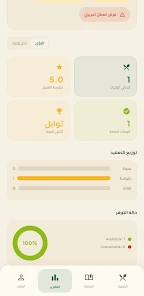
Screenshots




Latest Update












Hot Tags
Latest News
-
![Revealing the Launch Playlists and Cross-Progression for COD Warzone Mobile News]()
-
![March 2024 Free Redemption Codes for Honkai: Star Rail News]()
-
PUBG Mobile Teams Up with Bentley Motors: Luxury Cars, Exclusive Collectibles, and Beyond 2024-04-18
![PUBG Mobile Teams Up with Bentley Motors: Luxury Cars, Exclusive Collectibles, and Beyond News]()
-
![Monster Never Cry is now accessible on both Android and iOS mobile devices. News]()
-
V2.2 of the Farlight 84 update introduces an overhauled Season structure, fresh in-game currency, an 2024-04-16
![V2.2 of the Farlight 84 update introduces an overhauled Season structure, fresh in-game currency, an News]()
-
![Arrival of Genshin Impact 4.6 Update: 'Embers of Two Realms, Twilight of Crimson' News]()
-
April 2024 Clash of Clans Update: Unveiling a Fresh Companion, Enhanced Levels, Chat Tagging, and Be 2024-04-16
![April 2024 Clash of Clans Update: Unveiling a Fresh Companion, Enhanced Levels, Chat Tagging, and Be News]()






