

SilentBox: Notification Vault
Version:1.2.0
Published:2026-10-21
Introduction
SilentBox: Notification Vault puts you back in control of interruptions by quietly capturing incoming alerts into a secure, organized vault so you can review messages when it suits you. SilentBox: Notification Vault is built for people who need focused time at work, study, or rest and who prefer to batch, sort, or prioritize notifications without losing context or missing important events. The first run guides you through granting notification access and choosing a few starter rules so the app begins protecting your attention immediately.
Key features at a glance
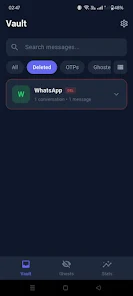
The app offers a compact but powerful toolkit: a local vault that archives notifications by app, sender, and time; rule-based routing that decides which alerts are vaulted or allowed through; priority exceptions that let essential contacts or apps bypass quiet rules; and scheduled digests that group nonurgent items into single summaries. A fast, in-vault search finds messages by keyword, sender, or date, and one-tap actions let you mark items read, dismiss them, or open the originating app. These features are designed to reduce interruption fatigue while keeping the original notification content intact for later review.
How notifications are organized and leveled
Organization is driven by flexible rules and a tier system that acts like levels or folders for different kinds of alerts. You can create tiers such as urgent, normal, and low priority, route social and promotional messages to lower tiers during work hours, and keep calendar and alarm events at the top level so they always appear immediately. Threaded grouping preserves conversational context across multiple messages, and combined filters let you implement nuanced behavior such as vaulting messages from unknown senders while allowing direct messages from starred contacts.
Controls, interaction mechanics, and progression
Controls are intentionally simple: grant notification access, open the vault with a tap, and use swipes or long-press gestures to act on items. Widgets and quick settings tiles let you switch profiles or view the vault from the home screen without opening the full app. A lightweight setup wizard introduces templated rules and suggested profiles so progression from basic to advanced configurations feels gradual. As you adjust rules, the app learns your preferences and surfaces suggestions to speed up setup and reduce manual tuning over time.
Customization, visual style, and replay value
Visual options focus on clarity and efficiency: choose compact lists to view more items at once or expanded previews to read message excerpts without opening each item. Grouping can collapse by app, sender, or time period, and adjustable font sizes and contrast controls improve readability. Appearance settings are practical rather than ornamental, matching bright and dark system themes. Because rules and profiles are easy to modify, the app retains replay value as your routine and priorities change, making it useful across different phases of daily life rather than a one-time setup.
Privacy, security, and offline behavior
Local security is central: vault contents remain on-device and can be protected with a PIN, pattern, or biometric unlock. SilentBox: Notification Vault keeps data local by default and only performs cloud backup when you explicitly enable that option, so the vault is fully usable offline. Optional automatic clearing policies and an access log let you manage retention and audit who opened the vault and when, helping preserve privacy for sensitive messages while giving you control over stored history.
Performance, compatibility, and accessibility
The app is engineered to be lightweight and respectful of battery life, with background processing tuned to minimize wakelocks while reliably capturing notifications across a wide range of Android versions and manufacturer customizations. Accessibility features include adjustable text sizes, high-contrast modes, and compatibility with TalkBack and other screen readers so users with differing needs can manage alerts comfortably. Permission requests are limited to notification access and optional choices for biometrics and local backups to reduce unnecessary prompts.
Getting started and ongoing value
Setup is straightforward: after granting notification access, select apps to vault and pick or modify rule templates to suit work, sleep, or commuting profiles. The guided flow shows how to enable PIN or biometric protection, create priority exceptions, and schedule digests. SilentBox: Notification Vault delivers ongoing value by turning a constant stream of interruptions into a manageable system, reducing stress and improving focus through predictable behavior rather than intrusive features. Regular backups, easy export, and rule templates make it simple to adapt the vault as your communication habits evolve.
Show More
Information
Screenshots




Latest Update












Latest News
-
![Revealing the Launch Playlists and Cross-Progression for COD Warzone Mobile News]()
-
![March 2024 Free Redemption Codes for Honkai: Star Rail News]()
-
PUBG Mobile Teams Up with Bentley Motors: Luxury Cars, Exclusive Collectibles, and Beyond 2024-04-18
![PUBG Mobile Teams Up with Bentley Motors: Luxury Cars, Exclusive Collectibles, and Beyond News]()
-
![Monster Never Cry is now accessible on both Android and iOS mobile devices. News]()
-
V2.2 of the Farlight 84 update introduces an overhauled Season structure, fresh in-game currency, an 2024-04-16
![V2.2 of the Farlight 84 update introduces an overhauled Season structure, fresh in-game currency, an News]()
-
![Arrival of Genshin Impact 4.6 Update: 'Embers of Two Realms, Twilight of Crimson' News]()
-
April 2024 Clash of Clans Update: Unveiling a Fresh Companion, Enhanced Levels, Chat Tagging, and Be 2024-04-16
![April 2024 Clash of Clans Update: Unveiling a Fresh Companion, Enhanced Levels, Chat Tagging, and Be News]()






