

SoniNote
Version:1.0.5
Published:2026-10-23
Introduction
SoniNote is a lightweight audio note-taking app that captures voice, transcribes recordings, and organizes clips with tags and folders. Designed for meetings, lectures, and quick ideas, SoniNote blends clear recording controls with simple editing and reliable cloud sync to keep your audio notes searchable and accessible on the go.
Core features
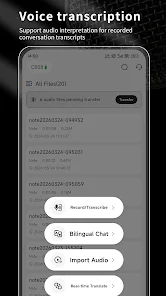
SoniNote provides a straightforward set of tools built for productivity. Record in high-quality audio with adjustable sample rates and automatic gain control. Built-in speech-to-text converts spoken words into editable transcripts that you can review line by line. Each recording can be labeled, tagged, and sorted into folders for fast retrieval. Cloud backup options and local export in common formats such as MP3 and WAV make sharing and archiving simple.
Interface and workflow
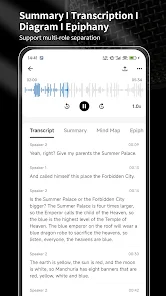
The interface is intentionally minimal to keep your focus on content. A large record/stop button sits prominently, while recent recordings appear in a scrollable list below. Tap any entry to expand a detailed view with waveform visualization, the text transcript, and options for trimming or exporting. Workflow is linear and predictable: record, review, tag, and either save locally or push to a connected cloud account.
Editing and organization
SoniNote includes lightweight editing tools aimed at quick corrections rather than full studio production. Trim silence from the beginning and end of clips, split long sessions into smaller segments, and annotate key timestamps with text notes. The tagging system supports multiple tags per file, plus custom color labels for instant visual grouping. Powerful search operates across titles, transcripts, and tags so you can locate a specific phrase or idea in seconds.
Transcription and accuracy
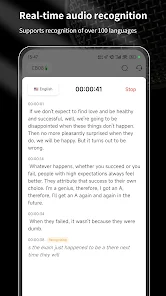
Automatic transcription runs locally or via optional cloud services depending on privacy preferences and device capability. The transcript editor highlights recognized text alongside timecodes, letting you jump to exact moments in the audio. Accuracy is best in clear environments; SoniNote offers noise reduction presets and voice activity detection to improve results in noisy rooms.
Integrations and export options
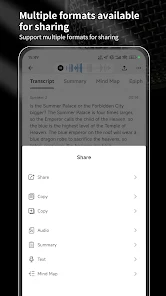
Exporting recordings is flexible: share files directly to messaging apps, save to cloud storage providers, or export transcripts as plain text or SRT for subtitling. Calendar integration can create recordings linked to events so SoniNote will automatically start when a meeting begins. The app also supports basic collaboration by sharing a recording link that others can stream or download without needing a full account.
Performance and compatibility
Optimized for battery-friendly operation, SoniNote minimizes background CPU usage while maintaining consistent audio capture. It supports a wide range of Android devices and works well on both phones and tablets. For extended recordings, the app manages disk usage with file compression and auto-archiving settings to prevent storage exhaustion. Latency is low during live playback, and waveform rendering remains smooth even with long sessions.
Privacy and data control
Privacy is built into the app’s settings. Choose to keep transcripts on-device, enable end-to-end encryption for synced recordings, or selectively upload when connected to trusted networks. Permissions are granular: you can allow microphone access only when recording, and control which folders the app can write to. Local backup options let you maintain full ownership of your audio data.
Getting started
Begin with a quick setup that guides you through microphone calibration and cloud preferences. Create a folder structure that matches your routine—work, study, personal—and start recording right away. Use tags and short titles for each session to build an organized archive that grows more valuable the longer you use SoniNote.
Who benefits most
SoniNote suits students, journalists, professionals, and anyone who needs reliable, searchable voice capture. It prioritizes clarity, speed, and practical organization rather than advanced audio production features, making it an effective daily tool for capturing ideas, meetings, and lectures.
Download SoniNote today to streamline capture and recall of spoken information and transform audio into organized, actionable notes.
Show More
Information
Screenshots

Latest Update
-
![Lines Gold Pro - Icon Pack APK]()
Lines Gold Pro - Icon Pack
-
![Remote Fire TV APK]()
Remote Fire TV
-
![Flight Dark Pro - Icon Pack APK]()
Flight Dark Pro - Icon Pack
-
![Ares Light: Pastel Icon Pack APK]()
Ares Light: Pastel Icon Pack
-
![getConf - Hidden Settings APK]()
getConf - Hidden Settings
-
![Dots Live Wallpaper - Battery APK]()
Dots Live Wallpaper - Battery
-
![Chroma - Icon Pack APK]()
Chroma - Icon Pack
-
![One UI Fluffy Icon Pack APK]()
One UI Fluffy Icon Pack
-
![Pixly Limitless Fluo Icon Pack APK]()
Pixly Limitless Fluo Icon Pack
-
![Compress Video - Resize Video APK]()
Compress Video - Resize Video
-
![Pixly Professional Dark APK]()
Pixly Professional Dark
-
![Tracker Detect Pro APK]()
Tracker Detect Pro












Latest News
-
![Revealing the Launch Playlists and Cross-Progression for COD Warzone Mobile News]()
-
![March 2024 Free Redemption Codes for Honkai: Star Rail News]()
-
PUBG Mobile Teams Up with Bentley Motors: Luxury Cars, Exclusive Collectibles, and Beyond 2024-04-18
![PUBG Mobile Teams Up with Bentley Motors: Luxury Cars, Exclusive Collectibles, and Beyond News]()
-
![Monster Never Cry is now accessible on both Android and iOS mobile devices. News]()
-
V2.2 of the Farlight 84 update introduces an overhauled Season structure, fresh in-game currency, an 2024-04-16
![V2.2 of the Farlight 84 update introduces an overhauled Season structure, fresh in-game currency, an News]()
-
![Arrival of Genshin Impact 4.6 Update: 'Embers of Two Realms, Twilight of Crimson' News]()
-
April 2024 Clash of Clans Update: Unveiling a Fresh Companion, Enhanced Levels, Chat Tagging, and Be 2024-04-16
![April 2024 Clash of Clans Update: Unveiling a Fresh Companion, Enhanced Levels, Chat Tagging, and Be News]()






