
Hidden Camera Detector: Finder
Version:1.1
Published:2026-10-23
Introduction
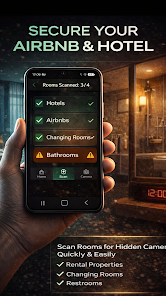
Hidden Camera Detector: Finder is a compact Android utility that helps users scan rooms and belongings for concealed cameras and listening devices. Combining magnetic, RF and camera-lens detection techniques, this app guides non-technical users through quick inspections and offers clear visual cues to identify potential privacy risks in hotels, offices, or rentals.
Overview of the app
Hidden Camera Detector: Finder is designed for travelers, renters, and anyone who wants a straightforward way to check private spaces. The app does not claim to replace professional security equipment, but it brings accessible tools to your phone so you can run fast checks before sleeping, working, or hosting meetings. Its interface focuses on clarity and speed, minimizing setup time.
How it detects suspicious devices
The app combines several smartphone-based detection methods into a single workflow. First, the magnetic sensor scan looks for unusual magnetic fields that could indicate the presence of camera modules or electronic housings. Next, the RF scanner listens for radio frequency transmissions that small Wi-Fi or Bluetooth-enabled cameras and microphones often emit. Finally, the camera-lens finder uses the phone's front or rear camera in low-light mode to reveal lens reflections that are otherwise hard to spot with the naked eye.
Key features at a glance
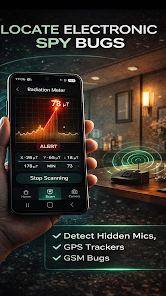
- Magnetic field analysis: Quick scans highlight spikes in electromagnetic readings to flag potential devices behind walls or furniture.
- RF signal detection: Detects active transmissions in common bands used by wireless cameras and accessories.
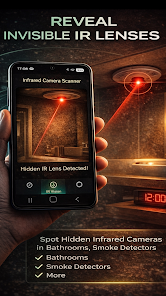
- Camera lens finder: Uses an infrared-like inspection mode to locate small reflective lenses in sockets, smoke detectors, and decorative items.
- Guided inspection mode: Step-by-step checks explain where to look and how to interpret readings for inexperienced users.
- History logs: Save scan results and photos to track suspicious patterns or document findings.
User interface and controls
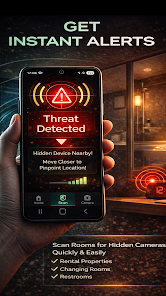
The interface emphasizes large, readable indicators and simple color codes: green for normal, yellow for caution, and red for potential threats. Controls are laid out to let you switch detection modes without navigating deep menus. Visual and audio alerts draw attention when sensors pick up anomalies, and contextual help explains what different readings may mean.
Practical usage scenarios
Hidden Camera Detector: Finder is useful in a range of everyday situations. Business travelers can run a quick check in hotel rooms before meetings. Apartment renters may want to inspect a new unit for unexpected devices. Hosts can validate event locations, and parents can scan shared spaces where privacy is a concern. The app is portable and designed to be used discreetly with minimal noise or setup.
Tips for effective scans
- Start with the magnetic scan around outlets, mirrors, and decorative fixtures where small devices are commonly hidden.
- Use the RF mode near clocks, air purifiers, and Wi-Fi routers; compare readings in different spots to identify localized sources.
- Perform the camera-lens finding step in a dim room and sweep slowly—small lenses show sharp reflections when angled toward the phone.
- Record images and timestamps for any suspicious findings to review later or share with security professionals.
Performance and limitations
The app is optimized for modern Android devices and achieves quick results without draining the battery. However, it has natural limitations: it cannot guarantee detection of every covert device, especially purely passive recorders or objects that are shielded. For serious threats or legal concerns, consult a certified specialist. The app aims to increase awareness and offer a fast first pass for privacy checks.
Getting started and compatibility
Installation is straightforward: download, grant necessary sensor permissions, and follow the built-in tutorial. The app works best on phones with functioning magnetometers and microphones. Regular updates improve detection algorithms and add compatibility for new device types. Hidden Camera Detector: Finder also includes in-app guidance to help you calibrate sensors for more accurate readings.
For users seeking a practical, easy-to-follow privacy tool, Hidden Camera Detector: Finder balances simplicity and capability. It’s a convenient first step for anyone wanting to take control of their personal space and perform quick, informed inspections before settling in.
Show More
Information
Screenshots

Latest Update












Latest News
-
![Revealing the Launch Playlists and Cross-Progression for COD Warzone Mobile News]()
-
![March 2024 Free Redemption Codes for Honkai: Star Rail News]()
-
PUBG Mobile Teams Up with Bentley Motors: Luxury Cars, Exclusive Collectibles, and Beyond 2024-04-18
![PUBG Mobile Teams Up with Bentley Motors: Luxury Cars, Exclusive Collectibles, and Beyond News]()
-
![Monster Never Cry is now accessible on both Android and iOS mobile devices. News]()
-
V2.2 of the Farlight 84 update introduces an overhauled Season structure, fresh in-game currency, an 2024-04-16
![V2.2 of the Farlight 84 update introduces an overhauled Season structure, fresh in-game currency, an News]()
-
![Arrival of Genshin Impact 4.6 Update: 'Embers of Two Realms, Twilight of Crimson' News]()
-
April 2024 Clash of Clans Update: Unveiling a Fresh Companion, Enhanced Levels, Chat Tagging, and Be 2024-04-16
![April 2024 Clash of Clans Update: Unveiling a Fresh Companion, Enhanced Levels, Chat Tagging, and Be News]()






