

QuickPik
Version:5.5.1
Published:2026-10-24
Introduction
QuickPik is a lightweight, fast image manager for Android that streamlines selecting, organizing, and sharing photos across apps. It provides a responsive picker interface, smart folders, and quick-edit tools so users can handle media tasks without delay, saving time when attaching images to messages, emails, or cloud backups.
Core tools and capabilities
QuickPik focuses on the essentials: fast access to galleries, multi-select support, and direct integration with messaging and productivity apps. The app includes batch selection, crop and rotate functions, and a simple resize option to reduce file size before sending. For professionals and casual users alike, these tools remove friction when managing images on mobile devices.
How the workflow operates
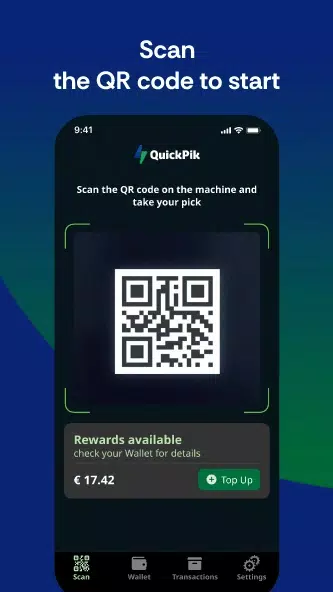
The picker opens within other apps or runs as a standalone utility. When invoked, QuickPik scans device storage and presents categorized views such as Recent, Favorites, Screenshots, and Camera Roll. Users can tap to preview, long-press to select multiple items, and drag to change order. Integration hooks let third-party apps request a selection and receive compressed or original files according to user preferences.
User interface and navigation
The design emphasizes clarity: large thumbnails, clear labels, and minimal chrome to keep the focus on images. QuickPik supports grid and list layouts with adjustable thumbnail sizes, and a persistent toolbar provides one-tap actions like share, delete, and open with. Visual cues such as checkmarks and item counts help prevent mistakes during batch operations.
Customization and quick edits
QuickPik offers a set of lightweight editing options that avoid heavyweight processing. Users can crop to common aspect ratios, rotate, and adjust basic exposure or contrast. Preset sizes let you quickly downscale images for web or chat. Custom folder rules and smart albums can be created to auto-organize content by date, location, or file type.
Performance and battery considerations
Performance is a priority: QuickPik loads previews asynchronously and caches thumbnails to maintain smooth scrolling on older devices. Memory usage is tuned to prevent slowdowns during large selections, and background operations are throttled to reduce battery impact. The app also supports hardware-accelerated rendering where available for snappier animations and transitions.
Compatibility and file handling
QuickPik supports common image formats including JPEG, PNG, WebP, and HEIF variants. For apps that require video or animated content, QuickPik can display short previews and provide separate controls to include or exclude motion files. Export options let you choose between original quality, compressed copies, or resized versions to match recipient needs.
Sharing and privacy controls
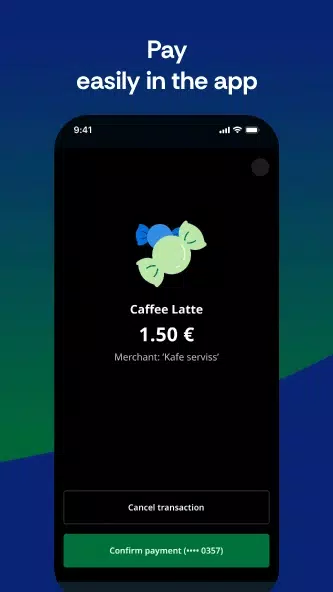
Sharing workflows are straightforward: select items, choose a target app, and QuickPik hands off files in the chosen format. Privacy options let you strip metadata such as location and device details before sending. Additionally, a secure mode prevents cloud backups for specified folders, giving users control over where images are stored and shared.
Getting started and setup tips
Installation is quick and initial setup asks for storage permissions and optional access to location metadata for smart albums. Create your first smart folder to group similar photos automatically, and adjust thumbnail density to match your screen size. For frequent tasks, assign default export settings so QuickPik remembers whether to send originals or compressed versions.
Why choose QuickPik
QuickPik is designed for people who want a reliable, no-frills image picker that integrates cleanly with other Android apps. It minimizes tapping, reduces wait times for large selections, and keeps useful tools within reach. Whether you frequently share screenshots, send large batches of photos, or just want a faster attachment workflow, QuickPik streamlines the process without unnecessary complexity.
Show More
Information
Screenshots
Latest Update












Hot Tags
Latest News
-
![Revealing the Launch Playlists and Cross-Progression for COD Warzone Mobile News]()
-
![March 2024 Free Redemption Codes for Honkai: Star Rail News]()
-
PUBG Mobile Teams Up with Bentley Motors: Luxury Cars, Exclusive Collectibles, and Beyond 2024-04-18
![PUBG Mobile Teams Up with Bentley Motors: Luxury Cars, Exclusive Collectibles, and Beyond News]()
-
![Monster Never Cry is now accessible on both Android and iOS mobile devices. News]()
-
V2.2 of the Farlight 84 update introduces an overhauled Season structure, fresh in-game currency, an 2024-04-16
![V2.2 of the Farlight 84 update introduces an overhauled Season structure, fresh in-game currency, an News]()
-
![Arrival of Genshin Impact 4.6 Update: 'Embers of Two Realms, Twilight of Crimson' News]()
-
April 2024 Clash of Clans Update: Unveiling a Fresh Companion, Enhanced Levels, Chat Tagging, and Be 2024-04-16
![April 2024 Clash of Clans Update: Unveiling a Fresh Companion, Enhanced Levels, Chat Tagging, and Be News]()






