

Life Bible
Version:10.1.394
Published:2026-10-30
Introduction
Life Bible is a comprehensive Bible study app designed to help users read, understand, and apply Scripture every day. Life Bible delivers verse-of-the-day notifications, structured devotionals, thousands of reading plans and the TouchPoints topical guides so you can begin each morning with focused Scripture and practical insight. The app combines offline reading, integrated audio and study tools into a single, easy-to-navigate experience that supports both personal devotions and group preparation.
Key Features
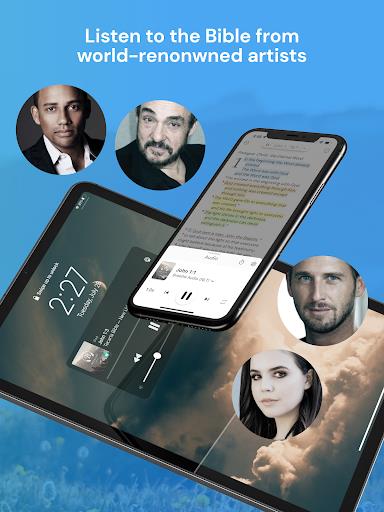
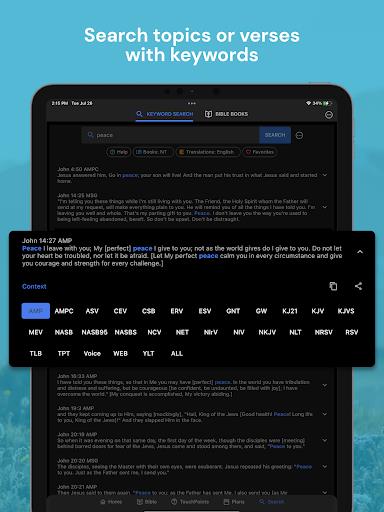
Stream or download many widely used translations (NLT, NIV, KJV, ESV, CSB and more) with additional Spanish and Chinese options available for offline access. The app’s search lets you query dozens of translations at once and apply filters to focus on your preferred versions, book locations, or topic tags. An integrated audio Bible provides background playback and standard player controls such as play/pause, skip and adjustable playback speed so you can listen during commutes or while doing household tasks. Highlights, bookmarks and a rich verse-notes editor allow you to keep sermon notes, study observations and short reflections in one place.
Reading Plans, Progression and Challenge Systems
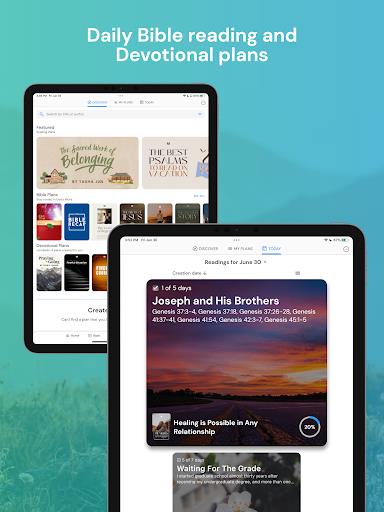
Life Bible organizes content into short, medium and long-term reading plans — from two-week topical series to one-year cover-to-cover schedules — so you can choose a structure that fits your daily rhythm. Each plan shows clear progression indicators: percentage complete, daily checklists and historical progress to help you see momentum over time. Habit-support features include daily reminders, streak tracking and optional completion badges that function as gentle challenges to help maintain consistency without gamifying spiritual practice. Plans are modular, allowing you to pause, resume or combine shorter topical plans into a longer study sequence.
Study Tools and Customization
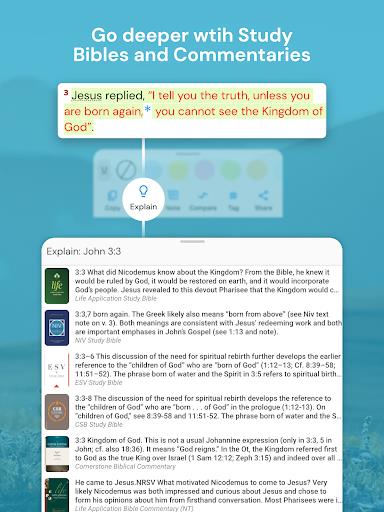
The app includes access to study Bibles and commentaries with preview content to help you evaluate which resources best deepen your understanding. A split-screen study view lets you read the biblical text alongside commentaries, devotionals or your own notes for side-by-side comparison. Customization options include multiple highlight colors, adjustable font sizes and light/dark themes; these controls help tailor the reading environment for long sessions, public teaching preparation or quiet reflection. The verse-notes editor supports basic formatting and saves work to your account so notes remain available across devices.
Controls, Navigation and Visual Style
Navigation is designed for clarity: swipe and tap gestures take you between chapters and sections, a persistent toolbar provides quick access to search and reading plans, and the home screen can be personalized to surface your current plan, favorite translation or daily devotional. The visual style favors readable typography and clean layouts so scripture text stays central; spacing, margins and color contrast are chosen to reduce eye strain during extended reading. Playback controls for audio are accessible from the notification shade and lock screen for convenient listening without opening the app.
Offline Play, Accessibility and Replay Value
Offline downloads allow you to read and listen without an internet connection, which is useful for travel, low-connectivity locations or intentional device-free times. The app emphasizes accessibility: adjustable font sizes, high-contrast theme options and large tap targets improve usability for users with different needs. Because reading plans are modular and repeatable, devotional series and topical TouchPoints provide replay value — you can revisit a topic with fresh notes, different translations or mixed audio narration to deepen understanding over time.
Storage, Limitations and Privacy
Some study Bibles, commentaries and premium resources require in-app purchases for full access; the app makes this explicit before purchase. Downloading multiple translations and audio files will use device storage, so the app shows file sizes and allows selective removal of downloaded packs. Sync and backup keep highlights, notes and reading progress available across linked devices; the developers provide options to export or share individual verses and notes when you want to use them in teaching materials or personal archives.
Development Team and Support
The Life Bible team consists of designers, editors and developers focused on creating a straightforward, stable study experience. Regular updates address performance, add translations and refine features based on user feedback. In-app help, a feedback channel and FAQ resources are available to assist with setup, offline downloads and account syncing so you can get started quickly and maintain consistent study habits.
Whether you are starting a one-year reading plan, preparing a group study or building a daily devotional habit, Life Bible offers structured plans, flexible study tools and accessible playback so scripture study fits your schedule and learning style.
Show More
Information
Screenshots
Latest Update












Latest News
-
![Revealing the Launch Playlists and Cross-Progression for COD Warzone Mobile News]()
-
![March 2024 Free Redemption Codes for Honkai: Star Rail News]()
-
PUBG Mobile Teams Up with Bentley Motors: Luxury Cars, Exclusive Collectibles, and Beyond 2024-04-18
![PUBG Mobile Teams Up with Bentley Motors: Luxury Cars, Exclusive Collectibles, and Beyond News]()
-
![Monster Never Cry is now accessible on both Android and iOS mobile devices. News]()
-
V2.2 of the Farlight 84 update introduces an overhauled Season structure, fresh in-game currency, an 2024-04-16
![V2.2 of the Farlight 84 update introduces an overhauled Season structure, fresh in-game currency, an News]()
-
![Arrival of Genshin Impact 4.6 Update: 'Embers of Two Realms, Twilight of Crimson' News]()
-
April 2024 Clash of Clans Update: Unveiling a Fresh Companion, Enhanced Levels, Chat Tagging, and Be 2024-04-16
![April 2024 Clash of Clans Update: Unveiling a Fresh Companion, Enhanced Levels, Chat Tagging, and Be News]()






