

Vivid Navigation Gestures
Version:3.5.6
Published:2026-10-31
Introduction
Vivid Navigation Gestures transforms how you control Android devices by replacing buttons with fluid, colorful gestures and customizable shortcuts. This lightweight utility improves one-handed use, speeds up common tasks, and offers visual feedback so gestures feel intuitive and responsive across apps and launchers.
Overview
Vivid Navigation Gestures is a gesture-driven navigation tool designed for users who want to simplify interactions and reclaim screen space. Rather than relying on traditional navigation bars, it maps swipes, taps, and edge drags to system actions, app shortcuts, and multi-step sequences. The app focuses on practical productivity gains without requiring deep system changes.
Primary capabilities
- Gesture mapping: Assign common actions like Back, Home, Recent, and App Switch to simple gestures.
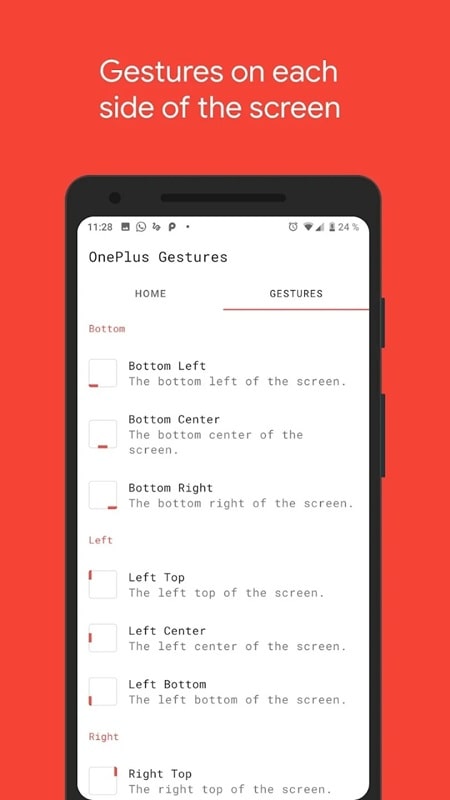
- Edge controls: Use left, right, or bottom edge swipes for context-aware shortcuts.
- Visual cues: Colorful indicators and animations confirm the gesture and reduce misfires.
Tools and settings that matter
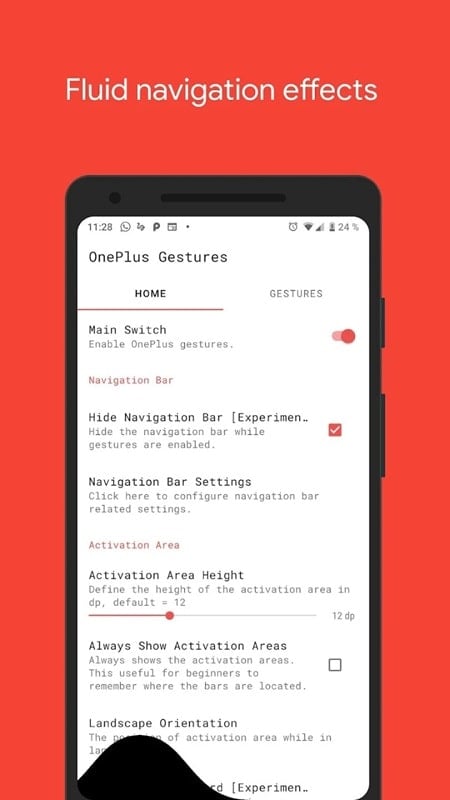
Under the hood, Vivid Navigation Gestures provides fine-grained controls to suit different workflows. Users can define gesture sensitivity, active regions, and action priority so the tool adapts whether you use a phone or a large-screen device. A built-in test mode lets you try mappings before committing them, and optional haptic feedback improves certainty for fast sequences.
Supported actions and integrations
- System actions: Back, Home, Recent Apps, Notifications, Quick Settings.
- App shortcuts: Launch apps, open app-specific shortcuts, or trigger services.
- Custom macros: Chain actions like open app → toggle setting → return to home.
How it works in daily use
Once configured, Vivid Navigation Gestures runs in the background with minimal battery impact. A subtle visual bar or dot can be displayed at the edge of the screen to guide gestures. Swiping from that edge triggers the assigned action instantly. Because actions can be context-aware, the same gesture can behave differently in full-screen video, games, or while typing, preventing accidental triggers.
Practical examples
- Swipe up from the bottom center to open Recent Apps for faster multitasking.
- Quick left-edge tap to go Back while watching videos in landscape mode.
- Long press edge to access a customizable quick-launch wheel for frequently used apps.
Customization and personalization
Customization is a major strength. Vivid Navigation Gestures lets you change gesture shapes, activation zones, animation colors, and haptic intensity. Profiles can be created for different scenarios — one for gaming with fewer interruptions, another for productivity with many shortcuts. Themes and color presets help the visual feedback match your wallpaper or icon pack.
Tuning tips
- Sensitivity: Reduce sensitivity on large displays to avoid accidental triggers.
- Activation size: Shrink the activation area for precise use when typing.
- Profiles: Set automatic profile switching based on app launch or time of day.
Performance and interface design
The interface is focused and minimal, with a modern material-style settings screen that organizes options by category. Performance is typically smooth — transitions and animations are GPU-accelerated where supported. Memory and CPU usage remain modest; the app prioritizes fluid response so gestures feel immediate even on mid-range devices.
Accessibility and stability
Accessibility options include larger activation zones and alternative feedback modes for users who prefer visual or vibration cues over sound. The app also includes safeguards to prevent navigation loops or conflicts with other system-level gesture implementations.
Getting started quickly
Installation requires only a few taps: grant the necessary accessibility and overlay permissions, then pick a starter profile. New users can rely on curated presets to get a productive setup in minutes. Regular updates add new actions and compatibility improvements for the latest Android releases.
Final thoughts for prospective users
Vivid Navigation Gestures offers a practical way to modernize navigation on Android. It suits users looking to increase efficiency, personalize controls, or maximize screen real estate. With flexible customization, responsive feedback, and thoughtful defaults, the app can become an essential part of a faster, more natural phone experience.
Show More
Information
Screenshots

Latest Update












Latest News
-
![Revealing the Launch Playlists and Cross-Progression for COD Warzone Mobile News]()
-
![March 2024 Free Redemption Codes for Honkai: Star Rail News]()
-
PUBG Mobile Teams Up with Bentley Motors: Luxury Cars, Exclusive Collectibles, and Beyond 2024-04-18
![PUBG Mobile Teams Up with Bentley Motors: Luxury Cars, Exclusive Collectibles, and Beyond News]()
-
![Monster Never Cry is now accessible on both Android and iOS mobile devices. News]()
-
V2.2 of the Farlight 84 update introduces an overhauled Season structure, fresh in-game currency, an 2024-04-16
![V2.2 of the Farlight 84 update introduces an overhauled Season structure, fresh in-game currency, an News]()
-
![Arrival of Genshin Impact 4.6 Update: 'Embers of Two Realms, Twilight of Crimson' News]()
-
April 2024 Clash of Clans Update: Unveiling a Fresh Companion, Enhanced Levels, Chat Tagging, and Be 2024-04-16
![April 2024 Clash of Clans Update: Unveiling a Fresh Companion, Enhanced Levels, Chat Tagging, and Be News]()






