

Eye Pro
Version:5.0.4
Published:2026-10-31
Introduction
Eye Pro is a lightweight vision-care app designed to reduce eye strain, improve focus, and guide regular screen breaks with science-backed exercises and reminders. It blends guided routines with quick microbreaks, offering adjustable programs, progress tracking, and visual assessments to help users build healthier screen habits without interrupting productivity.
What Eye Pro Offers
The app combines preventive tools and short training sessions to protect vision during prolonged device use. Core features include customizable break schedules, a library of eye exercises, contrast and brightness guidance, and simple assessments that highlight potential strain patterns. Eye Pro prioritizes ease of use so that workplace and home users can maintain comfort while staying productive.
Key Functions and Tools
- Break Scheduler: Configure microbreaks and longer rest periods with options for frequency, duration, and quiet reminders that won’t disrupt important tasks.
- Exercise Library: Short guided routines—such as focus shifts, palming, and blink training—are presented as audio or visual prompts for quick daily practice.
- Assessment Tests: Simple checks for contrast sensitivity and focus stability provide feedback and suggest tailored exercise plans.
- Progress Tracking: View session counts and streaks to see improvements over days and weeks, encouraging consistent habits.
- Screen Optimization Tips: Practical recommendations about brightness, text size, and ambient lighting help reduce strain beyond the exercises themselves.
How Eye Pro Works
The workflow is straightforward. After a brief setup where you choose work intervals and comfort preferences, Eye Pro runs in the background and prompts breaks at chosen intervals. During a break, the app guides you through short activities or relaxation techniques that can be completed at the desk. The assessment module uses quick visual tasks to adapt the difficulty and frequency of exercises to your needs.
User Interface and Daily Workflow
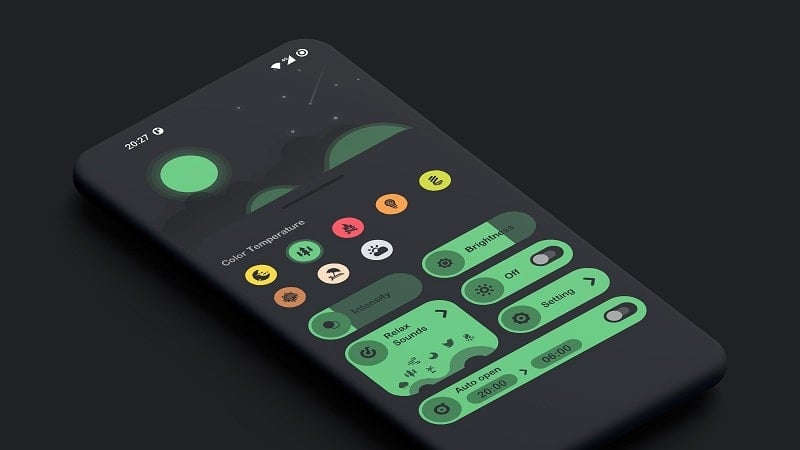
Design focuses on minimal distraction. The interface presents clear status indicators for the next break, an easy-access play button for on-demand sessions, and a calendar view of completed routines. Notifications are intentionally subtle: fade-in banners and optional sound cues keep interruptions low while ensuring you don’t skip important recovery time.
Customization and Personalization
Personalization is one of Eye Pro’s strengths. Users can set different profiles for work, study, or leisure to reflect changing screen demands. Adjustable exercise length, reminder frequency, and visual themes allow the experience to match personal tastes. For those with specific needs, the app supports manual entry of vision concerns so exercise plans can be tweaked accordingly.
Performance, Compatibility, and Privacy
Engineered to be battery-friendly and lightweight, the app has modest background requirements and uses local timers rather than constant network connections. It supports a wide range of Android versions and adapts to different screen sizes and orientations. Privacy is treated seriously: assessments and tracking data stay on-device unless you choose to export logs for personal review or to share with a clinician.
Practical Use Cases
Eye Pro fits several daily scenarios: remote workers who spend long hours in front of a laptop, students who alternate between reading and note-taking, and creative professionals who need to preserve focus without fatigue. Short guided breaks can be completed while sitting, and the assessment tools help identify when to increase the frequency or intensity of exercises.
Getting Started
Begin by installing and allowing the minimal permissions requested for local notification delivery. Set a preferred schedule and complete one short visual test so the app can recommend an initial routine. From there, follow daily prompts, review progress in the built-in dashboard, and adjust settings as your comfort level improves.
Why Choose Eye Pro
For users seeking a practical, unobtrusive way to reduce digital eye strain, Eye Pro provides a balanced mix of evidence-inspired exercises, scheduling flexibility, and unobtrusive reminders. Its focus on user choice and device-friendly design makes it suitable for a wide audience that wants simple, actionable steps to protect their vision during heavy screen use.
Show More
Information
Screenshots
Latest Update












Hot Tags
Latest News
-
![Revealing the Launch Playlists and Cross-Progression for COD Warzone Mobile News]()
-
![March 2024 Free Redemption Codes for Honkai: Star Rail News]()
-
PUBG Mobile Teams Up with Bentley Motors: Luxury Cars, Exclusive Collectibles, and Beyond 2024-04-18
![PUBG Mobile Teams Up with Bentley Motors: Luxury Cars, Exclusive Collectibles, and Beyond News]()
-
![Monster Never Cry is now accessible on both Android and iOS mobile devices. News]()
-
V2.2 of the Farlight 84 update introduces an overhauled Season structure, fresh in-game currency, an 2024-04-16
![V2.2 of the Farlight 84 update introduces an overhauled Season structure, fresh in-game currency, an News]()
-
![Arrival of Genshin Impact 4.6 Update: 'Embers of Two Realms, Twilight of Crimson' News]()
-
April 2024 Clash of Clans Update: Unveiling a Fresh Companion, Enhanced Levels, Chat Tagging, and Be 2024-04-16
![April 2024 Clash of Clans Update: Unveiling a Fresh Companion, Enhanced Levels, Chat Tagging, and Be News]()






