

ONEWallet - Cards Wallet
Version:2.2.3
Published:2026-11-02
Introduction
ONEWallet - Cards Wallet is a compact digital wallet that organizes your payment cards, loyalty cards, and IDs with secure encryption and a clean interface. It simplifies daily transactions and card management across devices while prioritizing privacy and quick access for everyday use.
Overview: what the app does
ONEWallet - Cards Wallet centralizes physical and virtual cards into a single app, removing the need to carry stacks of plastic. It supports multiple card types, offers backup and restore options, and includes biometric protection so sensitive details remain behind a secure layer. The app balances convenience with control, letting users decide which cards are visible and how they authenticate.
Key tools and security measures
The security model in this app combines local encryption, optional cloud backup, and device-level biometric locks. Cards are encrypted on the device with a PIN or fingerprint requirement. Developers provide optional encrypted cloud sync for cross-device continuity, and a recovery option to restore your wallet after a device change or reset.
Core features at a glance
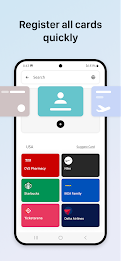
- Card management: Store debit, credit, loyalty, and membership cards with custom labels and icons.
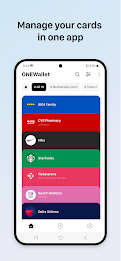
- Quick access: Pin frequently used cards to the home view and access them with one tap.
- Biometric unlock: Use fingerprint or face unlock to open the wallet instantly.
- Encrypted backup: Secure cloud backup keeps your data safe and recoverable.
- Offline mode: Access stored card details without network access when needed.
Interface and usability
The interface focuses on clarity: card tiles with large typography and recognizable colors help identify cards at a glance. Navigation is split between a home screen for favorites, a full card list, and a settings area for privacy controls. The app maintains fast animations and minimal visual clutter to make everyday use smooth and efficient.
How it fits into your daily workflow
ONEWallet - Cards Wallet aims to reduce friction in payment and membership tasks. Add your loyalty card when you sign up at a store, pin a boarding pass for travel, or store a library card for quick scanning. Notifications and widgets can be configured to surface a card at the right moment, turning manual searching into almost automatic retrieval.
Customization and personalization options
Users can organize cards into folders or categories, assign custom icons, and reorder items. Theme options include light and dark modes to match device appearance, while display preferences let you hide sensitive numbers until you choose to reveal them. These options help tailor the app to different privacy needs and aesthetic tastes.
Performance and compatibility
The app is lightweight and performs well on a range of Android devices. It is optimized to minimize battery impact and operates smoothly even on older hardware. Cross-device features require a secure account setup, but most core functionality like local card storage and biometric unlock works without any network connection.
Practical tips for new users
- Start by adding only the cards you use every day to the favorites view.
- Enable biometric unlock for faster access and to avoid typing a PIN repeatedly.
- Use encrypted cloud backup only if you need multi-device sync; keep local backups if you prefer full control.
- Regularly review and remove obsolete cards to keep the wallet streamlined.
Why it’s worth trying
For users who prefer a minimalist, secure approach to card management, ONEWallet - Cards Wallet offers a focused set of capabilities without unnecessary extras. It reduces physical clutter while keeping essential features such as encrypted storage, fast access, and simple organization. The design choices favor speed and privacy, making the app a practical replacement for carrying multiple plastic cards.
Getting started and installation notes
Installation is straightforward: download the app from the official store, complete the onboarding steps, set a master PIN, and import or scan cards. The scan functionality saves time, and manual entry is available for unusual card types. After setup, spend a few minutes arranging favorites and testing biometric access to ensure a smooth experience.
Show More
Information
Screenshots
Latest Update












Hot Tags
Latest News
-
![Revealing the Launch Playlists and Cross-Progression for COD Warzone Mobile News]()
-
![March 2024 Free Redemption Codes for Honkai: Star Rail News]()
-
PUBG Mobile Teams Up with Bentley Motors: Luxury Cars, Exclusive Collectibles, and Beyond 2024-04-18
![PUBG Mobile Teams Up with Bentley Motors: Luxury Cars, Exclusive Collectibles, and Beyond News]()
-
![Monster Never Cry is now accessible on both Android and iOS mobile devices. News]()
-
V2.2 of the Farlight 84 update introduces an overhauled Season structure, fresh in-game currency, an 2024-04-16
![V2.2 of the Farlight 84 update introduces an overhauled Season structure, fresh in-game currency, an News]()
-
![Arrival of Genshin Impact 4.6 Update: 'Embers of Two Realms, Twilight of Crimson' News]()
-
April 2024 Clash of Clans Update: Unveiling a Fresh Companion, Enhanced Levels, Chat Tagging, and Be 2024-04-16
![April 2024 Clash of Clans Update: Unveiling a Fresh Companion, Enhanced Levels, Chat Tagging, and Be News]()






