

Sygic Travel
Version:5.17.0
Published:2026-11-03
Introduction
Sygic Travel is a mobile trip planner that helps you turn loose ideas into practical day-by-day itineraries, combine offline maps with local guides, and navigate cities with clear timing estimates. This editor-style overview focuses on how Sygic Travel structures routes, manages offline content, and supports real-world travel decisions so you can evaluate whether it fits your planning style before installing.
Core features and how they work
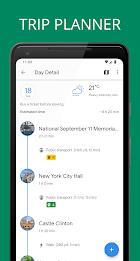
The app centers on an itinerary builder where you add points of interest, photos, and brief descriptions, then place them into a timeline to create single-day or multi-day plans. Controls are intentionally simple: drag an item into the timeline to fix its slot, tap to change estimated duration or set opening hours, and use gestures to move or remove stops. Routing modes include walking, driving, cycling, and public transit, which generate realistic travel-time estimates between stops and help you spot heavy-transit transitions or long walk segments at a glance.
Maps, offline use, and visual style
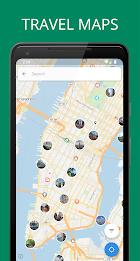
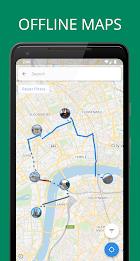
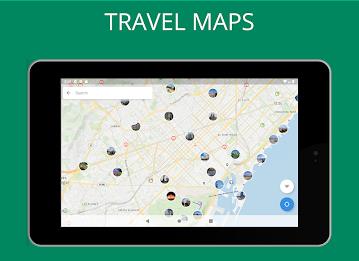
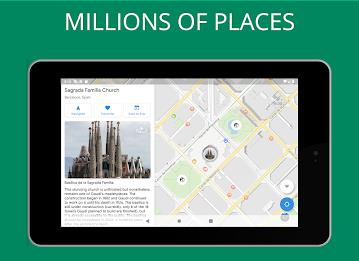
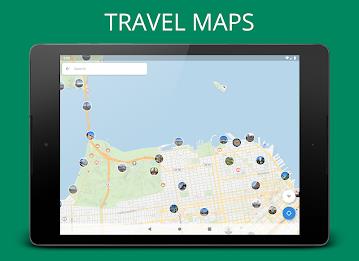
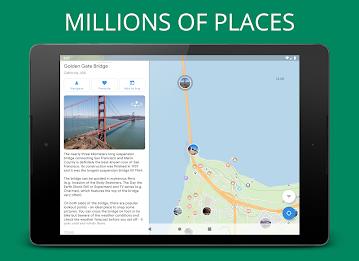
Sygic Travel provides downloadable city packs that include maps, lists of attractions, and short guide content so you can access your itinerary offline. The visual style emphasizes a readable map plus a complementary timeline view: map layers show routes and POI clusters while photo thumbnails and concise descriptions help you decide what to keep or skip. You can cache map areas in advance to reduce roaming data and improve load times when you arrive in a destination.
Progression, customization, and controls
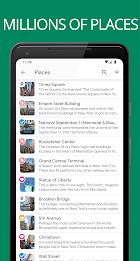
Rather than a game-like progression, the app's progression system is practical: draft a few must-see items, convert a draft into a day plan, then expand days into a full trip. Customization options let you adjust visit durations, add personal notes, tag favorites, and filter places by category such as museums, parks, or family-friendly spots. Controls are supported by contextual menus and simple gestures so even newcomers can build a practical itinerary in minutes while power users can fine-tune every transit leg.
Planning mechanics and challenge systems
The planner includes built-in checks to prevent overbooking: estimated visit times combined with travel durations highlight days that are too ambitious and suggest rearrangements to reduce backtracking. These optimization suggestions act as a lightweight challenge system, nudging you to balance ambition with realistic on-the-ground pacing. You can intentionally add free time or rest blocks when you want a relaxed itinerary instead of a tightly packed schedule.
Level structure, templates, and replay value
Templates and sample itineraries provide entry points for different trip lengths and styles—short city breaks, multi-day sightseeing, or family-friendly outings—so you can reuse structure as a starting point. Replay value comes from modifying saved itineraries for return visits, swapping categories to explore new themes, and experimenting with alternative routing modes to change transit and walking times for the same set of sights.
Sharing, syncing, and export
The app synchronizes plans across your devices when you sign in, and you can share itineraries with travel companions or export them to PDF for printing or offline reference. Sync lets multiple devices access the same plan for coordination, while export provides a portable snapshot of schedules and directions for people who prefer a paper copy or a simple downloadable file before departure.
Accessibility and user experience
Menus are streamlined for mobile use with readable fonts, clear contrast on map labels, and gesture-based editing for fast changes. The interface is optimized to remain responsive on modern smartphones, though performance depends on the size of cached maps and device resources. Accessibility considerations include large tap targets for timeline items and simple toggles to show or hide detailed information when you need an uncluttered view.
Practical tips and getting started
To begin, download the city pack while on Wi‑Fi, mark must-see places with favorites, and build your first day slowly to learn typical visit durations. Verify public transit schedules with local sources when precise timing matters, and use the timeline to move attractions between days to reduce travel time. Sygic Travel's mix of offline maps, time estimates, and a visual timeline is designed to make planning predictable and to help you spend more time enjoying places and less time figuring out logistics.
Show More
Information
Screenshots

Latest Update












Hot Tags
Latest News
-
![Revealing the Launch Playlists and Cross-Progression for COD Warzone Mobile News]()
-
![March 2024 Free Redemption Codes for Honkai: Star Rail News]()
-
PUBG Mobile Teams Up with Bentley Motors: Luxury Cars, Exclusive Collectibles, and Beyond 2024-04-18
![PUBG Mobile Teams Up with Bentley Motors: Luxury Cars, Exclusive Collectibles, and Beyond News]()
-
![Monster Never Cry is now accessible on both Android and iOS mobile devices. News]()
-
V2.2 of the Farlight 84 update introduces an overhauled Season structure, fresh in-game currency, an 2024-04-16
![V2.2 of the Farlight 84 update introduces an overhauled Season structure, fresh in-game currency, an News]()
-
![Arrival of Genshin Impact 4.6 Update: 'Embers of Two Realms, Twilight of Crimson' News]()
-
April 2024 Clash of Clans Update: Unveiling a Fresh Companion, Enhanced Levels, Chat Tagging, and Be 2024-04-16
![April 2024 Clash of Clans Update: Unveiling a Fresh Companion, Enhanced Levels, Chat Tagging, and Be News]()






