

Camel Live
Version:3.8.0.10
Published:2026-11-18
Introduction
Camel Live is a lightweight mobile app designed for smooth live streaming and real-time broadcasting. It combines simple controls with reliable connectivity to let users share video, view multiple streams, and interact with audiences without complicated setup, making it suitable for creators, small teams, and casual broadcasters.
What this app does
Camel Live focuses on real-time video transmission with minimal latency and a clean user interface. The app supports single- and multi-camera feeds, chat integration, and basic moderation tools. It prioritizes stability over flashy extras so that broadcasters can focus on content rather than troubleshooting network issues.
Main features at a glance
- Live broadcast controls: Start or stop streams, switch cameras, and manage audio input from a single screen.
- Multi-view support: View several streams concurrently or invite guests to join a live session.
- Chat and reactions: Built-in messaging and emoji reactions help hosts engage with viewers in real time.
- Adaptive bitrate: Automatic adjustment of video quality to maintain continuity on variable connections.
- Basic moderation: Mute, remove, or block disruptive participants from within the app.
User interface and performance
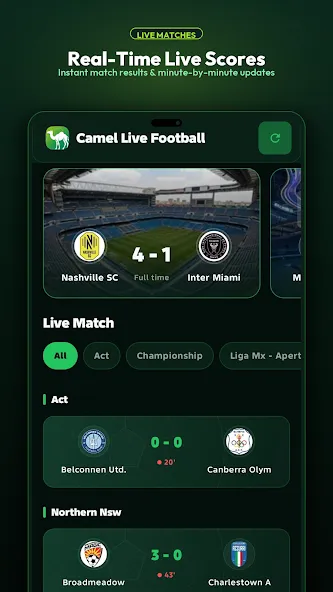
The interface is laid out for quick access: a central preview pane, a compact control bar, and an overlay for chat and viewer stats. Camel Live keeps CPU and memory use modest, which reduces battery drain during long sessions. Graphics are functional rather than ornamental, favoring clarity over visual clutter on small screens.
Stream quality and stability
Adaptive bitrate and configurable resolution let users tailor streams to their network. When bandwidth drops, the app reduces bitrate to prevent interruptions. For advanced users there are settings to lock resolution or prioritize frame rate, useful for fast-paced content where smooth motion matters.
Workflow and integrations
Camel Live integrates with social platforms and can publish stream links directly to external channels. The workflow supports quick setup: select destination, configure audio/video sources, and tap "Go Live." For teams, the app allows role-based access so moderators and co-hosts can join without sharing primary credentials.
Tools for creators
- Guest invites: Bring in remote contributors with a single invite link.
- Clip export: Save highlights locally for later editing or posting.
- Basic overlays: Add text or logos to the stream without third-party software.
Getting started
Installing the app is straightforward and the initial onboarding guides users through camera permissions, audio setup, and choosing a streaming destination. New users will find templates for common scenarios—interviews, product demos, and casual streams—that speed up the first broadcasts.
Tips for new broadcasters
- Test your connection and audio before going live to avoid interruptions.
- Use earphones to reduce echo when co-hosting locally.
- Enable adaptive bitrate if your network is unpredictable.
- Schedule a practice session to familiarize yourself with moderation tools and guest management.
Why people choose it
Many users pick Camel Live for its reliability and straightforward controls. It doesn’t try to replace full-featured studio apps but instead provides an efficient way to publish live content from a phone or tablet. Creators who value uptime and fast setup often prefer its minimal learning curve.
Who should consider this app
Camel Live works well for independent creators, podcasters, small organizations, and educators who need dependable live video without complex hardware. It also suits users who want a quick path from concept to broadcast with sensible defaults and useful moderation options.
Final practical notes
Before streaming, check permissions and test different resolution settings to match your audience’s expectations. Keep the app updated for security and performance improvements, and explore built-in templates to speed up recurring broadcasts. Camel Live aims to make live video accessible and consistent for everyday use.
Show More
Information
Screenshots

Latest Update











Latest News
-
![Revealing the Launch Playlists and Cross-Progression for COD Warzone Mobile News]()
-
![March 2024 Free Redemption Codes for Honkai: Star Rail News]()
-
PUBG Mobile Teams Up with Bentley Motors: Luxury Cars, Exclusive Collectibles, and Beyond 2024-04-18
![PUBG Mobile Teams Up with Bentley Motors: Luxury Cars, Exclusive Collectibles, and Beyond News]()
-
![Monster Never Cry is now accessible on both Android and iOS mobile devices. News]()
-
V2.2 of the Farlight 84 update introduces an overhauled Season structure, fresh in-game currency, an 2024-04-16
![V2.2 of the Farlight 84 update introduces an overhauled Season structure, fresh in-game currency, an News]()
-
![Arrival of Genshin Impact 4.6 Update: 'Embers of Two Realms, Twilight of Crimson' News]()
-
April 2024 Clash of Clans Update: Unveiling a Fresh Companion, Enhanced Levels, Chat Tagging, and Be 2024-04-16
![April 2024 Clash of Clans Update: Unveiling a Fresh Companion, Enhanced Levels, Chat Tagging, and Be News]()






