

AniDub Max
Version:1.5.6
Published:2026-11-18
Introduction
For pet owners who want playful photo moments without a lot of fuss, AniDub Max is a lightweight tool that puts interactive visual and sound cues in front of your camera. The app is built around a simple idea: use attention-grabbing animations and noises to direct a pet's gaze so you can get better photos, not to replace a full-featured camera app. AniDub Max keeps controls minimal and free, making it a straightforward companion when you need a few responsive tricks to capture your cat, dog, or small companion in a studio-like pose.
Getting Started with AniDub Max:
Open and aim: Launch the app and point your device camera at your pet; AniDub Max displays animated prompts that sit on-screen or near the lens to attract attention.
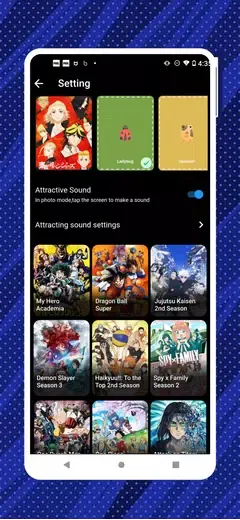
Choose a stimulus: Pick a theme or sound effect from the menu to see how your pet reacts; lightweight options are ideal for shy animals while bolder effects work for energetic pets.
Adjust distance and timing: Move the device a little or start an animation at the right moment to get your pet to look toward the lens; short bursts usually work better than continuous motion.
Scenario idea - vet visit prep: Use the app at home before a clinic appointment to get your pet used to focus-changing noises and visuals in a calm setting.
Scenario idea - family photos: Bring AniDub Max to group pictures where a quick visual cue can help a pet hold a pose long enough for a clear shot.
Features of AniDub Max:
Pet-focused visual effects: A selection of moving graphics sized for phones and tablets designed to catch a pet's peripheral vision without overwhelming them.
Sound cues tuned for animals: Short audio snippets provide auditory prompts that complement the animations and encourage pets to look or interact.
Mini digital toys: Simple on-screen playthings let curious pets tap or paw at the display, offering a degree of independent engagement while you frame the shot.
Theme packs: Multiple themed sets create different moods and scenarios so you can swap visuals depending on your pet's temperament.
Straightforward interface: Minimal buttons and clear labels keep the learning curve low, letting you start a capture session in seconds.
Lightweight and free: No complex editing suite or subscription barriers; the app focuses on immediate interaction for casual users and pet lovers.
Pros & Cons:
- Free and easy to use for beginners and casual photographers
- Interactive visuals and sounds tailored for pets
- Small on-screen toys encourage independent play
- Not a full replacement for dedicated camera apps or editing tools
- Limited technical detail on advanced settings or performance
Final Words:
AniDub Max is best if you want a handy, no-friction way to get a pet's attention while taking photos or keeping them lightly entertained. It shines as a novelty helper for everyday snaps and family gatherings but does not aim to be a multi-tool for pro photography. If simplicity and playful interaction matter more than manual controls, give AniDub Max a try and see whether its quick visual and audio cues make your pet portraits easier to capture.
Show More
Information
Screenshots



Latest Update












Hot Tags
Latest News
-
![Revealing the Launch Playlists and Cross-Progression for COD Warzone Mobile News]()
-
![March 2024 Free Redemption Codes for Honkai: Star Rail News]()
-
PUBG Mobile Teams Up with Bentley Motors: Luxury Cars, Exclusive Collectibles, and Beyond 2024-04-18
![PUBG Mobile Teams Up with Bentley Motors: Luxury Cars, Exclusive Collectibles, and Beyond News]()
-
![Monster Never Cry is now accessible on both Android and iOS mobile devices. News]()
-
V2.2 of the Farlight 84 update introduces an overhauled Season structure, fresh in-game currency, an 2024-04-16
![V2.2 of the Farlight 84 update introduces an overhauled Season structure, fresh in-game currency, an News]()
-
![Arrival of Genshin Impact 4.6 Update: 'Embers of Two Realms, Twilight of Crimson' News]()
-
April 2024 Clash of Clans Update: Unveiling a Fresh Companion, Enhanced Levels, Chat Tagging, and Be 2024-04-16
![April 2024 Clash of Clans Update: Unveiling a Fresh Companion, Enhanced Levels, Chat Tagging, and Be News]()






