

JTInstagram
Version:397.0.0.46.81
Published:2026-11-19
Introduction
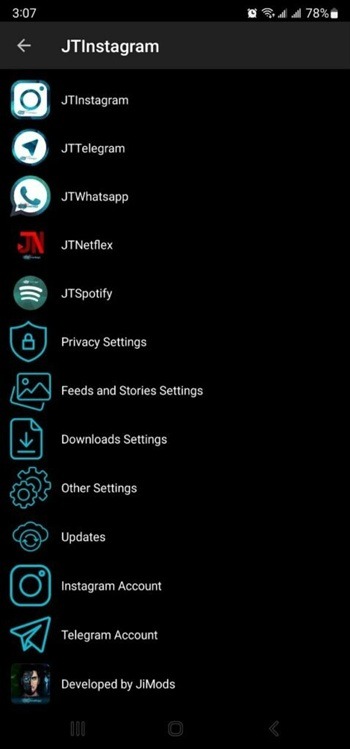
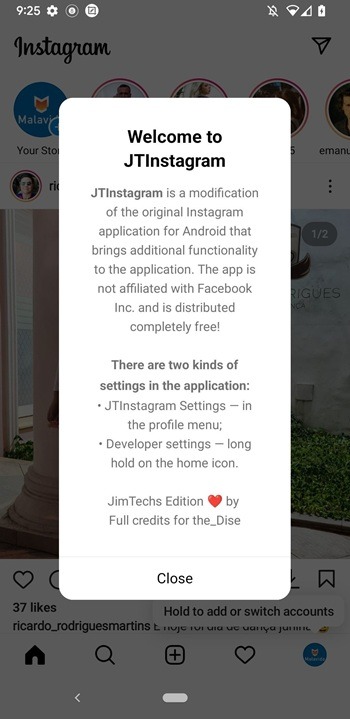
Waiting on a delayed train and need a quieter way to check Instagram? JTInstagram offers a stripped-back experience that focuses on privacy and user control while preserving the familiar Instagram feel. This mod-like client removes many common annoyances, gives you extra options for saving media, and lets you tune visibility settings so your activity is more discreet. It also supports interface personalization and multiple accounts on one device, making it a good fit if you swap between personal and work profiles during a busy day.
Getting Started with JTInstagram
Install and sign in: Download the APK, allow installations from unknown sources if prompted, then log in with your regular Instagram credentials to begin using familiar feeds and profiles.
Set up multiple accounts: Add additional accounts from the settings menu so you can switch between profiles without logging out each time; this is useful if you manage a brand and a personal account on the same phone.
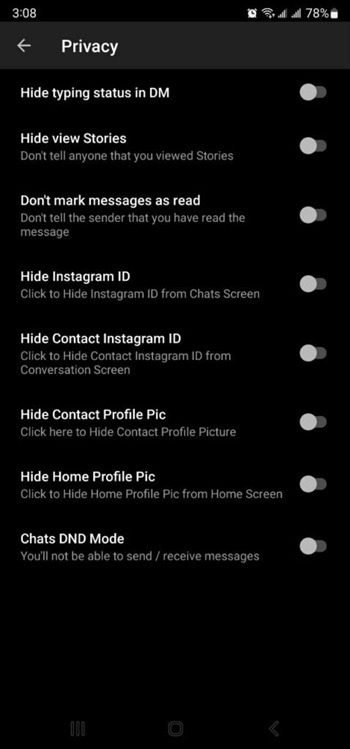
Enable privacy options: Open the privacy panel to adjust seen status, online visibility, and other interaction flags so your presence and replies behave the way you prefer.
Use the media saver: When you come across images, videos, or reels you have permission to keep, tap the save option to store high-resolution copies for offline viewing and archiving.
Features of JTInstagram
Incognito browsing: Browse stories and profiles without leaving visible traces in viewer lists, so you can check updates without notifying others.
Ad and popup blocking: The app removes many in-feed ads and intrusive pop-ups for a cleaner scroll; the result is a more focused browsing session with fewer distractions.
Theme and font customization: Choose from different skins and typefaces to make the interface match your taste, whether you prefer a minimalist look or a colorful layout.
Stable chat background handling: Recent fixes improve reliability when you change conversation backgrounds, which leads to fewer crashes and smoother message navigation.
Tips and Tricks
Plan offline galleries: Before a flight or long commute, save permitted photos and reels with JTInstagram so you can view them without an internet connection.
Use ghost mode selectively: Turn on invisible browsing while researching a topic or checking an old contact; this helps you stay informed without creating pressure to reply immediately.
Separate work and personal flow: Enable multiple accounts and customize themes per account so you can keep a professional appearance for work contacts and a more relaxed view for friends.
Suitable for JTInstagram
- Users who value privacy and want more control over activity indicators
- People who manage multiple Instagram accounts on one device
- Anyone who likes to save images and videos for offline access (with permission)
- Those who prefer a cleaner, ad-reduced browsing experience
Final Verdict
JTInstagram is a practical choice if you want to reduce social pressure and take control of visibility and media saving on Android; it blends useful privacy options with theme tweaks and multi-account convenience. While it enhances how you interact with Instagram content, remember it is an unofficial client and updates or compatibility may vary compared with the official app.
Show More
Information
Screenshots
Latest Update











Latest News
-
![Revealing the Launch Playlists and Cross-Progression for COD Warzone Mobile News]()
-
![March 2024 Free Redemption Codes for Honkai: Star Rail News]()
-
PUBG Mobile Teams Up with Bentley Motors: Luxury Cars, Exclusive Collectibles, and Beyond 2024-04-18
![PUBG Mobile Teams Up with Bentley Motors: Luxury Cars, Exclusive Collectibles, and Beyond News]()
-
![Monster Never Cry is now accessible on both Android and iOS mobile devices. News]()
-
V2.2 of the Farlight 84 update introduces an overhauled Season structure, fresh in-game currency, an 2024-04-16
![V2.2 of the Farlight 84 update introduces an overhauled Season structure, fresh in-game currency, an News]()
-
![Arrival of Genshin Impact 4.6 Update: 'Embers of Two Realms, Twilight of Crimson' News]()
-
April 2024 Clash of Clans Update: Unveiling a Fresh Companion, Enhanced Levels, Chat Tagging, and Be 2024-04-16
![April 2024 Clash of Clans Update: Unveiling a Fresh Companion, Enhanced Levels, Chat Tagging, and Be News]()






