

Blurrr
Version:1.2.1
Published:2026-11-16
Introduction
Blurrr is a focused photo-editing utility that streamlines background blur, depth effects, and selective focus adjustments with simple gestures and real-time previews. It targets mobile users who want fast, natural-looking bokeh and privacy blurring without complex menus or heavy resource use.
Quick overview
Designed for smartphones, Blurrr blends automatic detection with manual controls so users can refine the blurred areas precisely. The app balances quick, one-tap fixes and detailed editing modes, making it suitable for social photographers, casual users, and anyone who needs to obscure sensitive details in images.
Key capabilities
Rather than piling on filters, Blurrr concentrates on core functionality: selective blur, depth mapping, edge preservation, and export options. The algorithms prioritize preserving subject details while softening backgrounds. You can also adjust blur intensity and falloff to get different visual styles, from subtle portrait bokeh to heavy privacy masking.
- Selective blur: Paint or tap to define blur regions, then refine with an eraser tool.
- Depth-aware processing: Uses inferred depth to separate foreground and background more accurately.
- Real-time preview: See changes instantly as you slide intensity and radius controls.
- Privacy mask: Quickly hide faces, license plates, or text with a single action.
How Blurrr works in practice
Open a photo, let the app analyze the scene, then choose either automatic depth blur or manual selection. Automatic mode produces a good baseline for tight portraits and simple scenes. Manual mode is best when foreground and background have similar colors or when you need to preserve fine edges like hair or fur. Undo and refine steps are lightweight and non-destructive, so edits are reversible while you work.
Interface and performance
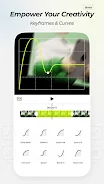
Blurrr keeps the interface minimal: a main canvas, context-aware toolbars, and sliders for intensity and transition. The layout reduces learning time and helps keep interactions fast. On modern devices the app performs GPU-accelerated blurs; older hardware uses optimized CPU paths to maintain responsiveness. Export options include common image formats and share shortcuts for social platforms.
Editing tools explained
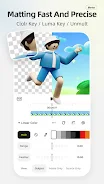
The toolset is compact but effective. The brush tool offers pressure-sensitive size and edge softness. An auto-mask feature tries to follow contours, and a refine edge brush helps when the automatic mask bleeds into the subject. There are also quick presets for portrait, macro, and wide-angle scenes so you can apply a starting look and tweak from there.
- Eraser and restore: Recover areas where blur was applied too aggressively.
- Feather control: Smooth the transition between sharp and blurred zones.
- Intensity slider: Adjust how strong the blur appears, from mild to heavy.
User experience and workflow
Workflow in Blurrr emphasizes speed. Typical sessions start with import, automatic analysis, one or two adjustments, and direct export. For photographers who prefer to batch process, the app supports applying a chosen blur profile to multiple images with minimal input. The visual feedback is clear, which reduces guesswork and speeds up decision-making.
Tips for new users
Start with automatic depth and then switch to manual brushing for tricky edges. Use lower intensity for natural portraits and higher intensity for anonymizing details. When working with hair or transparent objects, zoom in and refine the mask with the edge brush. Save custom presets if you use a consistent style across multiple photos.
Why people pick Blurrr
Users appreciate Blurrr for its focused feature set and approachable controls. It matches common mobile workflows: quick fixes on the go, and more precise edits when time allows. The combination of automatic depth detection and manual refinement gives users both convenience and control.
Getting started
Installing Blurrr is straightforward from your app store. After the first launch, the app offers a short guided tour highlighting tools and gestures. Permissions for photos are requested only when needed, and settings allow control over export resolution and whether edits are saved as new files or overwrite originals.
Blurrr strikes a practical balance between automation and hands-on editing, making it a smart choice for those who need reliable background blur and privacy masking without a steep learning curve.
Show More
Information
Screenshots

Latest Update









Hot Tags
Latest News
-
![Revealing the Launch Playlists and Cross-Progression for COD Warzone Mobile News]()
-
![March 2024 Free Redemption Codes for Honkai: Star Rail News]()
-
PUBG Mobile Teams Up with Bentley Motors: Luxury Cars, Exclusive Collectibles, and Beyond 2024-04-18
![PUBG Mobile Teams Up with Bentley Motors: Luxury Cars, Exclusive Collectibles, and Beyond News]()
-
![Monster Never Cry is now accessible on both Android and iOS mobile devices. News]()
-
V2.2 of the Farlight 84 update introduces an overhauled Season structure, fresh in-game currency, an 2024-04-16
![V2.2 of the Farlight 84 update introduces an overhauled Season structure, fresh in-game currency, an News]()
-
![Arrival of Genshin Impact 4.6 Update: 'Embers of Two Realms, Twilight of Crimson' News]()
-
April 2024 Clash of Clans Update: Unveiling a Fresh Companion, Enhanced Levels, Chat Tagging, and Be 2024-04-16
![April 2024 Clash of Clans Update: Unveiling a Fresh Companion, Enhanced Levels, Chat Tagging, and Be News]()






