

Adobe Photo Lightroom
Version:9.5.0
Published:2026-11-17
Introduction
Adobe Photo Lightroom is a mobile photo editor and organizer designed for photographers who need powerful, easy-to-use tools on the go. It provides non-destructive editing, advanced adjustment controls, and cloud syncing so you can edit, organize, and share high-quality images across devices quickly and reliably.
What Adobe Photo Lightroom Offers
Lightroom combines an intuitive interface with professional-grade tools. The app supports RAW and JPEG formats, enabling precise exposure, color, and detail adjustments. Built-in presets and adaptive sliders accelerate common edits, while selective tools let you refine specific areas without affecting the entire image.
Key Editing Tools
- Exposure and Tone — Comprehensive sliders for exposure, contrast, highlights, shadows, whites, and blacks let you sculpt image tonality with accuracy.
- Color Control — HSL and color mix panels allow hue, saturation, and luminance adjustments per color channel for targeted color grading.
- Selective Adjustments — Use brushes, radial, and linear gradients to adjust clarity, sharpness, and exposure on specific regions.
- Detail and Noise Reduction — Sharpening and noise reduction controls rescue detail in low-light or high-ISO shots.
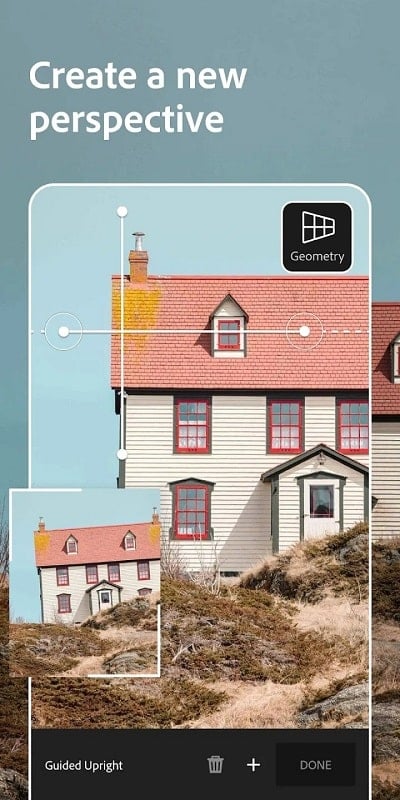
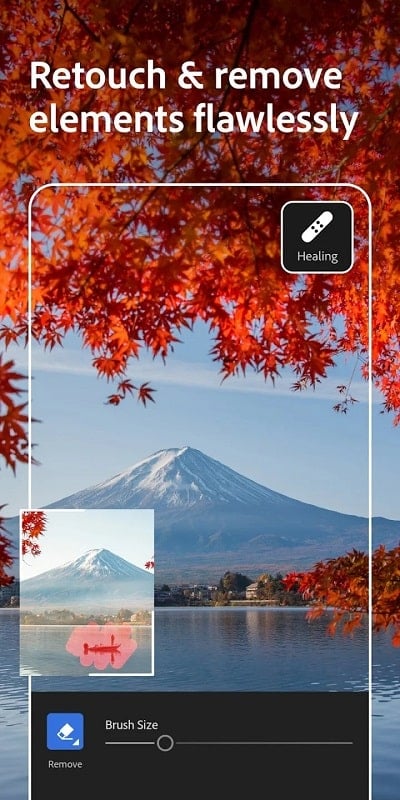
- Healing and Geometry — Remove blemishes or distractions and correct perspective or lens distortion with automatic or manual transforms.
Streamlined Workflow
Adobe Photo Lightroom is built around a seamless workflow that moves images from import to export with minimal friction. Import photos from camera roll, SD card, or directly from the camera; apply batch edits using presets; and sync changes to the cloud so edits are available on desktop and other devices. The non-destructive architecture preserves original files, letting you revert or tweak edits at any time.
Presets, Profiles, and Creative Options
Presets speed up repetitive tasks and create consistent looks across a set of photos. Lightroom ships with curated presets and allows custom or third-party presets to be imported. Profiles establish a color baseline—use camera matching, Adobe color, or creative profiles to influence how raw data is interpreted before fine-tuning.
Organization and Search
Library management in Adobe Photo Lightroom helps you keep large photo collections tidy. Create albums, add keywords, star-rate images, and flag picks or rejects. Smart search uses metadata and AI-powered subject detection to find people, scenes, or objects without manual tagging, making it fast to locate specific shots.
Sharing and Export
When images are ready, export options include full-resolution files, web-friendly JPEGs, and social-ready formats. Lightroom integrates with cloud storage and offers sharing links for clients or collaborators. Built-in album publishing and time-lapse export are handy for project delivery or social media sequences.
Performance and Compatibility
The app is optimized for modern Android devices, balancing speed with image quality. Background syncing minimizes interruption while you work, and offline editing keeps your edits accessible when internet access is limited. Compatibility with various camera RAW profiles ensures accurate rendering across brands and models.
Practical Tips for Better Results
- Use RAW when possible — RAW files retain more tonal and color information for larger adjustments.
- Start with profiles — Apply a profile to get a consistent starting point before detailed edits.
- Leverage presets — Create or import presets for styles you reuse often to maintain consistency and speed up post-processing.
- Organize as you shoot — Add keywords and albums right after import to keep projects manageable.
- Export settings — Match export resolution and compression to your intended use: higher for print, optimized for web sharing.
Why Choose This App
Adobe Photo Lightroom offers a robust balance of creative control and practical management tools. Its cloud-enabled features, reliable editing algorithms, and cross-device consistency make it suitable for photographers who need professional outcomes from a mobile environment. For a polished, efficient photo workflow on Android, Lightroom is a dependable choice.
Show More
Information
Screenshots

Latest Update












Hot Tags
Latest News
-
![Revealing the Launch Playlists and Cross-Progression for COD Warzone Mobile News]()
-
![March 2024 Free Redemption Codes for Honkai: Star Rail News]()
-
PUBG Mobile Teams Up with Bentley Motors: Luxury Cars, Exclusive Collectibles, and Beyond 2024-04-18
![PUBG Mobile Teams Up with Bentley Motors: Luxury Cars, Exclusive Collectibles, and Beyond News]()
-
![Monster Never Cry is now accessible on both Android and iOS mobile devices. News]()
-
V2.2 of the Farlight 84 update introduces an overhauled Season structure, fresh in-game currency, an 2024-04-16
![V2.2 of the Farlight 84 update introduces an overhauled Season structure, fresh in-game currency, an News]()
-
![Arrival of Genshin Impact 4.6 Update: 'Embers of Two Realms, Twilight of Crimson' News]()
-
April 2024 Clash of Clans Update: Unveiling a Fresh Companion, Enhanced Levels, Chat Tagging, and Be 2024-04-16
![April 2024 Clash of Clans Update: Unveiling a Fresh Companion, Enhanced Levels, Chat Tagging, and Be News]()






