

SuperMoney
Version:1.1.143
Published:2026-11-17
Introduction
Personal finance and payments apps have become essential tools, and SuperMoney joins the genre with a focus on consolidation and automation for everyday money tasks. The app promises a single place to track balances, move money, compare loan options, and monitor credit health, wrapped in an AI-driven layer that learns from your habits. This overview highlights what you can expect from SuperMoney on Android, who it suits, and practical ways it can simplify recurring chores like bill pay and savings goals.
Wonderful Features of SuperMoney
Streamlined Payments: Send and receive money quickly across bank accounts and merchants with a simplified payment flow that reduces steps and confirmation screens.
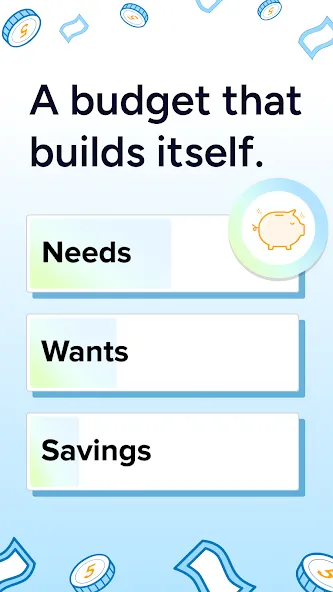
AI-Powered Budgeting: Receive real-time budget tracking and automated categorization of spending so you can see where money is going without manual work.
All-in-One Account Aggregation: Link bank accounts, credit cards, loans, and investment accounts to view balances and transactions in one consolidated feed.
Credit Monitoring and Alerts: Keep an eye on your credit score and get alerts for major changes, plus tips to help improve creditworthiness over time.
Loan Comparison and Refi Robot: Discover personalized loan offers and let the app run periodic rate checks to identify potential savings when refinancing becomes attractive.
Types of SuperMoney
Payments Hub: A core payments area where you manage transfers, merchant payments, and any UPI-style functionality for in-person and online purchases.
Budgeting and Savings Dashboard: Visual summaries, goal trackers, and an automated savings flow make routine saving less effort; use it to build an emergency fund or set aside for a holiday.
Credit and Loan Tools: Side-by-side loan comparisons and credit improvement guidance help you evaluate refinancing or new credit without leaving the app.
Useful Tips of SuperMoney
Securely Link Only What You Use: Connect primary accounts first and verify balances before adding many accounts to keep the dashboard manageable and reduce noise.
Set Autopay Rules: Automate recurring bill payments and minimum debt repayments to avoid late fees; this is especially handy when you travel or have a busy workweek.
Use Weekly Insights: Check brief weekly summaries to spot subscription creep or overspending categories; this is useful when preparing a monthly budget or reviewing expenses ahead of taxes.
Try the Refi Check Monthly: Let the refinance engine run periodic comparisons so you’ll be alerted to better offers when rates change, which can lower long-term interest costs.
FAQs of SuperMoney
Is SuperMoney free to use?
Yes. Creating an account and using core payment and budgeting features does not require a setup fee; some partner services may have their own charges.
How does SuperMoney protect my financial data?
The app uses encrypted connections and standard industry protections for linked accounts; always enable device-level security like a PIN or biometric lock for added safety.
Can I monitor credit and get improvement tips within the app?
Yes. SuperMoney provides credit score monitoring and personalized suggestions to help you address items that may be dragging your score down.
Final Verdict
SuperMoney is a practical choice if you want a single Android app to centralize payments, budgeting, and credit tools while offering automated routines for routine tasks; give it a try if you value consolidation and clear financial insights.
Show More
Information
Screenshots



Latest Update










Hot Tags
Latest News
-
![Revealing the Launch Playlists and Cross-Progression for COD Warzone Mobile News]()
-
![March 2024 Free Redemption Codes for Honkai: Star Rail News]()
-
PUBG Mobile Teams Up with Bentley Motors: Luxury Cars, Exclusive Collectibles, and Beyond 2024-04-18
![PUBG Mobile Teams Up with Bentley Motors: Luxury Cars, Exclusive Collectibles, and Beyond News]()
-
![Monster Never Cry is now accessible on both Android and iOS mobile devices. News]()
-
V2.2 of the Farlight 84 update introduces an overhauled Season structure, fresh in-game currency, an 2024-04-16
![V2.2 of the Farlight 84 update introduces an overhauled Season structure, fresh in-game currency, an News]()
-
![Arrival of Genshin Impact 4.6 Update: 'Embers of Two Realms, Twilight of Crimson' News]()
-
April 2024 Clash of Clans Update: Unveiling a Fresh Companion, Enhanced Levels, Chat Tagging, and Be 2024-04-16
![April 2024 Clash of Clans Update: Unveiling a Fresh Companion, Enhanced Levels, Chat Tagging, and Be News]()






