

Spirit Talker
Version:4.2.3
Published:2026-11-17
Introduction
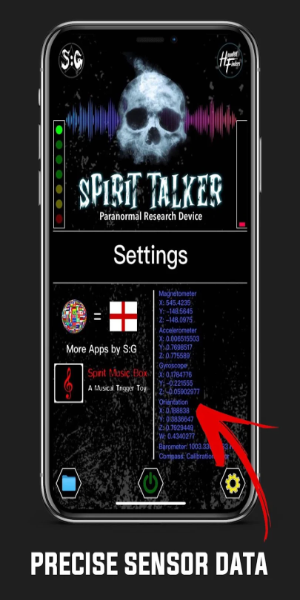
Spirit Talker is a sensor-driven utility designed for paranormal investigators and curious users who want a clear, device-friendly way to monitor environmental changes. Spirit Talker reads your phone or tablet’s available motion and magnetic sensors in real time and converts raw values into readable text and optional spoken replies, making it straightforward to document an investigation or experiment. The app emphasizes clarity over mystery: it reports magnetometer and gyroscope readings, gravity vectors and related sensor input in formats that are easy to interpret and archive.
How it works
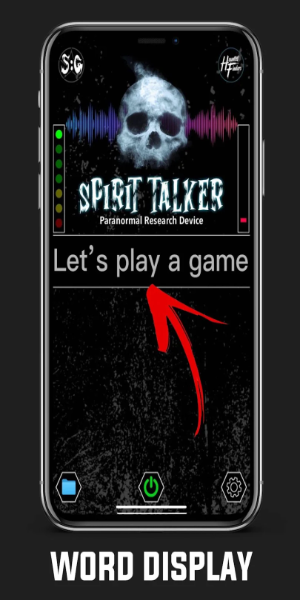
The core interaction model centers on continuous sensor monitoring combined with a question-and-response interface. As sensors feed data, Spirit Talker translates shifts into textual responses that appear in the session log; if a text-to-speech engine is available, those responses can be voiced aloud. Users pose questions through the app interface and receive contextual replies that reflect recent sensor activity. The system timestamps each response so you can correlate events with sensor graphs during later review.
Controls and interaction
Controls are intentionally simple: start or stop a scan, toggle which sensors are sampled, and ask a question using an on-screen input. Touch controls cycle through visualization modes such as numeric readouts, line charts, or a streamlined text pane for spoken replies. Adjustable sensitivity sliders let you set thresholds that determine when the app highlights a change, and a hold-to-record function creates named checkpoints you can jump back to while reviewing data.
Sensor management and calibration
Because device hardware varies, Spirit Talker includes on-device calibration tools and adaptive behavior when sensors are absent or unreliable. A quick calibration routine helps normalize magnetometer and gyroscope baselines, and the app flags poor-quality readings so they don't skew results. If a particular sensor is missing, Spirit Talker automatically reconfigures its output to lean on the remaining inputs, while making clear which data streams are active in each session.
Visual style and layout
The app adopts a clean, high-contrast interface that focuses attention on live data and session history. Graphs use distinct color coding for each sensor stream, and a compact timeline along the bottom of the screen provides fast visual cues for spikes and anomalies. Text panels are resizable and support larger font sizes for readability during field work. The overall layout is designed for one-handed operation so investigators can hold equipment while interacting with the screen.
Session progression and review
Investigative sessions progress from a brief calibration step into active monitoring and then into an archiveable report. Each session produces a saved record containing raw sensor logs, the sequence of text or spoken replies, and optional notes you add after the scan. This progression supports methodical review: you can scrub through the timeline, examine the sensor graphs at moments of interest, and export session data for offline analysis or secure storage.
Customization and accessibility
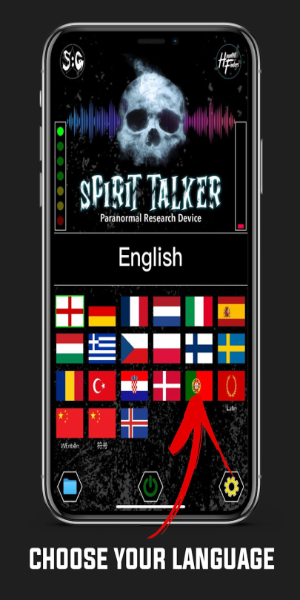
Spirit Talker lets you customize many aspects of the experience: choose language options for on-screen text and TTS, pick voice preferences when available, set sensitivity thresholds, and rename saved sessions for easier organization. Accessibility features include large-font mode, color contrast adjustments, and the ability to enable vibration cues on threshold events so users with visual limitations can still receive immediate feedback.
Offline use, privacy and performance
The app functions entirely offline; all processing and storage remain local to your device unless you explicitly export session files. That makes Spirit Talker suitable for remote locations with no network access and reduces privacy concerns since logs are not transmitted by default. The app is optimized to limit CPU and battery use during extended sessions by batching sensor reads and pausing nonessential visual updates when the screen is off.
Replay value and challenge options
Replay value comes from repeated testing, calibration tasks, and structured challenge sequences you can run to evaluate sensor consistency over time. The app includes optional accuracy checks and contrast tests to help users learn how their specific hardware responds to changes, which encourages methodical practice and improves long-term data quality. Regularly reviewing archived sessions also helps users refine settings and experiment with different sensitivity profiles.
Who will benefit
Spirit Talker is aimed at hobbyist investigators, educators demonstrating sensor behavior, and anyone who wants a reliable way to monitor environmental movement or magnetic changes with accessible controls and permanent session records. Its emphasis on adaptability, offline operation, and clear visual and audible output makes it a practical tool across a wide range of devices and skill levels.
Show More
Information
Screenshots
Latest Update












Hot Tags
Latest News
-
![Revealing the Launch Playlists and Cross-Progression for COD Warzone Mobile News]()
-
![March 2024 Free Redemption Codes for Honkai: Star Rail News]()
-
PUBG Mobile Teams Up with Bentley Motors: Luxury Cars, Exclusive Collectibles, and Beyond 2024-04-18
![PUBG Mobile Teams Up with Bentley Motors: Luxury Cars, Exclusive Collectibles, and Beyond News]()
-
![Monster Never Cry is now accessible on both Android and iOS mobile devices. News]()
-
V2.2 of the Farlight 84 update introduces an overhauled Season structure, fresh in-game currency, an 2024-04-16
![V2.2 of the Farlight 84 update introduces an overhauled Season structure, fresh in-game currency, an News]()
-
![Arrival of Genshin Impact 4.6 Update: 'Embers of Two Realms, Twilight of Crimson' News]()
-
April 2024 Clash of Clans Update: Unveiling a Fresh Companion, Enhanced Levels, Chat Tagging, and Be 2024-04-16
![April 2024 Clash of Clans Update: Unveiling a Fresh Companion, Enhanced Levels, Chat Tagging, and Be News]()






