

PhotoLayers-Superimpose,Eraser
Version:4.3.1
Published:2026-11-17
Introduction
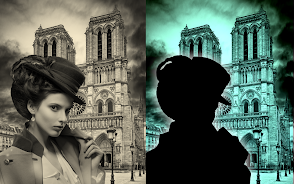
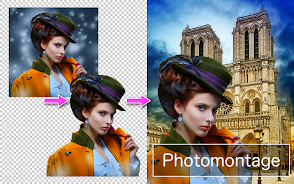
PhotoLayers-Superimpose,Eraser is a compact but capable photo-editing utility designed to remove backgrounds and build multi-layer composites with minimal fuss. The app puts background erasing and layer-based composition within reach of hobbyists and casual editors, combining an eraser tool and blending options that help you produce collages, thumbnails and creative photomontages without complex desktop software. With support for combining up to 11 images in a single composition and simple color-tone adjustments, PhotoLayers-Superimpose,Eraser is useful for quick social-media visuals as well as more deliberate layered artwork.
Key features and editing tools
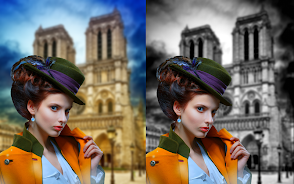
The core of the experience is the background eraser that creates transparent cutouts, plus manual erasing controls for refining edges. PhotoLayers-Superimpose,Eraser offers blending modes and adjustable opacity so each layer can be tuned to sit naturally in the scene, and basic color-tone sliders let you warm, cool or subtly shift saturation to unify multiple photos. Exports are available in common formats (PNG to preserve transparency or JPG for smaller size), making it straightforward to move finished images into other apps or upload them online. The app also limits compositions to a practical maximum of 11 images, which keeps projects responsive on most devices while still allowing complex arrangements.
How the interface and controls work
The workflow focuses on direct manipulation: select a layer to move, tap to bring it forward or backward in the stack, and use pinch-to-zoom and drag gestures to position and scale elements. The eraser operates in both sweeping strokes for broad cleanup and more careful moves for detail work; edges can be feathered and opacity adjusted so cutouts blend cleanly. Simple on-screen sliders control color tone adjustments and layer transparency, and intuitive icons guide common actions so new users can complete a basic edit quickly. These touch-based controls make PhotoLayers-Superimpose,Eraser approachable on phones and tablets alike, without requiring prior experience with advanced editors.
Creative workflow and learning progression
Users typically start by isolating a subject with the background eraser, then add additional images one at a time to build a scene. As you experiment, you’ll learn to balance scale and color between layers, use blending to create depth, and apply modest tone shifts to unify disparate photos. This progression—from single-cutout edits to multi-layer montages—serves as a natural learning curve: early projects can be finished in minutes while more detailed compositions reward practice. The app’s straightforward tools encourage iterative editing, so you can develop a consistent thumbnail or collage style over several sessions.
Visual style and export options
Because PhotoLayers-Superimpose,Eraser centers on layered composition and color adjustments rather than heavy filters, the visual outcome tends toward clean, controlled results that suit web thumbnails, profile art and simple promotional images. The ability to export as PNG preserves transparent backgrounds for flexible reuse, while JPG exports are available when smaller file size or broad compatibility is preferred. Modest tonal adjustments allow you to create warm, cool or neutral palettes to match a project’s mood, and the combination of blending modes and opacity controls helps you achieve subtle overlays and soft edges without overprocessing.
User experience, accessibility and offline use
The interface emphasizes clarity and quick access to core tools so beginners can perform essential edits without navigating dense menus. PhotoLayers-Superimpose,Eraser runs locally on the device and does not require a persistent online connection for basic editing and exporting, which means you can work offline and save bandwidth. The app is free to use with optional in-app purchases that unlock additional features; advertising is present in the free version and may interrupt the editing flow at times. New users should expect a short learning curve for layered editing concepts, but on-device help and an exploratory approach make skills grow naturally.
Tips, replay value and practical uses
To get the most from the app, start with a single subject cutout and experiment with one or two background images to learn scale and perspective. Reuse similar color-tone settings across projects to build a consistent look for thumbnails or social posts, and try different blending modes to find subtle ways to integrate elements. Because compositions can be assembled rapidly, the app has strong replay value for creators who produce many small pieces—memes, promo images, or layered artwork—rather than long-form edits. Overall, PhotoLayers-Superimpose,Eraser provides a balanced mix of control and simplicity that helps users of varying skill levels produce polished layered images quickly and reliably.
Show More
Information
Screenshots
Latest Update












Latest News
-
![Revealing the Launch Playlists and Cross-Progression for COD Warzone Mobile News]()
-
![March 2024 Free Redemption Codes for Honkai: Star Rail News]()
-
PUBG Mobile Teams Up with Bentley Motors: Luxury Cars, Exclusive Collectibles, and Beyond 2024-04-18
![PUBG Mobile Teams Up with Bentley Motors: Luxury Cars, Exclusive Collectibles, and Beyond News]()
-
![Monster Never Cry is now accessible on both Android and iOS mobile devices. News]()
-
V2.2 of the Farlight 84 update introduces an overhauled Season structure, fresh in-game currency, an 2024-04-16
![V2.2 of the Farlight 84 update introduces an overhauled Season structure, fresh in-game currency, an News]()
-
![Arrival of Genshin Impact 4.6 Update: 'Embers of Two Realms, Twilight of Crimson' News]()
-
April 2024 Clash of Clans Update: Unveiling a Fresh Companion, Enhanced Levels, Chat Tagging, and Be 2024-04-16
![April 2024 Clash of Clans Update: Unveiling a Fresh Companion, Enhanced Levels, Chat Tagging, and Be News]()






