

Bradesco
Version:4.89.0
Published:2026-11-18
Introduction
Mobile banking and personal finance apps have become central to daily money management, and Bradesco aims to be a single place where you can pay bills, track activity and explore credit and investment options. The app brings core services from account access to shopping offers into one interface, and it highlights real-time spending visibility and rewards for routine transactions. Whether you need to check a recent transfer, schedule a payment or browse special promotions, Bradesco packages everyday banking tasks and longer-term planning tools so you can manage finances on the go.
Wonderful Features of Bradesco
Unified account view: See balances and recent activity across checking, savings and investment accounts in one screen so you know where your money sits.
Payments made flexible: Pay bills by scanning barcodes or using Pix copy-and-paste, set installment options for purchases, and save frequent payees for fast checkouts.
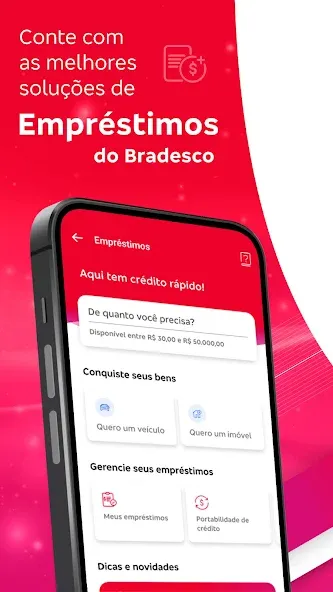
Loan and protection options: Apply for personal loans, mortgage assistance or insurance products directly from the app, with clear summaries of terms and repayment plans.
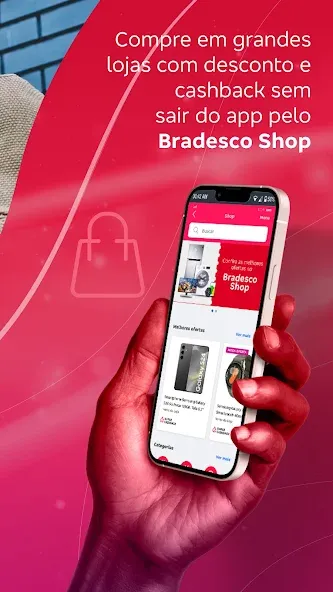
Marketplace and rewards: Shop inside the integrated store for discounted items, access cashback and coupon deals, and earn points from transactions that can be redeemed later.
Getting Started with Bradesco
Create and secure an account: Register using your personal details, verify identity as prompted and set up a PIN or biometric lock for everyday access.
Link external accounts: Use Open Finance features to add accounts from other banks into 'My Banks' so you can view balances and move funds without switching apps.
Set notification and limits: Turn on alerts for large transactions, weekly spending summaries and payment due dates; adjust transfer limits if you need tighter control.
Types of Bradesco
Everyday banking: Standard checking and savings features such as transfers, direct debits and quick top-ups for prepaid mobile numbers are available for routine use.
Credit and debt tools: Options for taking loans, renegotiating outstanding debt and planning mortgage payments help users address short- and long-term credit needs.
Investment and pension services: Explore funds, pension plans and other investment choices from basic to more structured products without leaving the app.
Customer support and advisory: Relationship managers are assigned for qualifying customers and in-app messaging lets you reach support or request account changes.
Useful Tips of Bradesco
Save frequent top-ups: Use the Quick Top-up option to keep mobile reloads on hand and avoid re-entering details for recurring payments.
Monitor spending trends: Check the real-time spending tracker to spot rising categories and set monthly targets to stay on budget.
Use marketplace deals selectively: Compare the offers inside the shop with external prices and apply cashback coupons to lower the effective cost on larger purchases.
FAQs of Bradesco
Who will be my Relationship Manager or Advisor?
If your combined balance in eligible deposits and investments reaches the required threshold, a Relationship Manager will be assigned and will contact you; reach out to support for details on qualification.
How do I open a joint account?
Contact Bradesco customer service for guidance and the necessary documentation to set up a joint account with another account holder.
How do I close my account?
Submit a formal request through your Relationship Manager or a secure message in online banking, and ensure the account balance is cleared before closure.
What are my tax responsibilities for invested funds in the United States?
Tax matters vary by jurisdiction and individual circumstances; consult a tax advisor for advice specific to your situation as Bradesco cannot provide tax guidance.
Where can I find my full account number, routing and SWIFT codes?
Log into online banking, go to Settings and choose Display Accounts; select the account and tap View Account to see the full number as well as routing and SWIFT details.
Final Verdict
Bradesco puts a wide range of banking tools and commerce features into a single app that suits users who want both day-to-day payment convenience and access to credit and investment services. If you value an integrated rewards program and in-app shopping, it is a practical choice for Android users looking to keep finances organized while exploring loans or insurance options.
Show More
Information
Screenshots


Latest Update









Hot Tags
Latest News
-
![Revealing the Launch Playlists and Cross-Progression for COD Warzone Mobile News]()
-
![March 2024 Free Redemption Codes for Honkai: Star Rail News]()
-
PUBG Mobile Teams Up with Bentley Motors: Luxury Cars, Exclusive Collectibles, and Beyond 2024-04-18
![PUBG Mobile Teams Up with Bentley Motors: Luxury Cars, Exclusive Collectibles, and Beyond News]()
-
![Monster Never Cry is now accessible on both Android and iOS mobile devices. News]()
-
V2.2 of the Farlight 84 update introduces an overhauled Season structure, fresh in-game currency, an 2024-04-16
![V2.2 of the Farlight 84 update introduces an overhauled Season structure, fresh in-game currency, an News]()
-
![Arrival of Genshin Impact 4.6 Update: 'Embers of Two Realms, Twilight of Crimson' News]()
-
April 2024 Clash of Clans Update: Unveiling a Fresh Companion, Enhanced Levels, Chat Tagging, and Be 2024-04-16
![April 2024 Clash of Clans Update: Unveiling a Fresh Companion, Enhanced Levels, Chat Tagging, and Be News]()






